The Future of Web Dev
The Future of Web Dev
Liquid Glass: WebGL2 Refraction Lens for Next.js and React
Add a cursor-following Liquid Glass lens that refracts and magnifies text with WebGL2. Works in Next.js App Router and React.
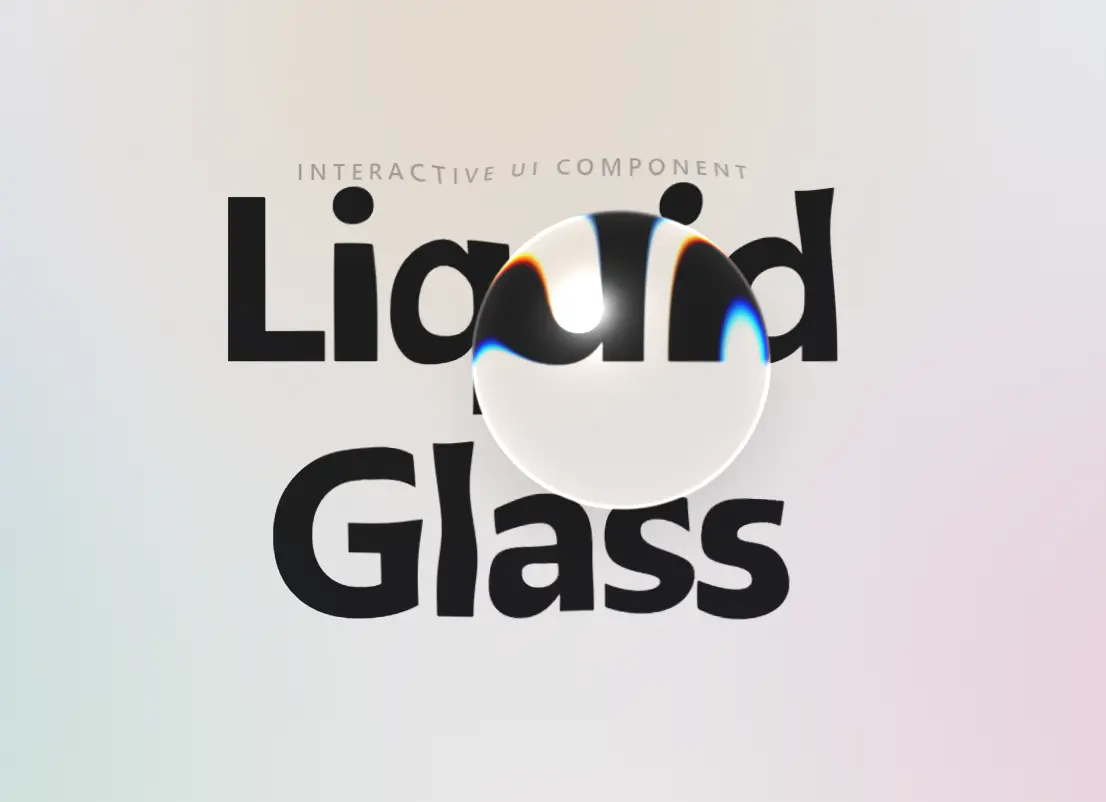
Liquid Glass is a React component that creates a glass droplet following the cursor, distorting and magnifying text beneath it with WebGL2.
You can drop it into a Next.js App Router page to add an Apple‑style Liquid Glass lens without pulling in Three.js or any runtime dependencies.
Features
- Adds a cursor-following glass lens with magnification, refraction, chromatic edge effects, and frosted blur.
- Based on raw WebGL2 and hand-written GLSL shaders.
- Installs as a local shadcn/ui component through a registry URL.
- Controls heading lines, label text, tagline text, colors, accent blobs, lens radius, magnification, refraction, and frost.
- Adds click ripples and slow idle motion for screens that need ambient movement.
- Falls back to static typography when WebGL2 is not available.
- Respect
prefers-reduced-motionfor motion-sensitive users.
How To Use It
Installation
Install with shadcn CLI:
npx shadcn@latest add https://starknightt.github.io/liquid-glass/r/liquid-glass.jsonFor a manual install, copy the component file into this path:
src/components/ui/liquid-glass.tsxBasic Usage
Give the parent a real size. The component fills the available area.
import { LiquidGlass } from "@/components/ui/liquid-glass";
export default function LandingPage() {
  return (
    <main className="fixed inset-0">
      <LiquidGlass
        text={["Design", "System"]}
        subText="Preview"
        tagline="React • WebGL2 • Tailwind CSS"
      />
    </main>
  );
}
Advanced Examples
Dark Hero Section
Use a dark background and white text for a more dramatic lens effect.
import { LiquidGlass } from "@/components/ui/liquid-glass";
export function DarkLaunchHero() {
  return (
    <section className="h-svh">
      <LiquidGlass
        text={["Atlas", "Studio"]}
        subText="Launching Soon"
        tagline="Interface tools for product teams"
        backgroundColor="#050505"
        textColor="#ffffff"
      />
    </section>
  );
}
Large Clear Lens
Increase the radius and magnification when the headline needs a more obvious distortion effect.
import { LiquidGlass } from "@/components/ui/liquid-glass";
export function PortfolioIntro() {
  return (
    <section className="h-[720px]">
      <LiquidGlass
        text={["Maya", "Chen"]}
        subText="Frontend Engineer"
        tagline="Interactive interfaces and visual systems"
        lensRadius={170}
        magnification={1.2}
        frost={0}
      />
    </section>
  );
}
Monochrome Launch Screen
Pass an empty accent array when the background should stay plain.
import { LiquidGlass } from "@/components/ui/liquid-glass";
export function MinimalComingSoon() {
  return (
    <main className="min-h-svh">
      <LiquidGlass
        text={["Launch", "Soon"]}
        subText="Private Beta"
        tagline="Early access opens in 2026"
        accentColors={[]}
      />
    </main>
  );
}
Available Component Props
| Prop | Type | Default | Description |
|---|---|---|---|
text | string[] | undefined | Renders the main heading. Each array item appears on its own line. |
subText | string | undefined | Adds a small uppercase label above the heading. |
tagline | string | undefined | Adds a caption below the heading. |
backgroundColor | string | "#fafafa" | Sets the canvas background color. Dark colors switch the accent blending behavior. |
textColor | string | "#1d1d1f" | Sets the heading, label, and tagline color. |
accentColors | string[] | Four soft pastel colors | Sets the drifting background blobs. Pass [] for no accents. |
lensRadius | number | 120 | Sets the lens size in CSS pixels. |
magnification | number | 1.12 | Sets the lens zoom strength. Use 1 to remove magnification. |
refraction | number | 0.55 | Sets edge bending strength from 0 to 1. |
frost | number | 0.18 | Sets frosted blur strength from 0 to 1. |
className | string | undefined | Adds classes to the wrapper. |
Alternatives and Related Resources
- 40+ Apple Liquid Glass-inspired UI Components for Next.js
- Glassmorphism UI Component Library with TailwindCSS
FAQs
Q: What happens if a browser doesn’t support WebGL2?
A: The component detects WebGL2 support and gracefully falls back to displaying the text with CSS, without any lens effect.
Q: Can I place the lens over other React components, like images or buttons?
A: The lens magnifies only the text you pass via props. It doesn’t capture arbitrary DOM content because it uses an offscreen canvas texture. To distort other elements, you’d need a different approach.
Q: How do I change the droplet physics feel?
A: Open liquid-glass.tsx and adjust 130 (spring stiffness) and 14 (damping) in the frame loop. Higher stiffness makes the lens snappier, lower damping adds more overshoot.
Q: Is there a way to disable the idle drift animation?
A: The idle Lissajous motion is built into the effect. You can freeze it by modifying the shader or physics code.