The Future of Web Dev
The Future of Web Dev
Build AI-native Apps Faster with Vercel’s AI Elements Component Library
Create AI-native applications faster with Vercel's AI Elements UI components. Pre-built chat, code, and interaction components that integrate with AI SDK and Next.js projects.
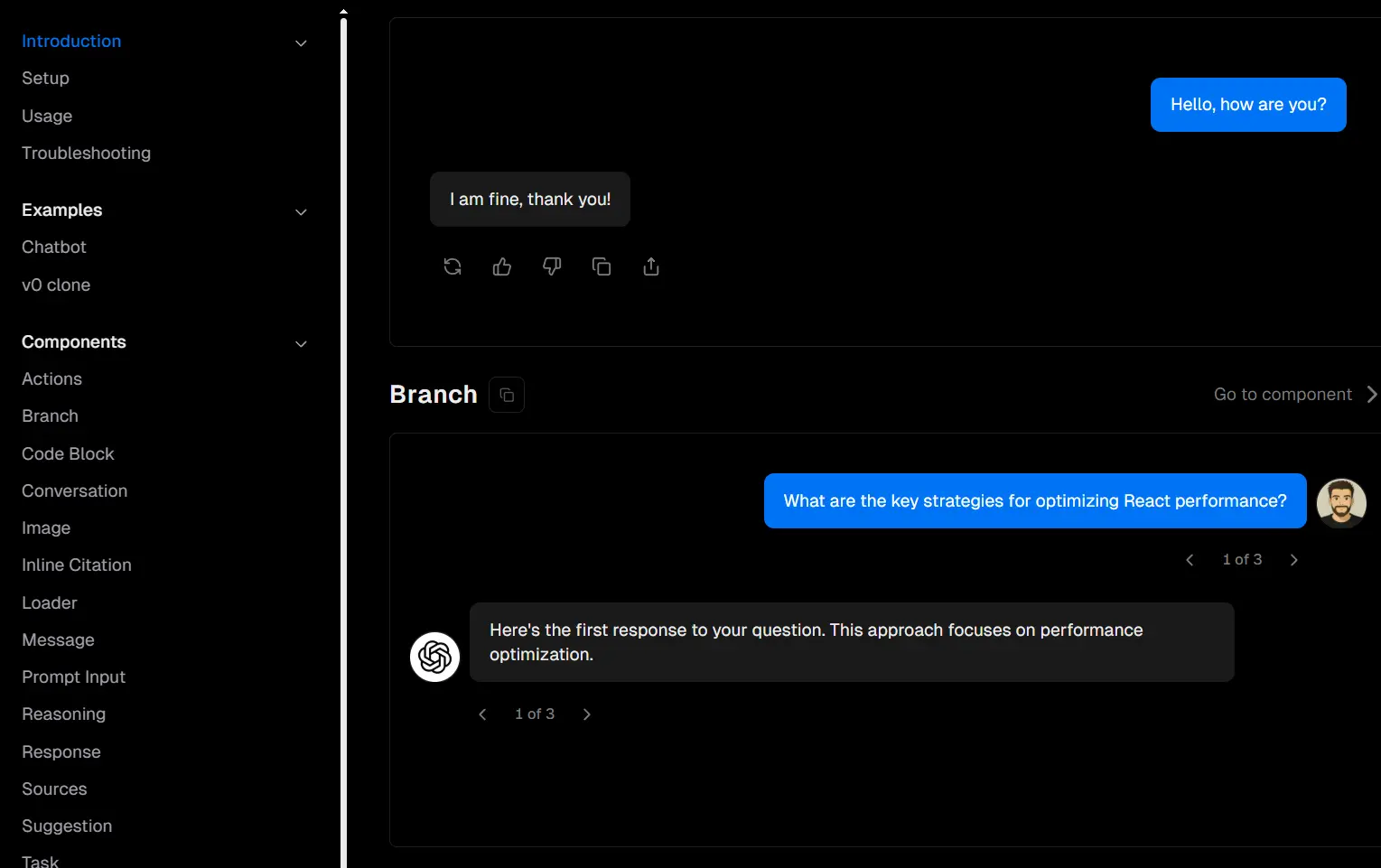
AI Elements is a React component library that builds on top of shadcn/ui to accelerate the development of AI-native applications. Developed by Vercel.
It provides pre-built, customizable UI components for AI-powered interfaces, including conversation displays, message handling, code blocks, reasoning visualizations, and more.
Features
⚡ Direct integration with Vercel AI SDK and Next.js projects for rapid development.
🛠️ Full customization control since components are added to your codebase.
📦 Simple CLI installation that works with existing shadcn/ui configurations.
🌙 Built-in support for dark mode and CSS variables theming.
Use Cases
- Chat applications and conversational AI interfaces that require message threading and user interaction handling.
- Code generation tools and AI-powered development environments that need syntax highlighting and code manipulation features.
- Documentation and knowledge management systems with AI-powered search and citation capabilities.
- Educational platforms that use AI tutoring with reasoning explanations and step-by-step guidance.
- Content creation tools that incorporate AI assistance with suggestion systems and collaborative editing features.
How to Use It
1. To get started, you need Node.js version 18 or later and a Next.js project. The Vercel AI SDK and shadcn/ui should already be installed and initialized in your project. Your project must also be configured with Tailwind CSS in CSS Variables mode.
2. Add components to your project using the AI Elements CLI or the shadcn/ui CLI.
Using the AI Elements CLI
Install all available components at once:
npx ai-elements@latestThis command will also set up shadcn/ui if it is not already configured. It installs all components into your components directory and adds the required dependencies to your project.
To install a specific component, use the add command followed by the component’s name. For example, to add the message component for displaying individual chat messages, you would run:
npx ai-elements@latest add messageUsing the shadcn/ui CLI
You can also use the standard shadcn/ui CLI to install AI Elements components. This method is useful if you are already familiar with the shadcn/ui workflow.
Install all components:
npx shadcn@latest add https://registry.ai-sdk.dev/all.jsonTo add a single component, provide the direct URL to its JSON definition. For instance, to install the conversation component, you would use:
npx shadcn@latest add https://registry.ai-sdk.dev/conversation.json3. After installation, you can import and use the components in your application just like any other React component.
For example, to use the Actions component, you would import it and include it in your JSX:
import { Actions, Action } from '@/components/ai-elements/actions';
import { ThumbsUpIcon } from 'lucide-react';
function MyComponent() {
  return (
    <Actions className="mt-2">
      <Action label="Like">
        <ThumbsUpIcon className="size-4" />
      </Action>
    </Actions>
  );
}
4. AI Elements uses your existing shadcn/ui configuration from the components.json file. Customize component styling by modifying the installed component files directly, as they become part of your codebase rather than external dependencies.
5. Configure theming through your existing Tailwind CSS setup and shadcn/ui CSS variables for consistent design across your application.
6. Set up Vercel AI Gateway integration by adding AI_GATEWAY_API_KEY to your environment variables for optimal performance and monitoring capabilities.
UI Components Included
actions: Renders interactive action buttons that can accompany AI responses.branch: Displays a visual representation of branching conversation flows.code-block: Formats and highlights blocks of code, often including a copy function.conversation: Acts as a container for organizing and displaying an entire chat conversation.image: A component specifically for showing AI-generated images.inline-citation: Used for displaying source citations within the flow of text.loader: Shows loading indicators to provide feedback during AI operations.message: Formats and displays individual messages within a chat, complete with avatars.prompt-input: An advanced input field for users to enter prompts, which can include features like model selection.reasoning: A component designed to display the AI’s thought processes or reasoning steps.response: Formats and presents the final response from the AI.source: Attributes information to its original source.suggestion: Provides users with quick, clickable action suggestions.task: Tracks and displays the status of a task being performed by the AI.tool: Visualizes the tools being used by an AI during its operation.web-preview: Renders embedded previews of web pages within the interface.
Related Resources
- shadcn/ui – The foundational component library that AI Elements builds upon.
- AI SDK – Vercel’s AI SDK that provides the backend functionality and API integration for AI-powered applications.
- Vercel AI Gateway – API gateway service for monitoring and managing AI model requests with rate limiting and analytics.
- Tailwind CSS – The utility-first CSS framework required for styling AI Elements components.
- AI Elements Vue – The Vue port of AI-Elements and is constructed on top of the popular
shadcn-vuelibrary.
FAQs
Q: Can I use AI Elements with existing shadcn/ui components in my project?
A: Yes, AI Elements is built on top of shadcn/ui and integrates with existing shadcn/ui components. The components share the same styling system and configuration. This allows you to mix and match components from both libraries without conflicts.
Q: What happens if I already have shadcn/ui configured in my project?
A: AI Elements will use your existing shadcn/ui configuration automatically. The CLI detects your current setup and installs components according to your existing directory structure and styling preferences without conflicting with your current configuration.
Q: Can I use AI Elements with package managers other than npm?
A: Yes, the AI Elements CLI automatically detects your package manager, npm, pnpm, yarn, or bun, and installs dependencies using your preferred package manager without requiring additional configuration.
Q: Can I use AI Elements without Next.js?
A: No. AI Elements is specifically designed and optimized for Next.js projects that are also using the Vercel AI SDK and shadcn/ui.