The Future of Web Dev
The Future of Web Dev
AI SaaS Starter Kit with Next.js & Convex – AquaKit
A complete AI SaaS starter kit with Next.js 15, Convex, Better Auth & Trigger.dev. Build and deploy AI applications faster with pre-configured components.
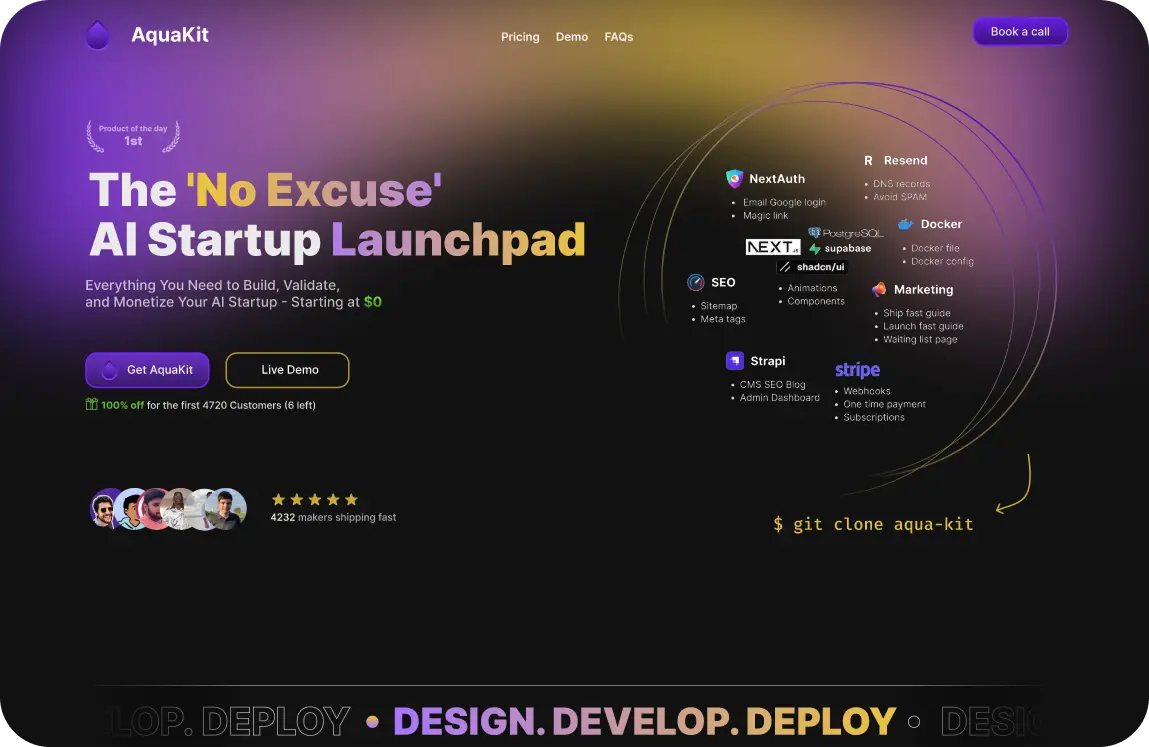
AquaKit is an AI SaaS starter kit that combines a Next.js frontend with a Convex backend, which offers real-time database functionalities and serverless functions.
For user management, it uses Better Auth to handle OAuth with providers like Google, GitHub, and Discord.
Background tasks and AI processing are managed by Trigger.dev, while monetization is handled through Polar.sh, which integrates with Stripe for subscriptions and payments.
Features
🚀 AI-powered development environment with Claude Code and Cursor integration for accelerated coding workflows.
🔐 Multi-provider OAuth authentication supporting GitHub, Google, and Discord sign-in with comprehensive setup documentation.
👤 Complete user management system with profile handling, avatar support, and session management capabilities.
⚡ Real-time data synchronization powered by Convex database with serverless function support.
🤖 Background job processing through Trigger.dev for AI model interactions, webhooks, and scheduled tasks.
💰 Built-in monetization system using Polar.sh for subscription management and payment processing.
🎨 Modern user interface built with TailwindCSS v4 and Radix UI components with theme support.
📱 Mobile-first responsive design that adapts to all device sizes and screen orientations.
⚡ Turbopack integration for ultra-fast development builds and hot module replacement.
🧠 Pre-configured patterns and templates for integrating various AI models and APIs.
Use Cases
- AI startups building SaaS products that need to launch quickly without spending months on infrastructure setup.
- Development teams creating AI-powered applications that require real-time data processing and background job handling.
- Entrepreneurs developing subscription-based AI services that need integrated payment processing and user management.
- Software agencies building multiple AI SaaS products for clients who want a standardized, proven foundation.
- Developers learning modern full-stack development with AI integration who want a reference implementation of best practices.
How to Use It
1. Clone the repository from GitHub.
git clone https://github.com/0xAquaWolf/AquaKit.git2. Install the required packages.
cd AquaKit
npm install
3. Create a .env.local file in the root directory of your project. This file will store your secret keys and configuration variables. Copy the contents of the .env.example file into your new .env.local file.
BETTER_AUTH_URL=
BETTER_AUTH_SECRET=

GITHUB_CLIENT_ID="your-github-client-id"
GITHUB_CLIENT_SECRET="your-github-client-secret"

GOOGLE_CLIENT_ID="your-google-client-id"
GOOGLE_CLIENT_SECRET="your-google-client-secret"

CONVEX_DEPLOYMENT=
NEXT_PUBLIC_CONVEX_URL=
NEXT_PUBLIC_CONVEX_SITE_URL=
SITE_URL=
4. Configure the secrets within your Convex deployment. Use the Convex CLI to set each environment variable.
npx convex env set GITHUB_CLIENT_ID "your-github-client-id"
npx convex env set GITHUB_CLIENT_SECRET "your-github-client-secret"
5. Start the development server. The application will now be running at http://localhost:3000.
npm run dev6. Prepare for deployment by building the production version using npm run build. This command optimizes your application for production deployment.
7. Configure your production environment variables in your hosting platform to ensure all OAuth callback URLs point to your production domain. Update the CONVEX_SITE_URL variable to match your production URL for proper authentication redirects.
Related Resources
- Next.js Documentation – Comprehensive guide for Next.js 15 with App Router, server components, and modern React patterns for building full-stack web applications.
- Convex Developer Documentation – Complete reference for Convex real-time database, serverless functions, and backend integration patterns for modern web applications.
- Better Auth Documentation – Detailed documentation for Better Auth package covering authentication flows, OAuth providers, and security best practices.
- Trigger.dev Documentation – Guide for implementing background jobs, workflow automation, and scheduled tasks in modern web applications.
FAQs
Q: Can I use AquaKit with different OAuth providers than the ones included?
A: Yes, AquaKit uses Better Auth which supports additional OAuth providers beyond GitHub, Google, and Discord. You can add providers like Twitter, Facebook, or LinkedIn by following the Better Auth documentation and updating your environment configuration accordingly.
Q: Is AquaKit suitable for enterprise applications with strict data requirements?
A: AquaKit is developing a self-hosted Docker version specifically for enterprise use cases that require complete data ownership. The current cloud version uses managed services, while the upcoming containerized version will allow you to host all components on your own infrastructure.
Q: How do I integrate my own AI models or APIs into AquaKit?
A: AquaKit provides pre-configured patterns for AI integration and includes examples for background job processing through Trigger.dev. You can add AI API calls in your Next.js routes or process them as background jobs depending on your performance requirements.
Q: What payment processors does AquaKit support besides Polar.sh?
A: Currently, AquaKit integrates with Polar.sh for payment processing and subscription management. However, you can modify the payment integration to work with other processors like Stripe or PayPal by updating the relevant components and API routes.
Q: Can I customize the UI components and styling in AquaKit?
A: Yes, AquaKit uses TailwindCSS v4 and Radix UI components that are fully customizable. You can modify the design system by updating the Tailwind configuration, creating custom components, or overriding the existing component styles to match your brand requirements.