The Future of Web Dev
The Future of Web Dev
Generate Deterministic Avatar Faces in React/Next.js – facehash
A React avatar library that turns any string into a deterministic face with typed props and a Next.js image route.
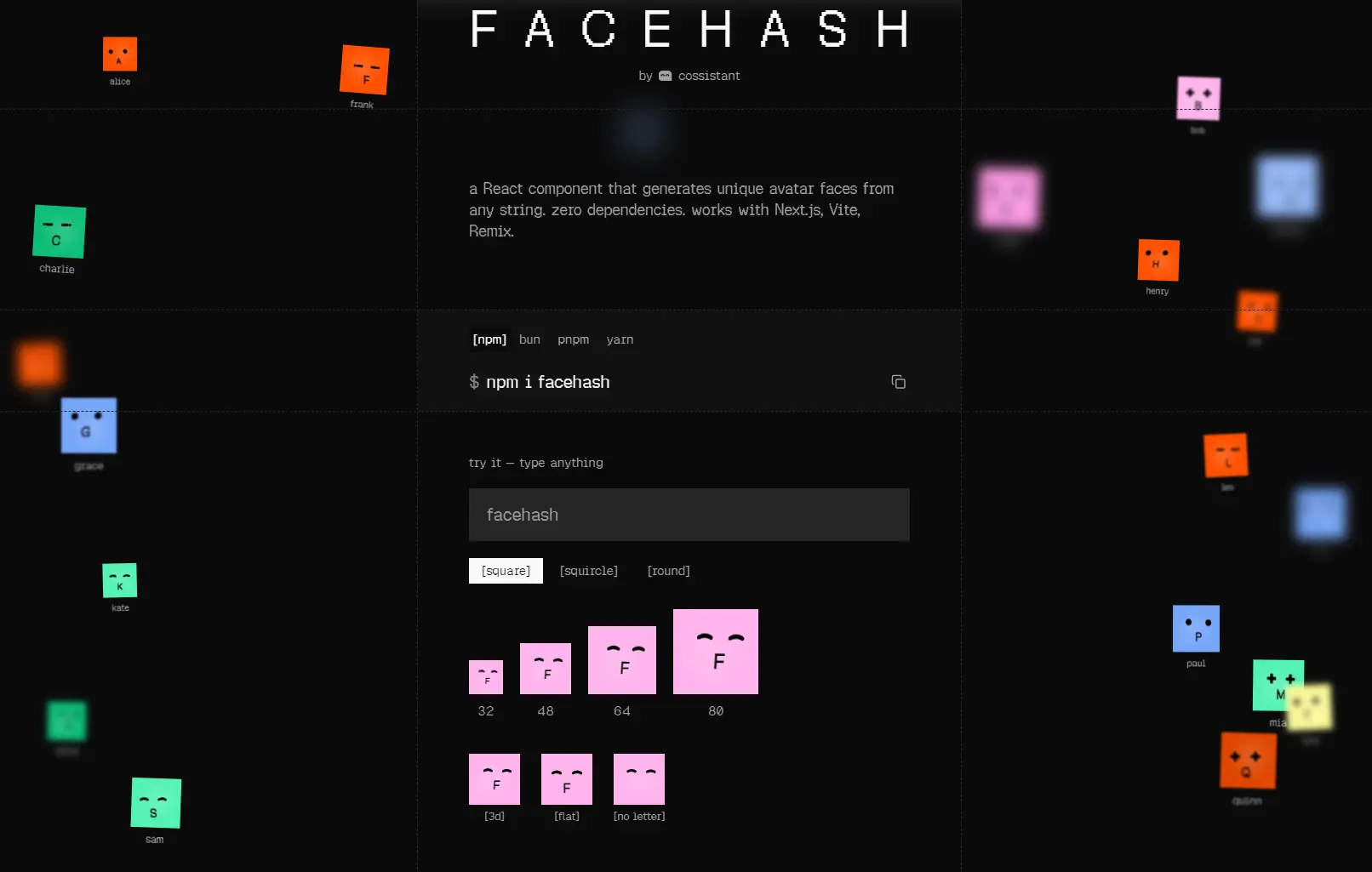
facehash is a React component library that generates unique, illustrated avatar faces from any string input.
Pass it an email address, a username, or a UUID, and it generates a friendly face that remains identical across renders and sessions.
The component also includes a Next.js route handler that serves avatar images as PNG or SVG over HTTP, full TypeScript definitions, and ARIA accessibility support by default.
Features
- Generate deterministic avatar faces from any string.
- Render avatars directly inside React components.
- Support Next.js, Vite, Remix, and general React setups.
- Output image URLs through a Next.js route handler.
- Return PNG by default and raw SVG on request.
- Apply custom color palettes.
- Switch between gradient and solid visual styles.
- Control 3D depth intensity.
- Toggle the initial letter display.
- Add a blink animation to make avatars more expressive.
- Replace the mouth with custom React content.
- Style the avatar with your own class names.
- Use a built-in avatar wrapper with image fallback.
- Keep rendering local and deterministic.
Use Cases
- User profile pages need a consistent avatar before a photo has been uploaded.
- Chat applications that display a fixed face per participant across all sessions.
- Comment sections that assign each account a unique, recognizable avatar automatically.
- AI agent dashboards that attach a persistent face to each bot for quick identification.
How To Use It
1. Install the facehash package with your preferred package manager:
# Install with npm
npm i facehash
# Install with pnpm
pnpm add facehash
# Install with yarn
yarn add facehash
# Install with bun
bun add facehash
2. Import the Facehash component and pass a name string. The component uses that string to derive every visual property of the face.
import { Facehash } from "facehash";
// Renders a 64px avatar face derived from the string "nika.vasquez"
<Facehash name="nika.vasquez" size={64} />
// Same string always produces the same face, regardless of when or where it renders
<Facehash name="support-bot-01" size={48} />
3. Create a route handler at app/api/avatar/route.ts to expose avatars as HTTP image URLs. This is the right approach for email templates, Open Graph images, or any context that requires a URL.
// app/api/avatar/route.ts
import { toFacehashHandler } from "facehash/next";
// Registers the GET handler; responds with PNG by default
export const { GET } = toFacehashHandler();
Use that URL anywhere an <img src> is accepted:
<!-- Fetches the avatar for "kai.oduya" as a PNG -->
<img src="/api/avatar?name=kai.oduya" alt="Avatar for Kai" />
<!-- Request a raw SVG for favicons or browser chrome -->
<img src="/api/avatar?name=kai.oduya&format=svg&pose=front" />
The route caches responses permanently. The same URL only generates the avatar once, regardless of how many times it is requested.
4. Use the Avatar, AvatarImage, and AvatarFallback components together to show a user’s photo and fall back to a generated face if the photo fails to load.
import { Avatar, AvatarImage, AvatarFallback } from "facehash";
// Displays the uploaded photo; falls back to the generated face for "priya.dev"
<Avatar>
  <AvatarImage src="/uploads/priya-headshot.jpg" />
  <AvatarFallback name="priya.dev" />
</Avatar>
Available Component Props
Table Of Contents
name (string, required)
The seed string used to deterministically generate the avatar. Any string is valid: emails, slugs, UUIDs, or arbitrary identifiers.
<Facehash name="agent-332" />
<Facehash name="[email protected]" />
<Facehash name="f47ac10b-58cc-4372-a567-0e02b2c3d479" />
size (number)
Sets the width and height of the rendered avatar in pixels. Defaults to 48.
<Facehash name="agent-332" size={32} />   {/* compact, e.g. comment thread */}
<Facehash name="agent-332" size={64} />   {/* standard profile display */}
<Facehash name="agent-332" size={128} />  {/* hero or settings page */}
colors (string[])
Accepts an array of hex color strings. The generator selects from these colors when tinting the avatar face.
// Dark brand palette
<Facehash name="agent-332" colors={["#1b2a4a", "#2e4a7a", "#4a7abf"]} />
intensity3d (string)
Controls the depth of the 3D shading applied to the face. Accepted values: "none", "subtle", "dramatic".
<Facehash name="agent-332" intensity3d="none" />      {/* flat illustration */}
<Facehash name="agent-332" intensity3d="subtle" />    {/* soft depth */}
<Facehash name="agent-332" intensity3d="dramatic" />  {/* strong shading */}
showInitial (boolean)
Renders the first character of the name string as a text initial inside the avatar.
<Facehash name="agent-332" showInitial={true} />  {/* shows "a" */}
<Facehash name="agent-332" showInitial={false} /> {/* face only */}
variant (string)
Switches the avatar container background between "gradient" and "solid" fill.
<Facehash name="agent-332" variant="gradient" />
<Facehash name="agent-332" variant="solid" />
enableBlink (boolean prop)
Activates an animated blinking effect on the avatar eyes. Pass the prop name with no value to enable it.
<Facehash name="agent-332" enableBlink />
<Facehash name="observer-bot" enableBlink />
onRenderMouth (function)
Accepts a render function that replaces the generated mouth with a custom React element. Useful for loading states or contextual expressions.
import { LoadingSpinner } from "@/components/loading-spinner";
{/* Replace the mouth with a spinner during a processing state */}
<Facehash name="job-processor" onRenderMouth={() => <LoadingSpinner />} />
{/* Combine with blinking for a "thinking" animation */}
<Facehash name="job-processor" enableBlink onRenderMouth={() => <LoadingSpinner />} />
className (string)
Passes a CSS class string to the root element. Tailwind utility classes for color and font work directly here.
{/* Light face color for a dark background */}
<Facehash name="ghost-user" className="text-slate-100" />
For app-wide defaults, build a typed wrapper that merges classes cleanly:
import { Facehash, type FacehashProps } from "facehash";
import { cn } from "@/lib/utils"; // assumes a cn/clsx utility
// Wrapper that applies default classes and forwards all facehash props
export function UserAvatar({ className, ...props }: FacehashProps) {
  return (
    <Facehash
      className={cn("text-zinc-900 font-mono font-semibold", className)}
      {...props}
    />
  );
}
// Uses the defaults defined above
<UserAvatar name="diana.bach" />
// Overrides color for a specific context (e.g., dark card)
<UserAvatar name="diana.bach" className="text-slate-50" />
FAQs
Q: Does facehash work inside a React Server Component?
A: The <Facehash> component needs a client context when enableBlink is active. Add "use client" to any file that renders the component inside the Next.js App Router.
Q: Can I use facehash in a Vite or Remix project?
A: Yes. The <Facehash> component and the Avatar wrapper work in any React project. The toFacehashHandler helper is specific to the Next.js App Router; server-side PNG generation in other frameworks requires a custom route implementation.
Q: Can I adjust avatar size responsively with Tailwind?
A: The size prop sets a fixed pixel dimension. For responsive sizing, set size to your base value and override width and height with Tailwind’s responsive prefixes via className.
Q: My generated avatar changes between renders.
A: Your input string is probably changing. Check for trimmed values, client-only placeholders, or IDs that arrive later from async data.
Q: Can I use facehash for uploaded profile images too?
A: Yes. Use the built-in Avatar, AvatarImage, and AvatarFallback pattern. It tries the real image first and uses a generated face as a fallback.