The Future of Web Dev
The Future of Web Dev
3D Image & Video Carousel Rotator For Next.js
Create an interactive 3D carousel gallery featuring image, video, and SoundCloud integration for your next.js projects.
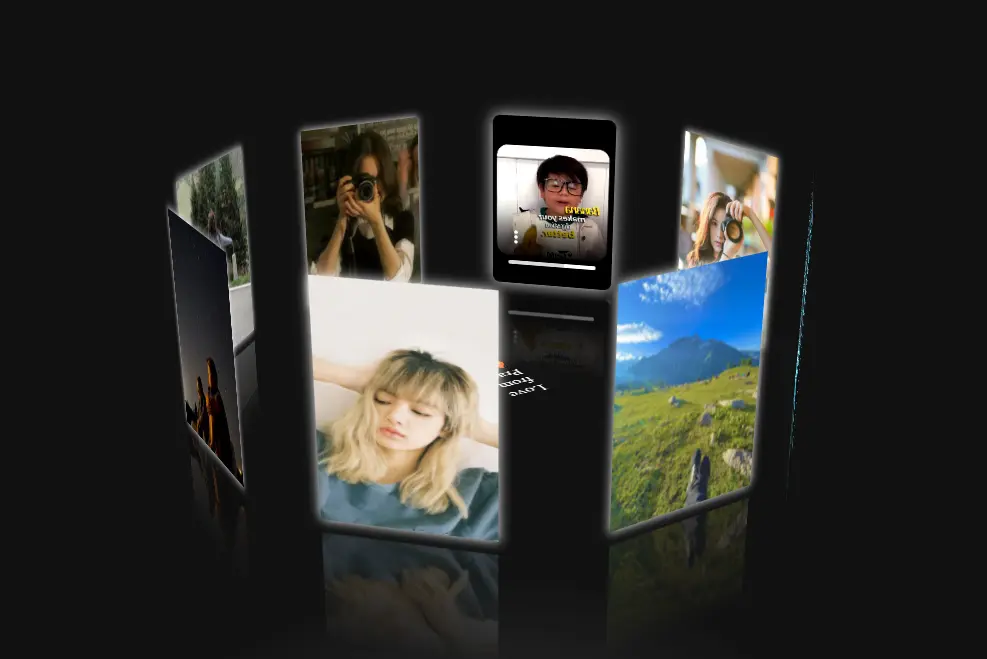
The 3D Carousel Gallery is a Next.js-based carousel rotator component that presents images and videos in an interactive, three-dimensional format. It integrates a SoundCloud music player for a rich multimedia experience.
This carousel provides a simple way to display media content in a visually engaging way. This is perfect for portfolios, product showcases, or any site that benefits from dynamic visual presentation.
More Features
🎠 Fluid 3D Animation: The carousel provides smooth transitions and animations.
📱 Responsive Layout: The design adapts to different screen sizes.
🎮 Interactive Controls: Users can drag, zoom, and set the carousel to auto-rotate.
🎨 Hover Effects: The carousel includes hover effects and transitions.
Use Cases
- Portfolio Display: Artists and photographers can showcase their work in an engaging format, complete with background music. This layout will make your portfolio more interactive.
- Product Showcase: E-commerce sites can present products from multiple angles, enhancing the user’s ability to examine items. Adding background music related to the product line could further engage customers.
- Interactive Storytelling: Websites can use the carousel to create a narrative, combining visuals and audio. This approach works well for educational content or interactive stories.
- Event Promotion: Event organizers can display photos and videos from past events, set to music that reflects the event’s atmosphere. This will make your promotional material more attractive.
- Virtual Tours: Real estate or tourism websites can make a carousel gallery for interactive virtual tours.
Installation
Before starting, you need Node.js (version 15.x or later) and either npm or yarn installed on your system.
- Clone the repository to your local machine:
git clone <repository-url> cd carousel-app - Install the necessary dependencies:
npm install # or yarn install - Start the development server:
npm run dev # or yarn dev - View the carousel in your browser by going to
http://localhost:3000.
Usage
To add your own images or videos, change the pages/index.js file. Here’s an example of how to add content:
<div id="spin-container">
  <img src="your-image-url.jpg" alt="description" />
  <video controls autoPlay loop>
    <source src="your-video-url.mp4" type="video/mp4" />
  </video>
</div>
You can adjust settings like rotation speed and item sizes in pages/index.js:
var radius = 240; // Item distance from the center
var autoRotate = true; // Auto-rotation on/off
var rotateSpeed = -60; // Speed, negative for clockwise
var imgWidth = 120; // Item width
var imgHeight = 170; // Item height
Users interact with the carousel by dragging to rotate, scrolling to zoom, and using the music player controls in the top bar. The carousel can also auto-rotate, which you can enable or disable.
Related Resources
- Next.js Documentation: The official Next.js documentation provides comprehensive information on the framework. Visit: Next.js Documentation.
- SoundCloud Widget API: Learn about integrating and customizing the SoundCloud music player. Visit: SoundCloud Widget API.
FAQs
Q: Can I use this carousel with different JavaScript frameworks?
A: This carousel is built specifically for Next.js. You might encounter compatibility issues with other frameworks.
Q: How do I add custom CSS styles?
A: You can modify the existing CSS or add your own styles within the pages/index.js file or in separate CSS files imported into your components.
Q: Is there a limit to the number of items in the carousel?
A: There’s no hard limit, but performance may decrease with a very large number of items. Test to determine the optimal number for your use case.
Q: How do I incorporate different music tracks for multiple carousels on one page?
A: You will need to manage the state of each carousel’s music player independently.
Q: How can I customize the appearance of the SoundCloud player?
A: SoundCloud’s Widget API allows many visual customizations. Explore them here: SoundCloud Widget API.
Preview
