The Future of Web Dev
The Future of Web Dev
Minimal Markdown Editor with Live Rendering for Next.js
A minimal Markdown editor with live GFM preview, PDF export, and dark mode. Built with next.js, CodeMirror and TailwindCSS.
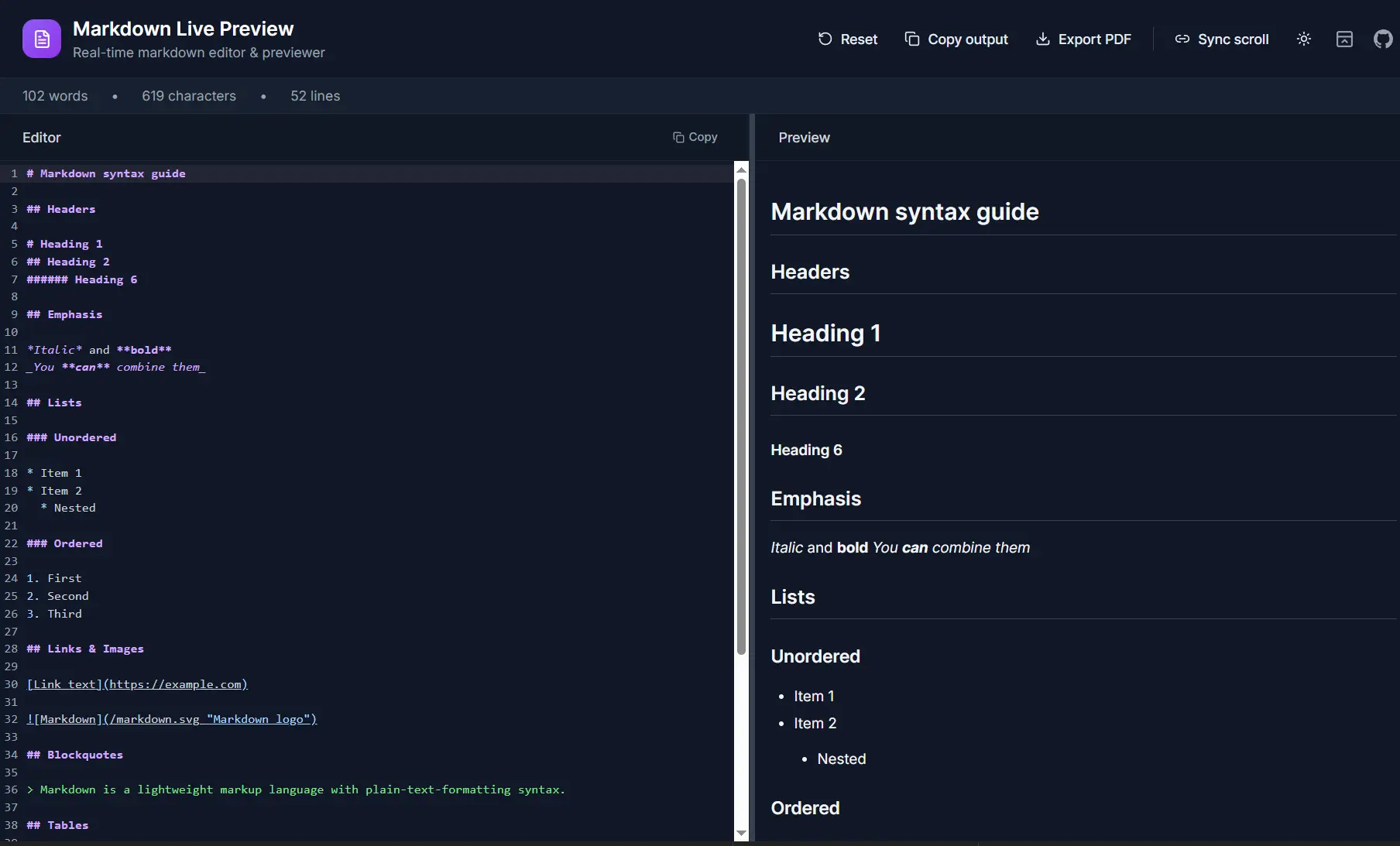
Markdown Live Preview is a browser-based Markdown editor that renders GitHub Flavored Markdown output in real time as you type.
It’s built on top of Next.js with the App Router, React, TypeScript, and Tailwind CSS. CodeMirror handles the editing surface, and react-markdown paired with remark-gfm processes the Markdown into HTML output.
The editor works as a standalone Next.js app. You can self-host it, run it locally, or drop it into any existing site through a standard <iframe> embed.
Features
📝 Live Preview: The preview pane re-renders on every keystroke.
🖊️ CodeMirror Editor: Displays line numbers and Markdown syntax highlighting in both GitHub light and dark themes.
↔️ Resizable Split Pane: A draggable divider separates the editor and preview columns.
🔄 Sync Scroll: An optional scroll-sync mode keeps the editor and preview pane aligned as you scroll through long documents.
🌗 Dark / Light Theme Toggle: The theme switch persists the selected value in localStorage.
📋 Copy Output as HTML: A single action copies the rendered HTML alongside plain text.
📄 Copy Raw Markdown: A separate copy action pulls the raw Markdown text directly from the editor pane.
🖨️ Export PDF: html2pdf.js handles one-click PDF generation.
📊 Live Stats: The navbar displays a live word count, character count, and line count that update as you edit.
🔼 Collapsible Navbar: You can collapse the header to reclaim vertical space.
📱 Mobile Tab Layout: On small screens, the editor and preview switch to a tab-based layout rather than a split view.
💾 Content Persistence: Editor content and all settings write to localStorage automatically.
🔔 Toast Notifications: sonner fires toast messages on reset, copy, and PDF export actions.
🖼️ Embeddable via Iframe: The app renders in a single full-height view that fits cleanly inside an <iframe> on any external page.
Use Cases
- Personal Writing Tool: Deploy the app to Vercel or any Node-capable host and use it as a daily Markdown writing environment with PDF export ready when needed.
- Blog or Tools Page Embed: Drop the iframe snippet into an existing blog or documentation site to add a live Markdown sandbox without building one from scratch.
- Documentation Drafting: Use the GFM table and task list support to draft structured technical documentation directly in the browser and export the result as a formatted PDF.
- Teaching or Workshop Environment: Host a shared instance and point students to it during workshops on Markdown syntax or technical writing.
How to Use It
Table Of Contents
Clone and Run Locally
Start by cloning the repository and installing dependencies.
git clone https://github.com/smkhan1101/md-live-preview.git
cd md-live-preview
npm install
Launch the development server with Turbopack:
npm run devOpen http://localhost:3000 in a browser. The editor and preview pane load side by side.
Available Scripts
| Command | Description |
|---|---|
npm run dev | Starts the development server with Turbopack |
npm run build | Compiles a production build |
npm run start | Starts the production server after a build |
npm run lint | Runs ESLint across the project |
Build for Production
Run the production build, then start the server:
npm run build
npm run start
The app listens on port 3000 by default. Set the PORT environment variable to change it.
Deploy to Vercel
Push the repository to GitHub, then import it into Vercel. No additional configuration is required for the default setup. Vercel detects Next.js automatically and applies the correct build settings.
After deployment, copy the live URL from the Vercel dashboard. This URL replaces the placeholder in the iframe embed snippet.
Embedding in Another Site
Paste the following <iframe> tag into any HTML page. Replace the src value with your deployed app URL:
<iframe
  src="https://your-deployed-url.vercel.app"
  title="Markdown Live Preview"
  style="width: 100%; height: 80vh; border: 1px solid #eee; border-radius: 8px;"
></iframe>
Related Resources
- react-markdown: Renders Markdown strings as React components using the remark and rehype plugin ecosystems.
- CodeMirror: A modular code editor library for the browser.
- remark-gfm: A remark plugin that adds GitHub Flavored Markdown support, including tables, task lists, and strikethrough.
- html2pdf.js: Converts HTML elements to downloadable PDF files entirely in the browser.
- streamdown: A drop-in replacement for react-markdown, designed for AI-powered streaming.
- Best Markdown Editors: Discover the 10 best markdown editors in JavaScript.
- MarkdownHTMLGen: Free, privacy-first, AI content friendly Markdown to HTML converter with real-time preview, advanced customization, and clean, semantic output.
FAQs
Q: Does the iframe embed share state with the host page?
A: No. The embedded app runs in a separate browsing context. Its localStorage writes stay scoped to the origin of the deployed URL, not the host page. Content typed inside the iframe persists between reloads of the embedded URL but remains invisible to the host page’s scripts.
Q: How do I change the default theme from light to dark?
A: Open localStorage in the browser’s developer tools and set the theme key to "dark" before the first load. Alternatively, click the theme toggle in the navbar once the app loads. The preference writes to localStorage immediately and applies on the next visit.
Q: Can I replace CodeMirror with a plain <textarea>?
A: Yes, but it requires replacing the @uiw/react-codemirror component and removing the @codemirror/lang-markdown dependency. The rest of the pipeline (react-markdown, remark-gfm) operates independently of the editor component and does not need changes.
Q: Does PDF export work offline?
A: html2pdf.js runs entirely in the browser and does not make network requests during PDF generation. Once the app loads, PDF export works without an active internet connection. The browser print fallback also works offline.