The Future of Web Dev
The Future of Web Dev
MDX-based Modern Changelog Template for Next.js
A minimal Next.js changelog template to showcase product updates. Features MDX support, dark mode, and a timeline design.
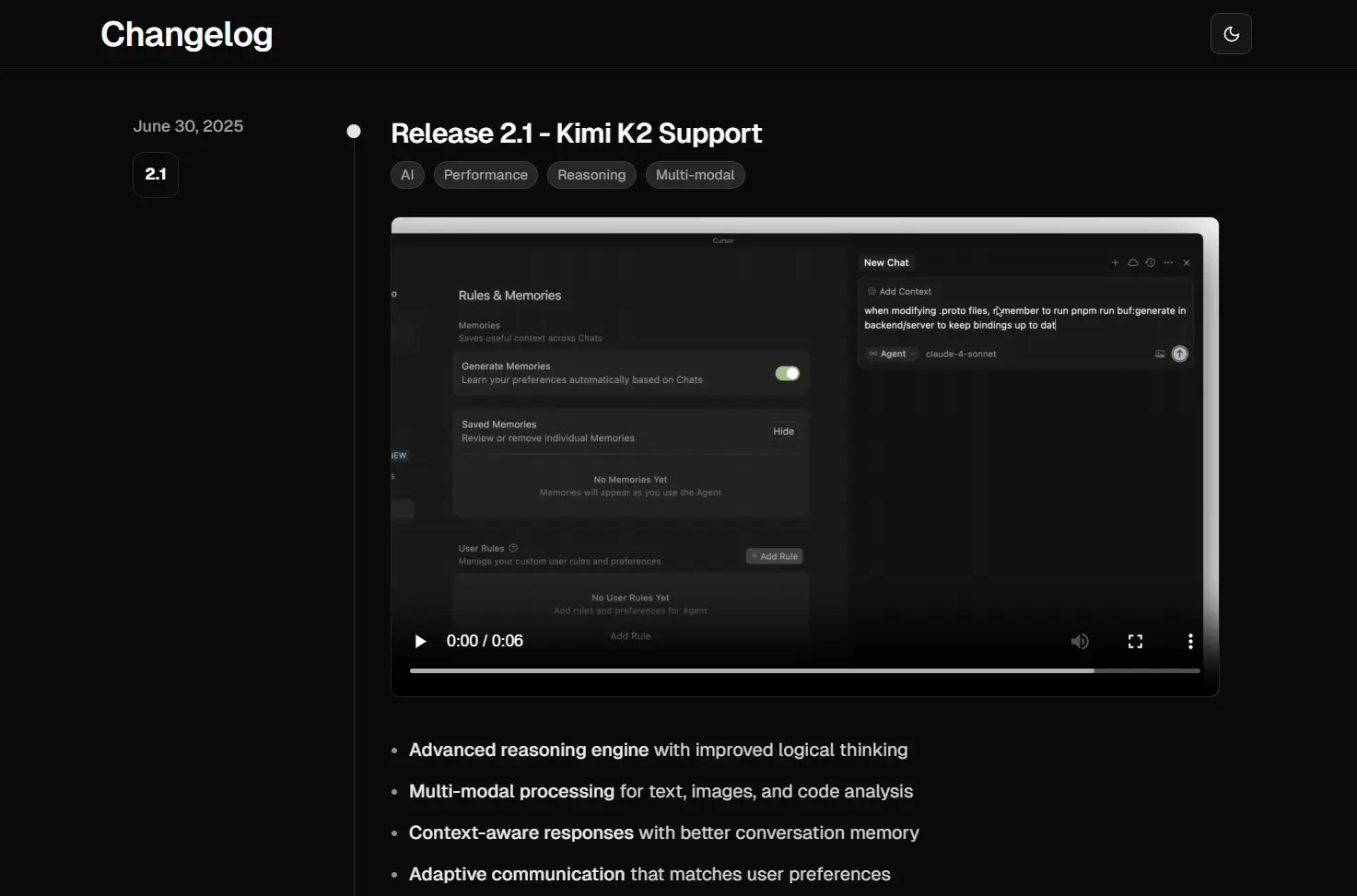
Changelog Template is a minimal template built with Next.js for showcasing product/project updates.
It allows you to present releases, new features, and bug fixes to users in a clean, chronological timeline.
You can use this template to create a dedicated page that communicates changes for a software product, an open-source project, or an internal tool.
Features
✨ Timeline Design – Visual chronological layout with dates and version numbers for clear release tracking.
🌙 Dark Mode – Automatic theme switching based on user preferences with manual toggle option.
📱 Responsive Layout – Mobile-first design optimized for all screen sizes and devices.
🔄 MDX Support – Write changelog entries using Markdown with React component integration.
⚡ Performance Optimized – Built with Next.js and React Server Components for fast loading.
🎨 shadcn/ui Components – Professional UI components with consistent design system.
📝 TypeScript Support – Full type safety throughout the application.
🔍 SEO Optimized – Built-in metadata and Open Graph image generation.
Use Cases
- SaaS Product Updates – Document feature releases, API changes, and service improvements for customer-facing products.
- Open Source Projects – Maintain public changelogs for GitHub repositories with professional presentation.
- Internal Team Documentation – Track development milestones and communicate changes across engineering teams.
- API Documentation – Document version changes, breaking updates, and new endpoints for developer audiences.
- Client Project Updates – Provide clients with professional timeline of project deliverables and improvements.
How to Use It
1. Clone or download the project repository from GitHub.
2. Install the necessary dependencies by running the following command in your project’s root directory.
pnpm install3. Start the local development server. You can now view the application by opening http://localhost:3000 in your web browser.
pnpm dev4. To add a new changelog entry, create a new MDX file inside the changelog/content/ directory. The filename must follow the YYYY-MM-DD.mdx format. Each file requires frontmatter at the top to define its metadata.
Here is an example of a new entry in a file named 2025-08-19.mdx.
---
title: "UX Improvements"
description: "Major improvements to UI/UX"
date: "2025-08-19"
tags: ["UI", "UX"]
version: "0.9"
---
- **Redesigned interface** with cleaner, more intuitive navigation
- **Enhanced accessibility** with improved keyboard navigation and screen reader support
- **Streamlined workflows** for faster task completion
- **Responsive design** optimized for all device sizes
<Accordion type="multiple" collapsible className="w-full not-prose">
<AccordionItem value="item-1">
<AccordionTrigger>Features</AccordionTrigger>
<AccordionContent className="flex flex-col gap-4 text-balance">
<ul className="list-disc space-y-2 pl-4">
<li>
<strong>Redesigned navigation menu</strong> with improved organization
and visual hierarchy
</li>
<li>
Enhanced accessibility features with full keyboard navigation support
</li>
<li>High contrast mode for users with visual impairments</li>
<li>Optimized touch targets for better mobile interaction</li>
<li>Enhanced swipe gestures and mobile-specific navigation</li>
</ul>
</AccordionContent>
</AccordionItem>
<AccordionItem value="item-2">
<AccordionTrigger>Bug Fixes</AccordionTrigger>
<AccordionContent className="flex flex-col gap-4 text-balance">
<ul className="list-disc space-y-2 pl-4">
<li>
Fixed inconsistent button placement across different screen sizes
</li>
<li>Resolved color contrast issues affecting readability</li>
<li>Corrected tab order problems in form navigation</li>
<li>Fixed device orientation change handling on mobile devices</li>
<li>Improved ARIA label compatibility with screen readers</li>
</ul>
</AccordionContent>
</AccordionItem>
</Accordion>Related Resources
- Next.js Documentation – Official Next.js documentation covering App Router, Server Components, and deployment strategies.
- Fumadocs – Documentation framework for MDX content management with advanced features like search and navigation.
- shadcn/ui – React component library with accessible, customizable components built on Radix UI and Tailwind CSS.
- MDX Documentation – Official MDX documentation for writing JSX in Markdown with component integration examples.
FAQs
Q: Can I customize the timeline design and colors?
A: Yes, you can modify the visual design by updating the Tailwind CSS configuration and CSS custom properties.
Q: How do I add custom components to my changelog entries?
A: Create custom React components and register them in the mdx-components.tsx file. This allows you to use custom elements like callout boxes, image galleries, or interactive demos within your MDX changelog entries.
Q: Can I integrate this with automated release processes?
A: Yes, you can create changelog entries programmatically by generating MDX files as part of your CI/CD pipeline.
Q: Does the template support multiple languages or localization?
A: The base template does not include internationalization features. You would need to implement Next.js i18n support or use a localization library to add multi-language support for changelog entries.