The Future of Web Dev
The Future of Web Dev
Build Modern Online Stores with Prostore Next.js e-commerce Starter
Launch your online store with Prostore's full-featured Next.js ecommerce platform. Includes payments, user management, and modern UI.
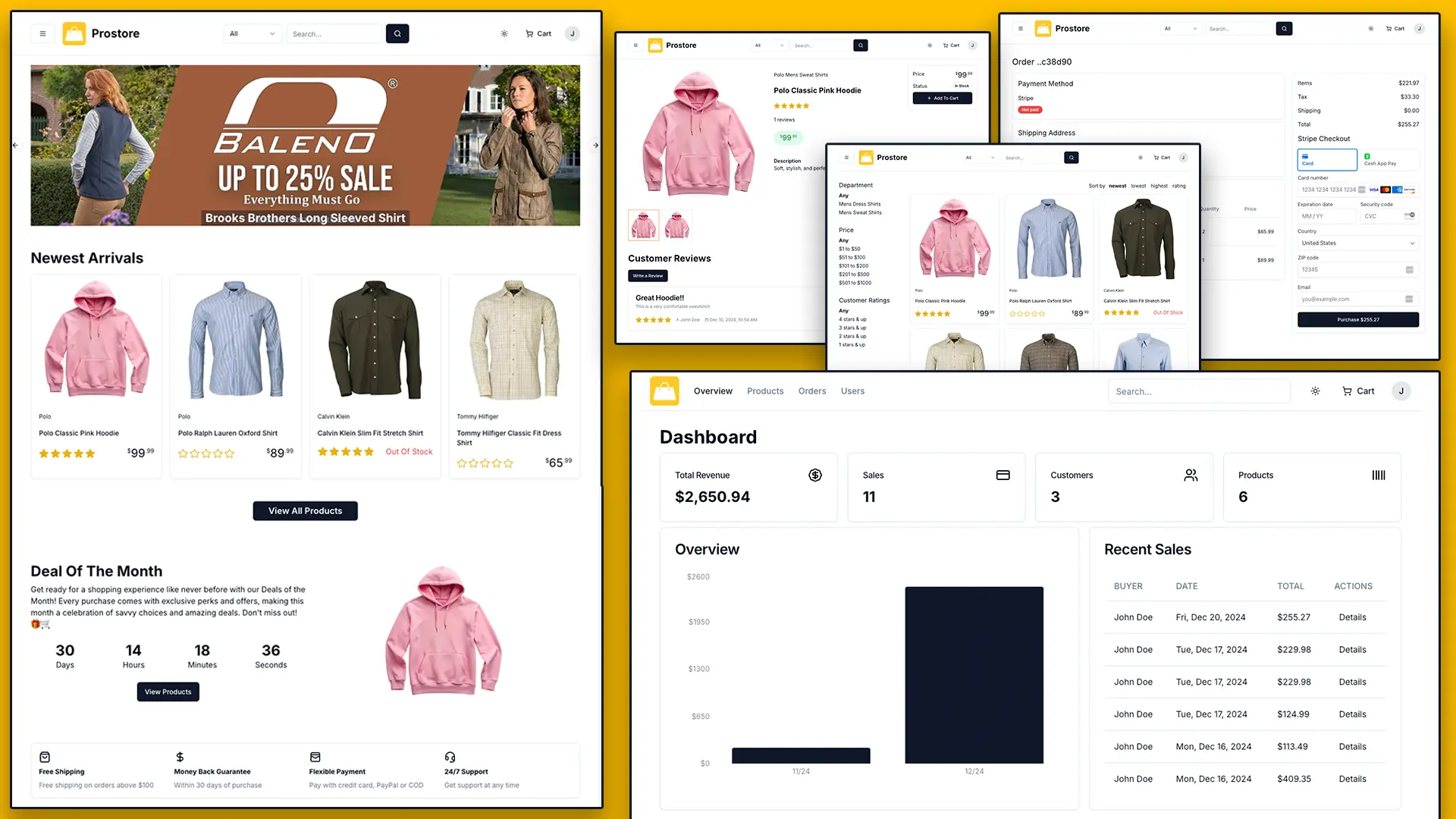
Prostore is a full-featured e-commerce platform built with Next.js, TypeScript, PostgreSQL, and Prisma that delivers enterprise-grade functionality for modern online stores.
The platform integrates essential e-commerce functionalities directly into its core. It handles everything from user authentication to payment processing.
Features
🔐 NextAuth authentication system with multiple provider support
📊 Admin dashboard with analytics and charts using Recharts
📦 Complete order management system with status tracking
👤 User profile management with order history
💳 Stripe payment integration with secure checkout
💰 PayPal payment gateway support
💵 Cash on delivery payment option
🛒 Interactive multi-step checkout process
🎨 Modern UI components with shadcn/ui
⭐ Featured products with promotional banners
🖼️ Multiple product images with Uploadthing integration
⭐ Customer ratings and reviews system
🔍 Advanced search functionality for customers and admins
📈 Product sorting, filtering, and pagination
🌙 Dark and light mode theme switching
📧 Email notifications using Resend API
📱 Responsive design optimized for all devices
🗄️ PostgreSQL database with Prisma ORM
Use Cases
- Boutique Online Shops: You can create a customized storefront for niche products, leveraging the flexible UI and product management features.
- Digital Product Marketplaces: The platform can be adapted to sell digital goods, with user authentication managing access to downloadable content.
- Subscription Box Services: You can build a recurring revenue business by integrating Stripe’s subscription billing capabilities.
- Multi-Vendor Marketplaces: With customization, you could extend the user management system to support multiple sellers on a single platform.
- Headless Commerce Backend: You can use Prostore as a powerful backend, managing inventory and orders while using a different frontend framework for the customer-facing site.
How to Use It
1. Clone the repository and install the required dependencies.
git clone https://github.com/bradtraversy/prostore.git
cd prostore
npm install
If you encounter dependency compatibility errors with React 19, use the legacy peer dependencies flag to resolve version conflicts.
npm install --legacy-peer-deps2. Create a PostgreSQL database through Vercel’s storage service or your preferred provider. Access your Vercel dashboard, navigate to the Storage section, and create a new PostgreSQL database. Copy the connection string provided by Vercel.
3. Create a .env file in your project root and add your database URL:
NEXT_PUBLIC_APP_NAME = "Prostore"
NEXT_PUBLIC_APP_DESCRIPTION = "A modern ecommerce store built with Next.js"
NEXT_PUBLIC_SERVER_URL = "http://localhost:3000"
DATABASE_URL=""
NEXTAUTH_SECRET=""
NEXTAUTH_URL=http://localhost:3000
NEXTAUTH_URL_INTERNAL=http://localhost:3000
PAYMENT_METHODS="PayPal, Stripe, CashOnDelivery"
DEFAULT_PAYMENT_METHOD="PayPal"
PAYPAL_API_URL="https://api-m.sandbox.paypal.com"
PAYPAL_CLIENT_ID=""
PAYPAL_APP_SECRET=""
UPLOADTHING_TOKEN=''
UPLOADTHING_SECRET=""
UPLOADTHING_APPID=""
NEXT_PUBLIC_STRIPE_PUBLISHABLE_KEY=""
STRIPE_SECRET_KEY=""
RESEND_API_KEY=""
SENDER_EMAIL="[email protected]"
4. Run Prisma migrations to set up your database schema:
npx prisma migrate dev
npx prisma generate
5. Generate a secure authentication secret using OpenSSL:
openssl rand -base64 326. Add the generated secret to your environment variables:
NEXTAUTH_SECRET="your_generated_secret_here"The platform supports multiple authentication providers through NextAuth, including email/password, Google, and GitHub authentication methods.
7. Configure Stripe by creating a developer account at Stripe.com and obtaining your publishable and secret keys from the dashboard. Add both keys to your environment configuration:
STRIPE_SECRET_KEY="sk_test_your_stripe_secret_key"
NEXT_PUBLIC_STRIPE_PUBLISHABLE_KEY="pk_test_your_stripe_publishable_key"
8. For PayPal integration, create a PayPal developer account and generate a new application to receive your client credentials:
PAYPAL_CLIENT_ID="your_paypal_client_id"
PAYPAL_APP_SECRET="your_paypal_app_secret"
9. To handle product image uploads. Navigate to your Uploadthing dashboard and copy your API credentials:
UPLOADTHING_TOKEN="your_uploadthing_token"
UPLOADTHING_SECRET="your_uploadthing_secret"
UPLOADTHING_APPID="your_uploadthing_app_id"
10. Configure Resend for transactional emails by creating an account and generating an API key:
RESEND_API_KEY="your_resend_api_key"11. Start the development server to begin working on your e-commerce platform:
npm run devThe application will be available at http://localhost:3000.
12. For production deployment, build the application and start the production server:
npm run build
npm start
13. Use Prisma Studio to manage your database through a web interface:
npx prisma studio14. Populate your database with sample data using the included seed script:
npx tsx ./db/seedThis command creates sample products, users, and orders to help you get started with the platform.
15. When deploying to Vercel’s Hobby tier, you may encounter Edge Function size limitations. The platform includes middleware that can exceed the 1MB limit on free plans. Reference the official documentation for optimization strategies or consider upgrading to a paid Vercel plan for production deployments.
Related Resources
- Next.js Documentation – Complete guide to Next.js App Router and server components for modern React applications.
- Prisma Documentation – TypeScript-first ORM documentation covering database modeling and query optimization.
- ShadCN/ui Components – Modern React component library built on Tailwind CSS and Radix UI primitives.
- Stripe Developer Docs – Payment processing integration guides and API reference for secure transactions.
FAQs
Q: Why does a new user sometimes see the previous user’s cart?
A: This happens because the cart persists between sessions. Fix it by deleting the current user’s Cart from the database in the signOutUser action.
Q: How do I resolve TypeScript warnings about ‘any’ type in auth.ts?
A: Create a types/next-auth.d.ts file that properly augments the NextAuth types for JWT, Session, and User interfaces with your custom properties.
Q: Can I integrate third-party services like inventory management or CRM systems?
A: The platform’s API-first architecture supports integration with external services. You can extend the existing API routes or create new endpoints to connect with inventory management, CRM, or analytics platforms.
Q: Does the platform support multiple currencies and international shipping?
A: The current version supports single currency operations through Stripe and PayPal. International shipping can be configured through the admin panel, though multi-currency support would require additional development.