The Future of Web Dev
The Future of Web Dev
Next.js i18n Starter with Better I18N and ISR Support
A Next.js starter template with Better I18N SDK, SSR translations, webhook ISR revalidation, and a CLI health audit tool.
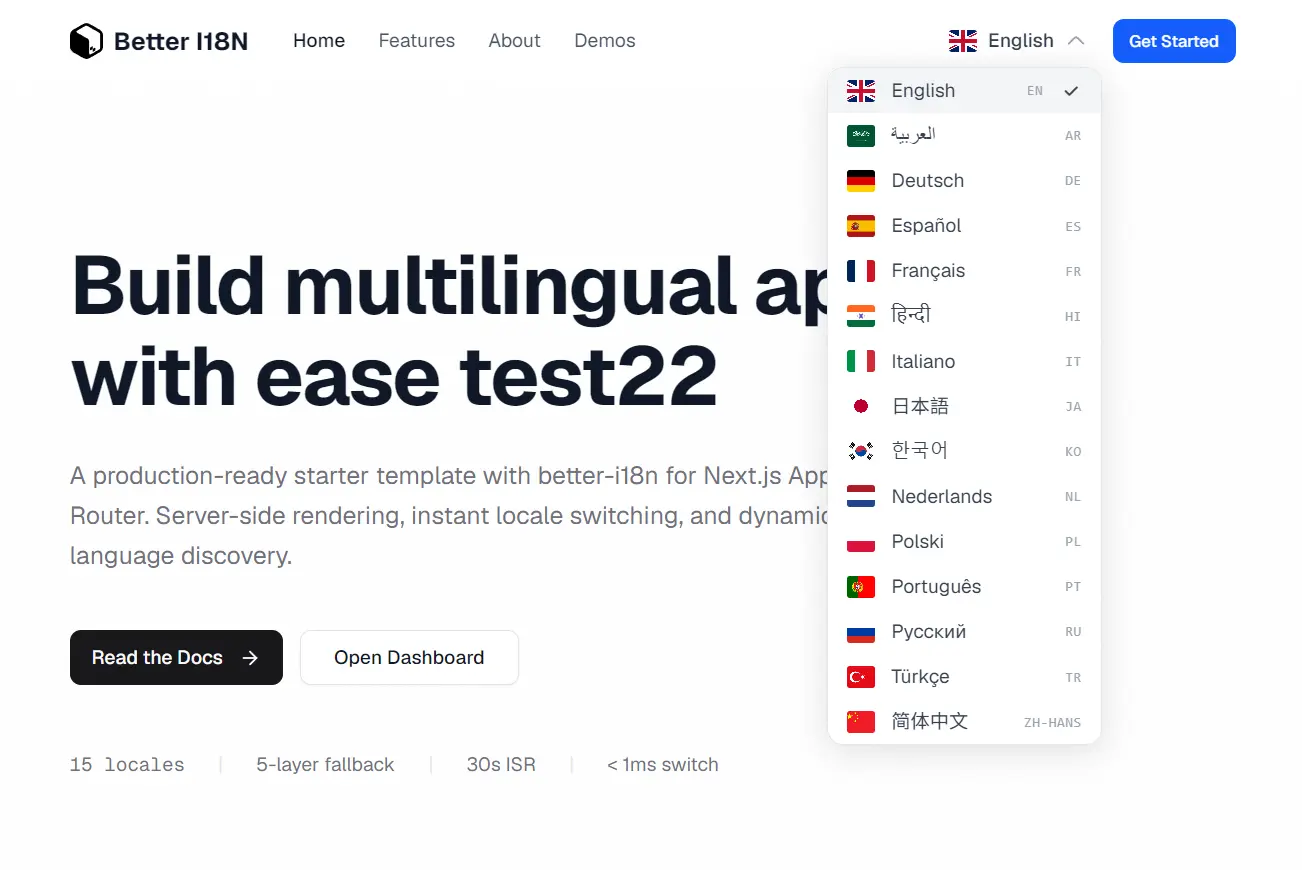
Next.js i18n Starter is a production-ready Next.js starter template that integrates Better I18N for cloud-managed translations. Powered by App Router with Server Components, Tailwind CSS, and TypeScript.
Translations live in the Better I18N cloud and arrive at the browser via CDN delivery. The server loads messages before the first paint, so pages render with the correct locale text from the start. A webhook endpoint at api/i18n/revalidate triggers ISR cache revalidation the moment you publish new translations from the dashboard.
Features
Next.js App Router: Runs on the App Router with full Server Components support and TypeScript throughout.
Better I18N SDK: Manages translations and distributes them through CDN delivery for fast global access.
Instant Locale Switching: Swaps locale client-side via URL navigation and a targeted message fetch.
🌐 Dynamic Language Discovery: Languages sync from the Better I18N dashboard automatically.
🖥️ SSR Translations: The layout fetches messages server-side before the page is sent to the browser.
🔄 Webhook Revalidation: A POST handler verifies HMAC-SHA256 signatures, then calls revalidatePath and revalidateTag to flush the ISR cache on translation publish.
🩺 i18n Doctor CLI: Audits your i18n setup and reports a health score across Coverage, Quality, Code, and Structure.
🗺️ 15 Locales: EN, TR, DE, ES, FR, JA, KO, AR, RU, PT, IT, NL, HI, PL, and ZH.
Use Cases
- Global E-commerce Storefronts: The template loads localized product data and currency formats for international shoppers.
- Content-heavy portals: Server rendered translations improve search engine indexing across multiple language directories.
- Software as a Service Dashboards: The dynamic language discovery synchronizes user preferences with the latest available translations.
Installation
1. Clone the repository from Github and install dependencies with Bun:
git clone https://github.com/better-i18n/nextjs-i18n-starter.git
cd nextjs-i18n-starter
bun install
2. Create a new Better I18N Project
- Go to dash.better-i18n.com and create a free account.
- Create a new project and add the languages you need.
- Copy your project identifier. It follows the format
your-org/your-project.
3. Configure Environment Variables
Copy the example environment file:
cp .env.example .envEdit .env with your project identifier and optional webhook secret:
NEXT_PUBLIC_BETTER_I18N_PROJECT=your-org/your-project
BETTER_I18N_WEBHOOK_SECRET=whsec_your_secret_here
You need BETTER_I18N_WEBHOOK_SECRET only if you plan to use webhook-based ISR revalidation.
4. Run the Dev Server and open http://localhost:3000. The middleware redirects this URL to /en (or your configured default locale) automatically.
bun devSetting Up Webhook Revalidation
Webhook revalidation keeps your production site in sync whenever you publish translations from the dashboard.
- In the Better I18N dashboard, go to your project and open Integrations > Webhooks.
- Add
https://your-domain.com/api/i18n/revalidateas the endpoint. - Select the Published event.
- Copy the webhook secret into your environment as
BETTER_I18N_WEBHOOK_SECRET.
The revalidation handler at app/api/i18n/revalidate/route.ts verifies each incoming request with HMAC-SHA256 before touching the cache:
// app/api/i18n/revalidate/route.ts
import { createRevalidateHandler} from "@better-i18n/next/revalidate";
export const POST = createRevalidateHandler({
  secret: process.env.BETTER_I18N_WEBHOOK_SECRET!,
});
On a successful publish event, the handler calls revalidatePath("/", "layout") and revalidateTag("i18n-messages") to flush stale translation data from the ISR cache.
Running the i18n Doctor CLI
Run a full audit of your i18n setup from the project root:
npx @better-i18n/cli doctorThe CLI outputs a score out of 100 across Coverage, Quality, Code, and Structure. Pass --ci to fail the build when the score drops below a minimum threshold. Pass --report to upload results to the Better I18N dashboard.
Sample output:
████████████████░░░░ 82/100  A
✓ Coverage     95
✓ Quality      88
! Code         72
✓ Structure   100
Locale Switching in Components
The LocaleDropdown component uses useSetLocale() to switch locales on the client side:
import { useSetLocale, useManifestLanguages } from "@better-i18n/next/client";
import i18n from "@/i18n.config";
export function LocaleDropdown() {
  const setLocale = useSetLocale();
  const { languages, isLoading } = useManifestLanguages(i18n.config);
  return (
    <select onChange={(e) => setLocale(e.target.value)}>
      {languages?.map((lang) => (
        <option key={lang.code} value={lang.code}>
          {lang.name}
        </option>
      ))}
    </select>
  );
}
Calling setLocale("tr") updates the cookie, fetches the Turkish message bundle, and navigates the URL from /en/... to /tr/... without a full page reload.
Loading Translations on the Server
The [locale]/layout.tsx file fetches messages server-side before the page renders:
import { BetterI18nProvider } from "@better-i18n/next/client";
import i18n from "@/i18n.config";
export default async function LocaleLayout({
  children,
  params,
}: {
  children: React.ReactNode;
  params: { locale: string };
}) {
  const { locale } = params;
  const messages = await i18n.getMessages(locale);
  return (
    <BetterI18nProvider locale={locale} messages={messages}>
      {children}
    </BetterI18nProvider>
  );
}
This pattern pre-loads all translation keys for the given locale and passes them through the BetterI18nProvider context to every child component.
Using Translations in Components
Call useTranslations with a namespace string to access translation keys:
import { useTranslations } from "next-intl";
export function HeroSection() {
  const t = useTranslations("home");
  return (
    <section>
      <h1>{t("title")}</h1>
      <p>{t("subtitle")}</p>
    </section>
  );
}
Deploying to Vercel
Set your environment variables during the Vercel deployment flow, and the platform handles the build. For other platforms, build and start with:
bun run build
bun start
Related Resources
- Next.js App Router Documentation: Official reference for the App Router, Server Components, and ISR configuration.
- Better I18N Documentation: Full SDK reference including framework guides, CLI docs, and CDN architecture details.
- next-intl: A widely used i18n library for Next.js that this starter adopts as its translation runtime layer.
FAQs
Q: Can I use this template with an existing Next.js project?
A: Reference the file structure and copy the key configuration files into your project. You also need to add NEXT_PUBLIC_BETTER_I18N_PROJECT to your environment.
Q: Does Better I18N require a paid account to use this template?
A: Better I18N has a free tier. The dashboard at dash.better-i18n.com lets you create a project and add languages at no cost.
Q: Can I add a language that is not in the 15 pre-configured locales?
A: Add the language in the Better I18N dashboard. The useManifestLanguages() hook pulls the language list from the CDN manifest at runtime, so the new language appears in the switcher with no code changes.