The Future of Web Dev
The Future of Web Dev
Privacy-First Markdown Editor Built with Svelte – SvelteMark
Privacy-first markdown editor with GitHub Flavored Markdown, math equations, and hierarchical file management. No accounts or cloud sync required.
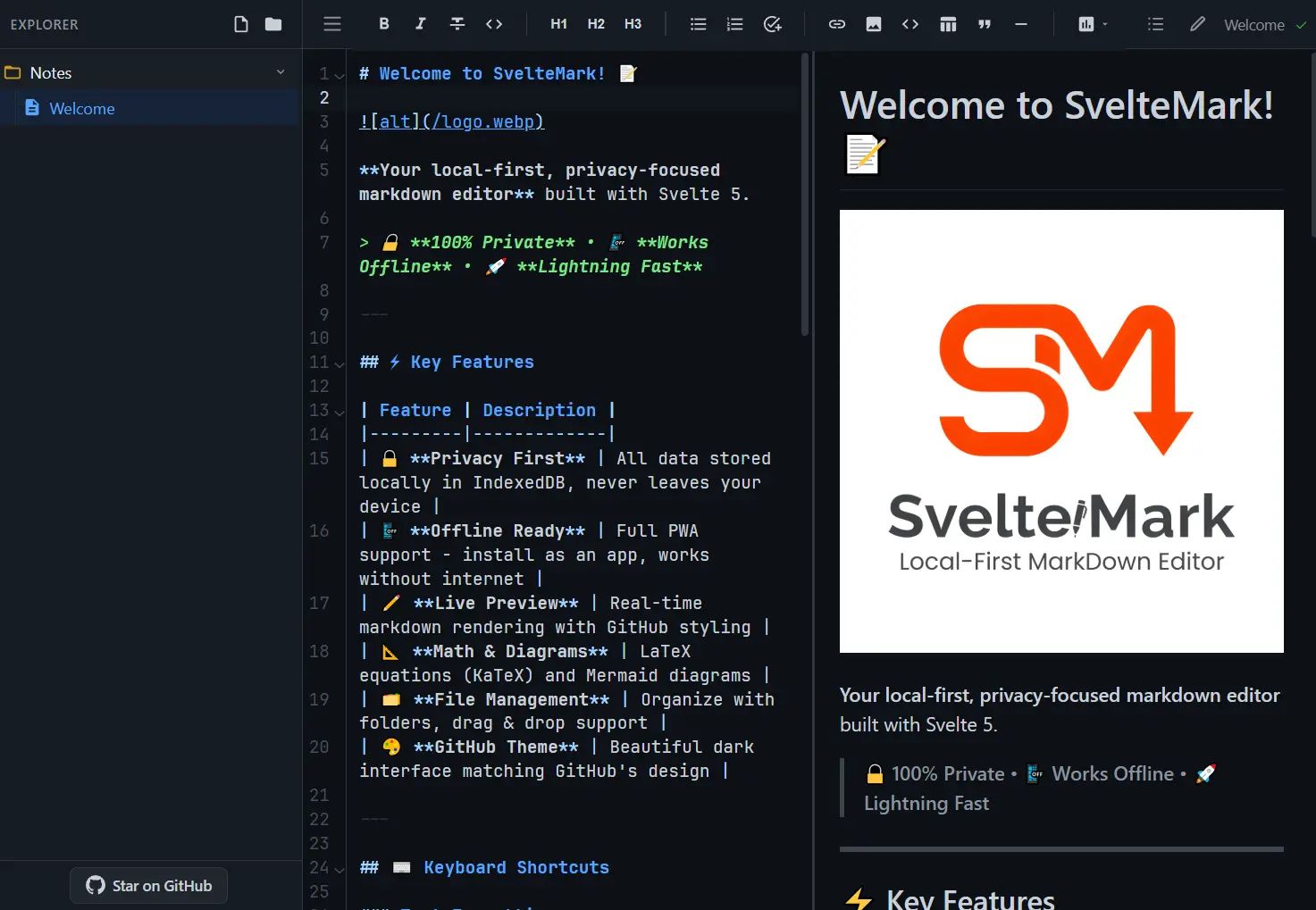
SvelteMark is a privacy-first markdown editor that runs entirely locally without external servers.
It uses Svelte and stores all data in your browser. Your data never leaves your device, and no account is required.
Features
🔒 Local-First Storage: All data lives in IndexedDB through Dexie.js.
🔄 Live Preview: Real-time markdown rendering with bidirectional scroll synchronization between editor and preview panes.
📊 Diagram Support: Native Mermaid.js integration renders flowcharts, sequence diagrams, and Gantt charts.
➗ Math Equations: LaTeX equation rendering through KaTeX lets you write mathematical notation inline or in blocks.
📁 File Organization: Hierarchical file tree with drag-and-drop support organizes notes into folders.
💾 Data Export: One-click JSON backup exports your entire database for migration or archival.
📱 PWA Installation: Service worker caching enables full offline functionality after first visit.
⌨️ Keyboard Shortcuts: Complete shortcut system covers formatting, navigation, and editor controls.
🖨️ Print Optimization: CSS rules format your markdown cleanly for PDF export through browser print.
📝 GitHub Flavored Markdown: GFM support includes tables, task lists, and extended syntax.
How to Use It
1. Clone the repository from GitHub and install dependencies through pnpm. The editor requires Node.js version 18 or higher and a browser with IndexedDB support.
git clone https://github.com/MasFana/sveltemark.git
cd sveltemark
pnpm install
pnpm dev
2. Access the development server at http://localhost:5173. The application loads its service worker and initializes IndexedDB on first visit.
3. Click the new file icon in the sidebar to create a note. Type markdown in the left pane and watch the preview update in real time. The editor saves changes automatically to IndexedDB after you stop typing.
# My First Note
This is **bold text** and this is *italic text*.
## Code Example
\`\`\`javascript
function greet(name) {
  return `Hello, ${name}!`;
}
\`\`\`
## Task List
- [x] Install SvelteMark
- [ ] Write first note
- [ ] Create folder structure
4. Right-click in the sidebar to create folders. Drag files into folders to organize your notes hierarchically. The file tree stores folder state in IndexedDB, so collapsed folders stay collapsed between sessions.
5. Wrap Mermaid syntax in code blocks with the mermaid language tag. The preview pane renders these blocks as interactive diagrams.
\`\`\`mermaid
graph TD
    A[Start] --> B{Decision}
    B -->|Yes| C[Action 1]
    B -->|No| D[Action 2]
\`\`\`
6. Use single dollar signs for inline math and double dollar signs for display math. KaTeX processes the LaTeX and renders it in the preview.
The quadratic formula is $x = \frac{-b \pm \sqrt{b^2-4ac}}{2a}$.
For display math:
$$
\int_0^\infty e^{-x^2} dx = \frac{\sqrt{\pi}}{2}
$$
7. Click the more menu icon and select Export Backup. The editor generates a JSON file containing all folders and files from IndexedDB. Store this file securely as your backup. To restore, select Import Backup and choose your JSON file.
8. Visit the editor in Chrome, Edge, or Safari. Click the install icon in the address bar to add SvelteMark to your desktop or home screen. The installed version works completely offline and launches like a native application.
Building for Production
Generate a production build with static assets optimized for deployment.
pnpm build
pnpm preview
The build output goes to the dist directory. Deploy these files to any static hosting service or run them from a local web server.
Keyboard Shortcuts
Text Formatting
Ctrl+B: Apply bold formattingCtrl+I: Apply italic formattingCtrl+Backtick: Wrap text in inline codeCtrl+~: Apply strikethroughCtrl+Shift+.: Create numbered listCtrl+.: Create bullet listCtrl+Q: Create block quote
Editor Control
Ctrl+H: Show keyboard shortcuts panelCtrl+F: Open find and replace dialogCtrl+P: Print current documentCtrl+S: Force save to IndexedDBCtrl+/: Toggle line commentTab: Indent current line or selectionShift+Tab: Outdent current line or selection
View Navigation
Ctrl+0: Reset zoom level to defaultF11: Toggle fullscreen mode
Multi-Select Operations
Ctrl+A: Select all text in editorCtrl+D: Select next occurrence of current selectionCtrl+Shift+L: Select all occurrences of current selection
Related Resources
- CodeMirror: A code editor component that handles syntax highlighting and keyboard shortcuts for web applications.
- Dexie.js: An IndexedDB wrapper that simplifies database operations with a promise-based API.
- unified: A text processing framework that transforms markdown through plugins for extended syntax support.
- Mermaid: A diagram generation library that converts text definitions into flowcharts and diagrams.
- streamdown: A drop-in replacement for react-markdown, designed for AI-powered streaming.
- Best Markdown Editors: Discover the 10 best markdown editors in JavaScript.
- MarkdownHTMLGen: Free, privacy-first, AI content friendly Markdown to HTML converter with real-time preview, advanced customization, and clean, semantic output.
FAQs
Q: Does SvelteMark sync notes across devices?
A: No. All data stays in your browser’s IndexedDB on the device where you created it. Export your notes as JSON and import them on another device to transfer manually.
Q: Can I use SvelteMark without installing it as a PWA?
A: Yes. Open the web application in any modern browser and use it directly.
Q: How do I migrate my notes to another markdown editor?
A: Export your data as JSON through the backup function. Parse the JSON file to extract the content field from each note.
Q: What happens to my notes if I clear browser data?
A: Clearing browser data deletes all notes stored in IndexedDB permanently. Export regular JSON backups to prevent data loss.