The Future of Web Dev
The Future of Web Dev
Next.js Starter Kit for AI Apps & Agents – Agentic Coding Boilerplate
A production-ready Next.js starter kit for AI apps & agents. Features authentication, database integration, and OpenAI chat functionality.
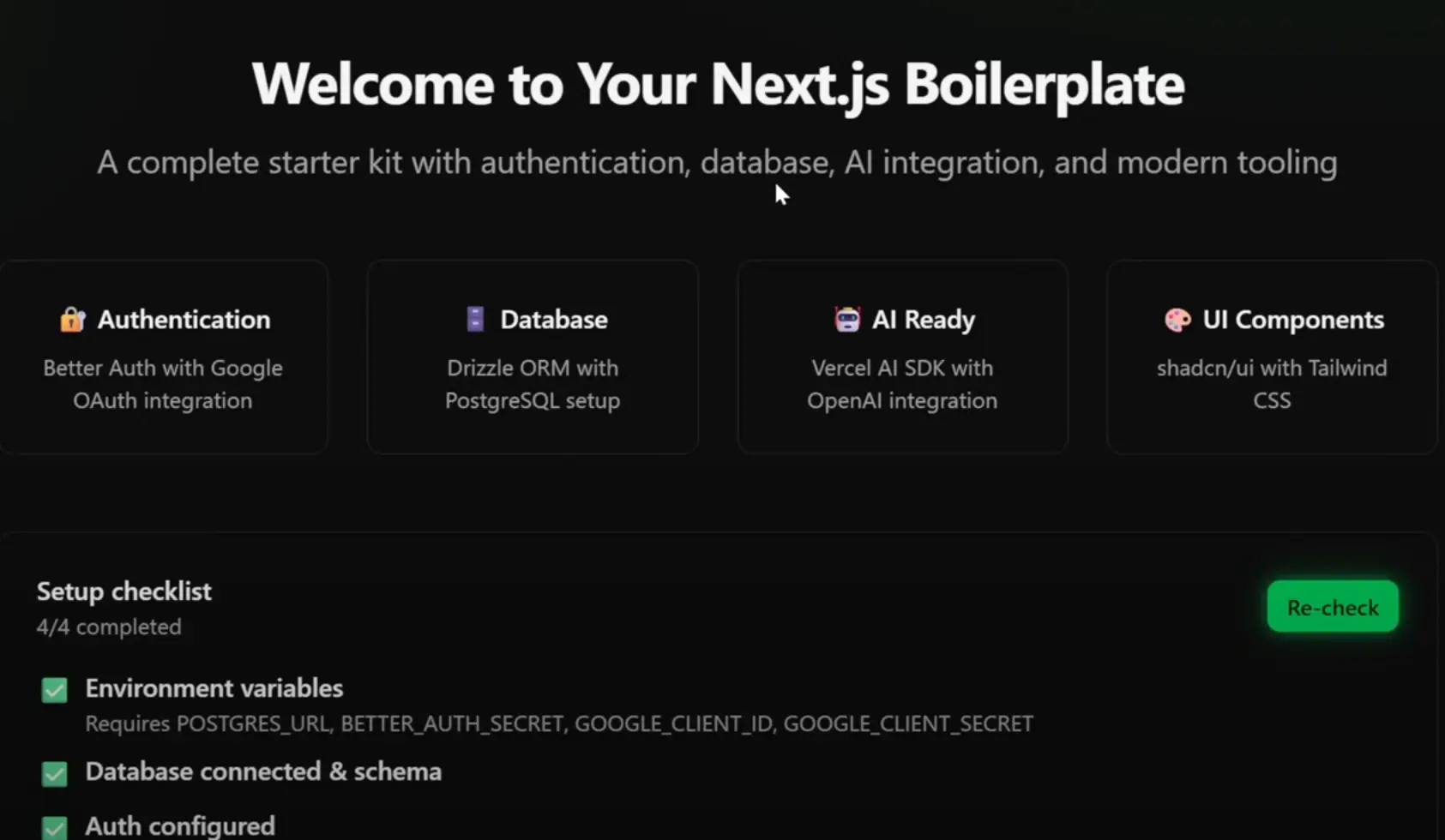
Agentic Coding Boilerplate is a Next.js starter kit for building AI-powered applications and autonomous agents.
No need to spend weeks configuring the fundamental components like authentication systems, database connections, and AI integrations. You can focus immediately on building your unique application logic and features.
Features
🔐 Complete authentication system with Better Auth and Google OAuth integration.
🗃️ Full database setup using Drizzle ORM with PostgreSQL support.
🤖 AI chat functionality powered by Vercel AI SDK and OpenAI integration.
🎨 Modern UI components using shadcn/ui with Tailwind CSS styling.
⚡ Latest technology stack including Next.js 15, React 19, and TypeScript.
🚀 Production-ready deployment configuration for Vercel.
🔧 Pre-configured API routes for authentication and chat endpoints.
📊 Database GUI access through Drizzle Studio for easy data management.
Use Cases
- Build AI-powered SaaS applications that require user accounts and chat interfaces.
- Create autonomous agent platforms where users can interact with AI assistants through authenticated sessions.
- Develop customer service chatbots with user authentication and conversation history tracking.
- Launch AI consulting tools that provide personalized recommendations based on user profiles.
- Prototype machine learning applications that need secure user authentication and data persistence.
How to Use It
1. Clone the repository from Github.
git clone https://github.com/leonvanzyl/agentic-coding-starter-kit.git
cd agentic-coding-starter-kit
2. Install the necessary dependencies.
npm install3. Copy the example environment file to create a new .env file.
cp env.example .env4. Open the .env file and populate it with your specific credentials for the database, authentication, and AI services.
# Database
POSTGRES_URL=

# Authentication - Better Auth
# Generate key using https://www.better-auth.com/docs/installation
BETTER_AUTH_SECRET=qtD4Ssa0t5jY7ewALgai97sKhAtn7Ysc

# Google OAuth (Get from Google Cloud Console)
GOOGLE_CLIENT_ID=
GOOGLE_CLIENT_SECRET=

# AI Integration (Optional - for chat functionality)
OPENAI_API_KEY=
OPENAI_MODEL="gpt-5-mini"

# Optional - for vector search only
OPENAI_EMBEDDING_MODEL="text-embedding-3-large"

# App URL (for production deployments)
NEXT_PUBLIC_APP_URL="http://localhost:3000"

# File storage (optional - if app required file uploads)
BLOB_READ_WRITE_TOKEN=
5. Generate the database schema and apply the migrations.
npm run db:generate
npm run db:migrate
6. Start the development server to run the application locally.
bash npm run devThe application will be accessible at http://localhost:3000 in your web browser.
7. Deploy to Vercel by installing the Vercel CLI with npm install -g vercel and running vercel --prod in your project directory.
8. Update the NEXT_PUBLIC_APP_URL variable to match your production domain and verify that your Google OAuth redirect URIs include your production callback URL.
Related Resources
- Better Auth Documentation – Complete authentication solution with comprehensive guides for setup, configuration, and advanced features including social logins and session management.
- Drizzle ORM Documentation – Type-safe ORM for TypeScript with detailed examples, migration guides, and advanced query building techniques.
- Vercel AI SDK Documentation – Official documentation for integrating AI capabilities with streaming responses, function calling, and multiple provider support.
- shadcn/ui Component Library – Modern React component library built on Radix UI and Tailwind CSS with copy-paste components and customization examples.
FAQs
Q: Can I use a different database provider instead of PostgreSQL?
A: Yes, Drizzle ORM supports multiple database providers including MySQL, SQLite, and others. You’ll need to modify the database configuration in src/lib/db.ts and update your connection string accordingly.
Q: Is it possible to add more OAuth providers besides Google?
A: Absolutely. Better Auth supports multiple OAuth providers including GitHub, Discord, Twitter, and more. Add the provider configuration in src/lib/auth.ts and include the necessary environment variables.
Q: Can I use a different AI provider instead of OpenAI?
A: Yes, the Vercel AI SDK supports multiple providers including Anthropic, Google, and others. Update the provider configuration in your chat API route and modify the environment variables accordingly.
Q: How do I customize the UI components and styling?
A: The boilerplate uses shadcn/ui components with Tailwind CSS. You can modify component styles directly in the component files or customize the global theme in your Tailwind configuration.
Q: What’s included in the database schema by default?
A: The default schema includes tables for users, accounts, sessions, and verification tokens required for authentication. You can extend the schema by modifying src/lib/schema.ts and generating new migrations.