The Future of Web Dev
The Future of Web Dev
Production-Ready Next.js Auth & User Management Boilerplate – Zexa
A production-ready Next.js authentication boilerplate with user management, admin dashboard, and role-based access control.
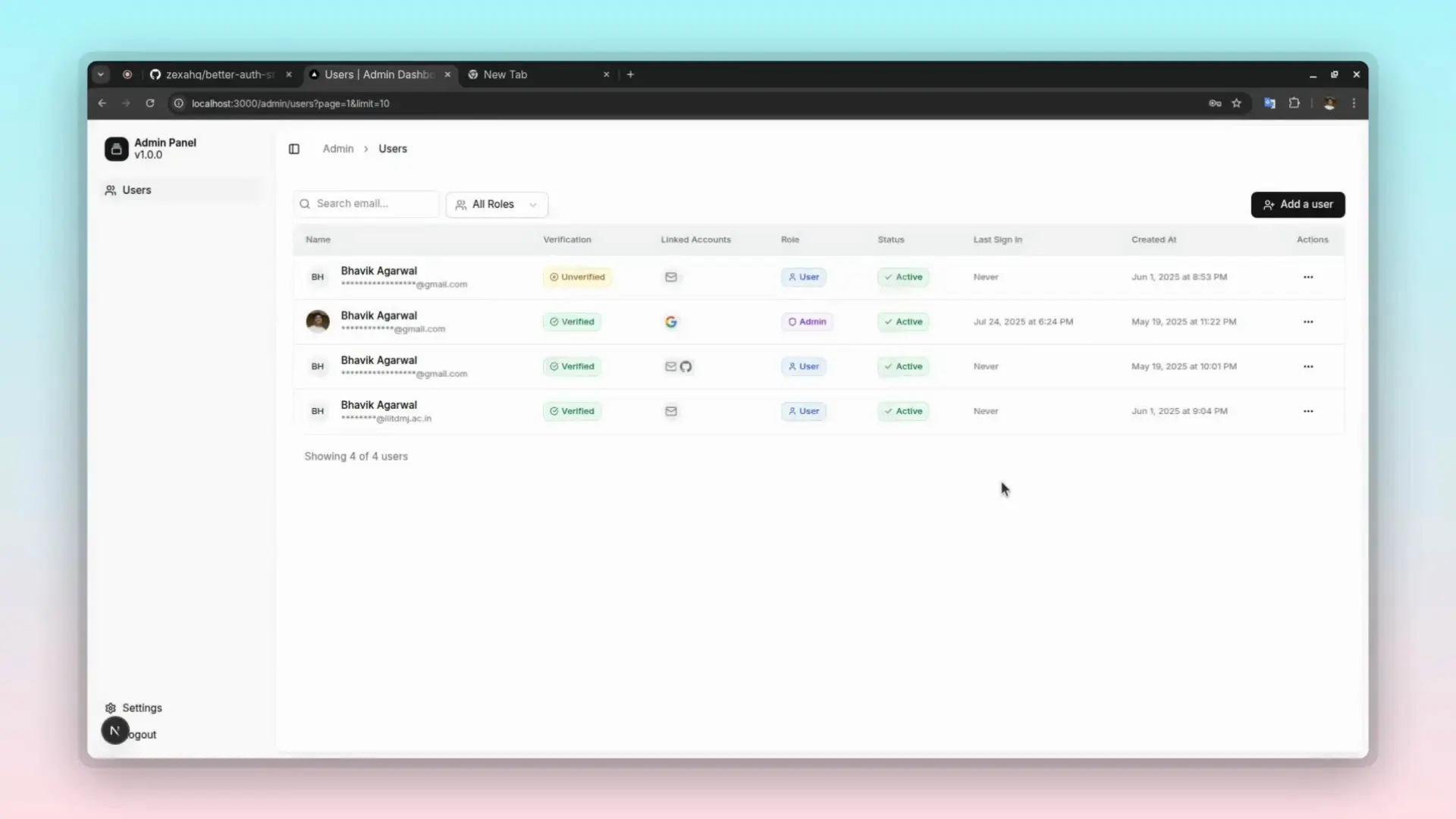
Zexa Auth Starter is a production-ready Next.js boilerplate that provides authentication infrastructure for modern web applications.
It’s ideal for developers looking to build applications that require secure user accounts and role-based access controls without starting from scratch.
Features
🔐 Email and password authentication with verification system
👥 Complete user registration and login workflows with form validation
🛡️ Role-based access control supporting admin and user permissions
📧 Automated email verification system using Resend integration
🔄 Session management with secure token handling and revocation
🎛️ Admin dashboard for user management and role assignment
🚫 User banning and unbanning functionality with expiration dates
🎨 Modern UI components built with Radix UI and Tailwind CSS
✅ Form validation powered by React Hook Form and Zod schemas
🔗 Account linking support for multiple authentication methods
🗄️ PostgreSQL database integration with Drizzle ORM
🔒 TypeScript implementation for complete type safety
Use Cases
- Building a Software as a Service (SaaS) application that requires user accounts, role management, and secure logins.
- Creating a members-only platform where content access is restricted to registered and verified users.
- Developing internal business applications that require distinct permission levels for regular employees and administrators.
- Prototyping a full-stack application concept quickly by skipping the initial setup for authentication and user management.
- Launching a web application that needs a secure, scalable, and maintainable user account system from day one.
Installation
1. Clone the repository from GitHub.
git clone https://github.com/zexahq/better-auth-starter.git
cd zexa-auth-starter
2. Install dependencies.
npm install3. Copy the .env.example file to a new file named .env.local and add your environment-specific variables.
# Better Auth Configuration
BETTER_AUTH_SECRET=your-better-secret-key
BETTER_AUTH_URL=http://localhost:3000
# OAuth Providers
GOOGLE_CLIENT_ID=your-google-client-id
GOOGLE_CLIENT_SECRET=your-google-client-secret
GITHUB_CLIENT_ID=your-github-client-id
GITHUB_CLIENT_SECRET=your-github-client-secret
DATABASE_URL=postgresql://your-database-user:your-database-password@your-database-host/your-database-name?sslmode=require
RESEND_API_KEY=your-resend-api-key
4. Generate and apply the necessary database migrations.
npm run db:generate
npm run db:migrate
5. Start the development server. Your application will be available at http://localhost:3000.
npm run devUsage
1. The app directory contains all routes, including specific sections for the admin dashboard, API endpoints, and authentication pages.
2. Reusable React components are located in the components directory, sorted into categories for admin, auth, and general UI elements.
3. Available scripts:
npm run dev: Starts the development server with Turbopack for a fast local development experience.npm run build: Compiles and bundles the application for production deployment.npm run start: Runs the production-ready server after a successful build.npm run lint: Executes ESLint to analyze the code for potential errors and style issues.npm run db:generate: Generates new database migration files based on changes in the Drizzle ORM schema.npm run db:migrate: Applies any pending database migrations to update the database schema.npm run db:push: Pushes schema changes directly to the database without creating migration files.npm run db:studio: Opens the Drizzle ORM Studio, a local GUI to view and manage your database.
Related Resources
- Next.js App Router Guide – Official documentation for Next.js App Router architecture
- Drizzle ORM Tutorials – Database ORM documentation and query building guides
- Tailwind CSS Components – Premium UI components and design system resources
FAQs
Q: Can I customize the authentication flow for my specific requirements?
A: Yes. You can modify the authentication providers, add custom fields to user profiles, and implement additional verification steps by editing the configuration files.
Q: How do I add social login providers like Google or GitHub?
A: Better Auth supports multiple OAuth providers. Add your provider configuration to the auth setup file and include the necessary environment variables for your chosen social login services.
Q: Is the admin dashboard customizable for different user roles?
A: The admin interface is built with React components that you can modify. You can add new admin features, customize the user management interface, and create role-specific dashboards by editing the components in the admin directory.
Q: What database providers are supported besides PostgreSQL?
A: Drizzle ORM supports multiple databases, including MySQL, SQLite, and other SQL databases. You can switch providers by updating the database configuration and installing the appropriate driver packages.
Q: How do I deploy this to production environments?
A: The starter is optimized for Vercel deployment but works with any Node.js hosting platform. Set up your environment variables, configure your production database, and follow standard Next.js deployment procedures.