The Future of Web Dev
The Future of Web Dev
Build ChatGPT-like AI Chatbot with Next.js Template
Build custom AI chat applications with this Next.js template featuring Vercel's AI SDK, authentication, and database integration, and more.
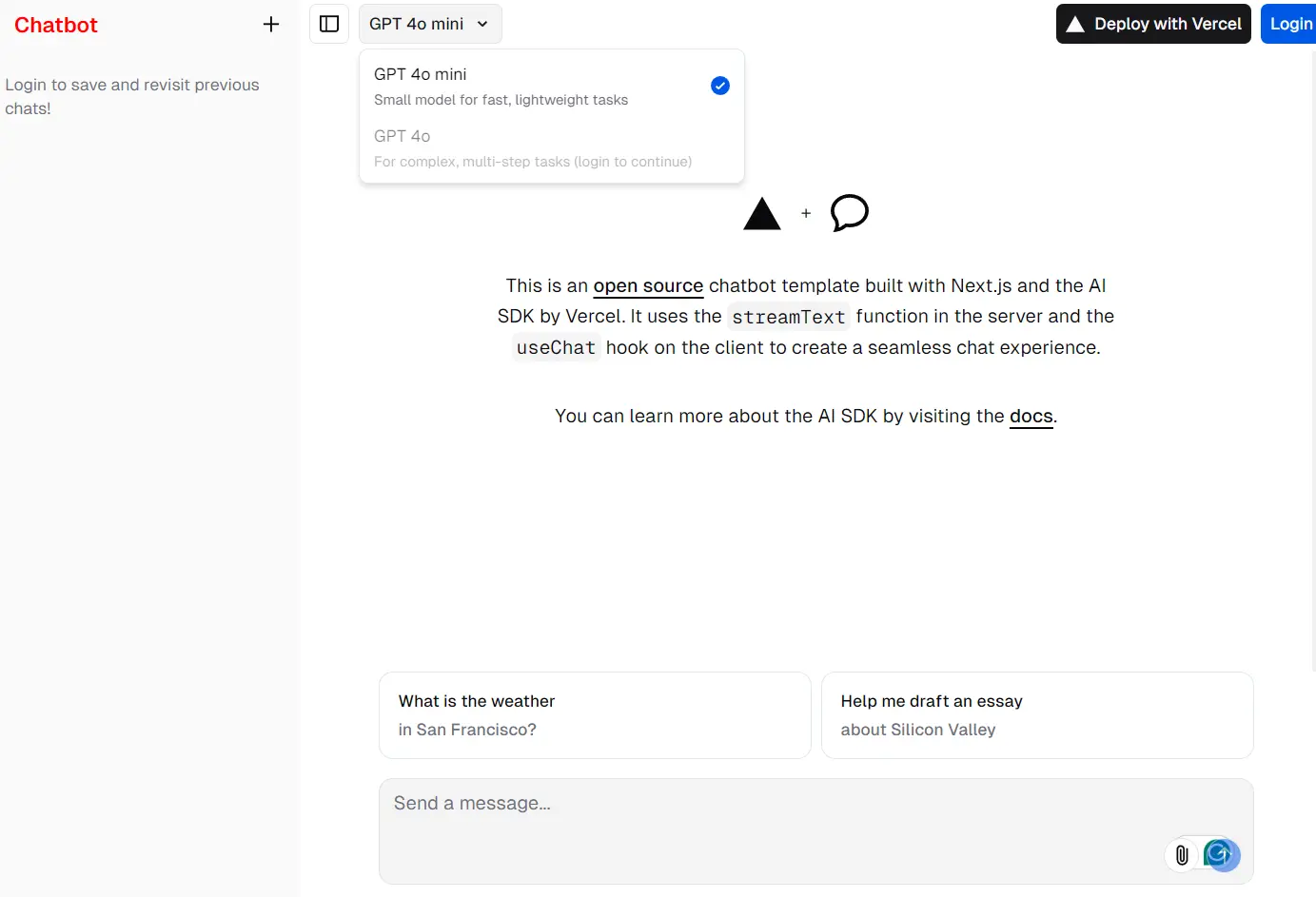
Next.js AI Chatbot is an open-source template for AI chatbot development that integrates Next.js with the AI SDK from Vercel.
It enables developers to build high-performance AI chatbots with a modern stack, using advanced features of Next.js and a unified API for language models.
This template supports server-side rendering with React Server Components and includes built-in data persistence and authentication for a comprehensive development experience.
You can use this template to incorporate AI capabilities without complex configurations, as it supports various AI model providers like OpenAI, Anthropic, and Cohere.
Features
⚡ Next.js App Router: Advanced routing for smooth navigation and enhanced performance.
🧠 AI SDK Integration: Unified API to generate text, structured objects, and tool calls with various language models.
💾 Data Persistence: Vercel Postgres for chat history and Vercel Blob for file storage.
⚙️ React Server Components (RSCs) & Server Actions: Improved server-side rendering to boost performance.
🎨 Shadcn/ui & Tailwind CSS: Stylish and accessible UI components with Radix UI primitives.
🔒 NextAuth.js: Simple and secure authentication implementation.
Use Cases
- Customer Support Chatbot: Integrate a chatbot into your e-commerce site to handle customer inquiries and provide support. The AI SDK can generate responses based on user inputs, making the interaction more dynamic and helpful.
- Content Generation Tool: Use the chatbot to generate blog posts, articles, or social media content. The unified API allows for easy integration with various language models, ensuring high-quality and relevant content.
- Educational Assistant: Create a chatbot for educational platforms to assist students with queries, provide explanations, and generate practice questions. The AI capabilities can enhance the learning experience by offering personalized support.
- Internal Communication Tool: Develop a chatbot for internal company communication to streamline information sharing and improve collaboration. The chatbot can answer frequently asked questions, provide updates, and facilitate team discussions.
- Personal Assistant: Build a personal assistant chatbot that helps users manage their daily tasks, set reminders, and provide recommendations. The AI SDK can generate personalized responses based on user preferences and past interactions.
Installation
- Install Vercel CLI:
npm i -g vercel- Link Your Project:
vercel link- Pull Environment Variables:
vercel env pull- Install Dependencies:
pnpm install- Start the Development Server:
pnpm dev
Access your app on localhost:3000.
Ensure sensitive information like API keys is stored securely in environment variables and not committed to your repository.
Related Resources
- Vercel Documentation: Official documentation for Vercel, providing detailed guides on deployment and environment variables. Vercel Docs
- Next.js Documentation: Comprehensive documentation for Next.js, covering all features and best practices. Next.js Docs
- Tailwind CSS Documentation: Official documentation for Tailwind CSS, offering detailed guides on styling and utility-first CSS. Tailwind CSS Docs
- Radix UI Documentation: Documentation for Radix UI, providing accessibility and flexibility with component primitives. Radix UI Docs
FAQs
Q: How do I manage user authentication in the chatbot?
A: The template includes NextAuth.js, which provides a simple and secure way to handle authentication.
Q: Can I customize the UI components?
A: Yes, shadcn/ui components are fully customizable using Tailwind CSS classes.
Q: Can I use this template for non-Next.js projects?
A: No, this template is specifically designed for Next.js. Consider adapting individual components for other frameworks.
Q: What are the system requirements for running the chatbot locally?
A: You need Node.js and npm or pnpm installed on your machine. Additionally, ensure you have the Vercel CLI installed for environment variable management.
Q: How do I switch language model providers?
A: You can switch language model providers by modifying a few lines of code in the AI SDK configuration. The template supports OpenAI, Anthropic, Cohere, and many more providers.
Q: Can I deploy the chatbot to platforms other than Vercel?
A: While the template is optimized for deployment on Vercel, you can deploy it to other platforms by configuring the environment variables and following the platform-specific deployment instructions.
Preview