The Future of Web Dev
The Future of Web Dev
PWA Boilerplate with iOS Layout Fixes – Next.js Native App Template
A Next.js PWA boilerplate that replicates native tab-bar navigation using scroll-snap, with iOS layout fixes and SQLite built in.
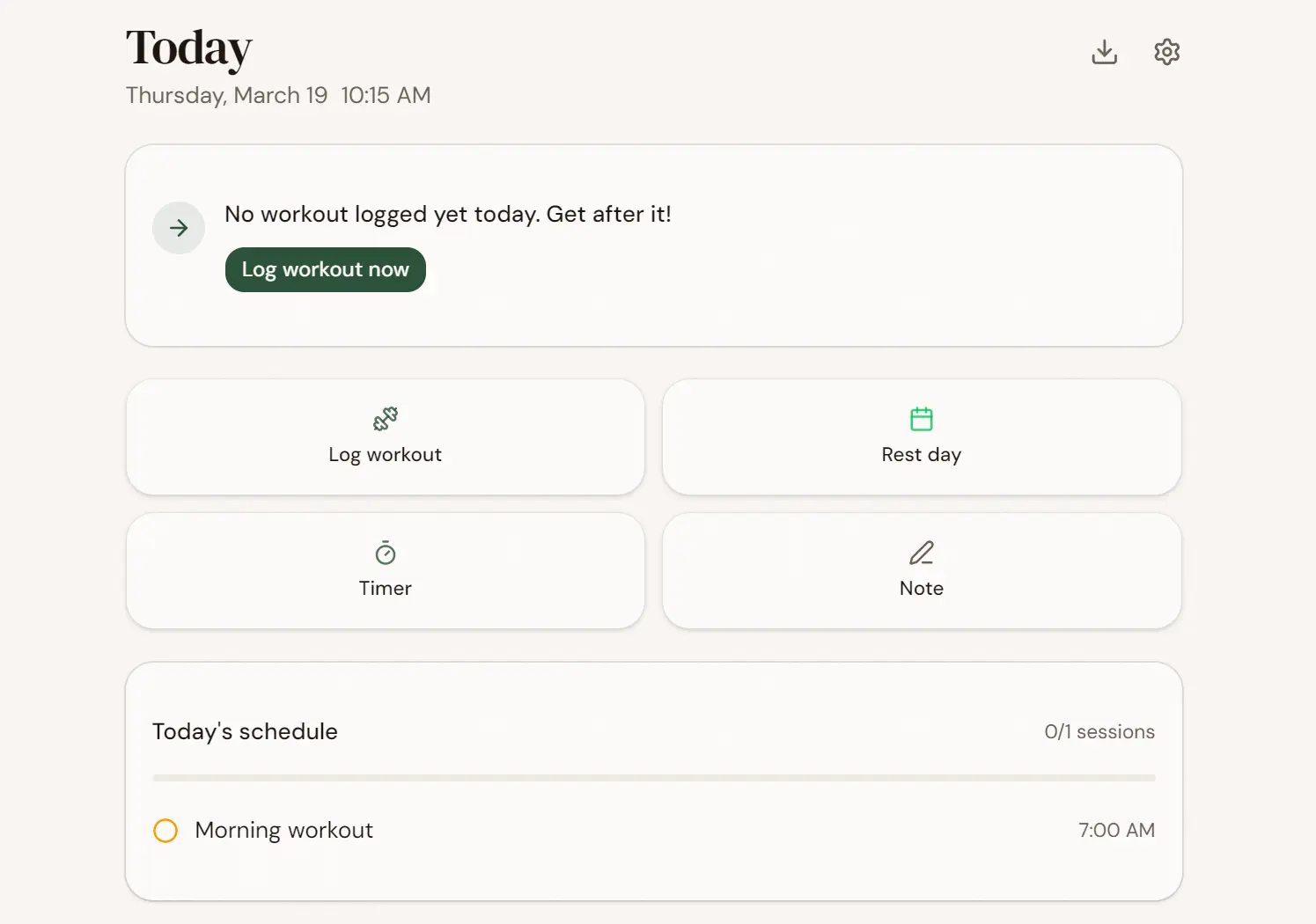
Next.js Native App Template is a PWA boilerplate that replicates the layout and navigation behavior of native iOS and Android apps inside your Next.js project.
The stack runs on React, TypeScript, Tailwind CSS, shadcn/ui, oRPC, TanStack Query, and SQLite via better-sqlite3.
Features
🗂️ Horizontal Scroll-Snap Shell: A single page.tsx acts as the entire app shell. Tab navigation runs through CSS scroll-snap on a horizontal flex container, with no client-side routing involved for tab changes.
📐 iOS-Safe Bottom Nav: The bottom navigation bar sits as a flex child (shrink-0) inside an h-dvh flex-col container. This layout avoids the position: fixed; bottom: 0 trap that places elements above the iOS home indicator in standalone PWA mode.
📏 JS-Measured Pane Heights: A ResizeObserver in TabContext measures the scroll container’s clientHeight and applies it as an inline pixel value to each TabPane.
🎨 iOS Strip Fix via Hex Fallbacks: globals.css sets hex background-color values alongside the oklch theme tokens on html and body. iOS cannot parse oklch, so hex fallbacks prevent the system-drawn black strip below the app viewport.
⚡ No-Flash Dark Mode: An inline script in <head> reads localStorage.theme synchronously before React hydrates. The dark class applies before the browser paints, eliminating the white-flash problem on page load.
🔌 Offline Service Worker: public/sw.js runs network-first for navigation requests, stale-while-revalidate for static assets, and network-only for /rpc/ API calls.
🔗 oRPC + Zod API Layer: All API procedures run through a single Next.js catch-all route at /rpc/. Each procedure validates inputs with Zod on the server before hitting the SQLite data access layer.
📦 TanStack Query Client State: Hooks in src/hooks/ wrap oRPC calls with optimistic updates and cache invalidation.
🗄️ SQLite with Auto-Migration: better-sqlite3 stores data at data/app.db in WAL mode. The migrate() function in db.ts runs automatically on first access and applies schema updates incrementally.
📱 Drag-to-Navigate Tab Bar: The bottom nav captures pointer events so users can slide a finger across the nav bar to switch tabs, matching standard native gesture behavior.
🔀 View Transitions API for Standalone Pages: Settings and Export routes (/settings, /export) animate in and out using a View Transitions API wrapper that mimics iOS push/pop transitions.
Use Cases
Cross-Platform PWA Apps: Build a PWA that behaves like a native tab-bar app on iPhone and Android without publishing to an app store. The scroll-snap shell and iOS layout fixes are already in place.
Personal Productivity Tools: Deploy a single-user, device-local app backed by SQLite. The no-auth architecture suits habit trackers, workout logs, journals, or personal dashboards where data stays on the device.
Rapid Domain Prototyping: Replace the workout-specific types, schema, DAO, and screen components to prototype a new product vertical quickly. The data layer, API routing, and PWA config need no structural changes.
Offline-First Web Apps: The service worker caches navigation and static assets when the network drops, and always fetches /rpc/ calls live. This pattern fits apps where users need access to data in low-connectivity environments.
How to Use It
Table Of Contents
Installation and First Run
Clone the repository and install dependencies.
git clone https://github.com/your-username/nextjs-native-app-template.git
cd nextjs-native-app-template
npm install
npm run dev
The dev server starts at http://localhost:3000. To test the PWA on iPhone, open the URL in Safari, tap the Share icon, and select “Add to Home Screen.” The app launches fullscreen with a native bottom tab bar.
Project Structure
The source tree separates shared infrastructure from domain-specific screens.
src/
├── app/
│   ├── layout.tsx          # fonts, metadata, viewport, theme sync script
│   ├── page.tsx            # single-page app shell (all tabs)
│   ├── providers.tsx       # QueryClientProvider
│   ├── globals.css         # Tailwind, oklch theme, animations, iOS fixes
│   ├── rpc/[[...rest]]/    # oRPC catch-all API route
│   ├── settings/           # standalone settings page
│   └── export/             # standalone export page
├── components/
│   ├── shared/             # AppShell, TabContext, TabPane, HapticsProvider
│   ├── ui/                 # shadcn/ui primitives
│   └── [domain screens]/   # today, log, timer, history, templates, goals
├── hooks/                  # useProfile, useEvents, useSchedule, useTemplates
└── lib/
    ├── orpc.ts             # oRPC browser client
    ├── types.ts            # TypeScript types
    ├── defaults.ts         # default profile, schedule, templates
    ├── analytics.ts        # streak calc, weekly review
    ├── view-transition.ts  # View Transitions API wrapper
    ├── sw-register.ts      # service worker registration
    └── server/
        ├── db.ts           # SQLite setup and migrations
        ├── dao.ts          # CRUD for all tables
        └── router.ts       # oRPC router procedures
Understanding the Shell Layout
The entire app lives in src/app/page.tsx. The outer container uses h-dvh flex-col overflow-hidden. Inside it, a horizontal scroll container holds each TabPane side by side. The bottom nav sits as a normal flex child — not a fixed-position element — so iOS resolves its position relative to the true screen bottom.
// src/components/shared/AppShell.tsx
<div className="h-dvh flex flex-col overflow-hidden">
  <div
    className="flex-1 min-h-0 flex snap-x snap-mandatory overflow-x-auto"
    style={{ alignItems: 'flex-start' }}
  >
    <TabPane />
    <TabPane />
    <TabPane />
  </div>
  <BottomNav className="shrink-0" />
</div>
align-items: flex-start on the scroll container prevents cross-axis stretching. Each TabPane receives an explicit pixel height from the ResizeObserver in TabContext.
Why not position: fixed; bottom: 0?
On iOS standalone PWAs, fixed bottom-0 places the element at the viewport bottom coordinate (for example, 793px on an iPhone 15), which is visually above the home indicator. A system-drawn gap always appears below it. The flex layout approach places the nav at the true screen bottom because iOS resolves h-dvh in a flex column to include the home indicator region.
Pane Height Measurement
TabContext.tsx watches the scroll container with a ResizeObserver and exposes paneHeight to all child panes.
// src/components/shared/TabContext.tsx
useEffect(() => {
  const ro = new ResizeObserver(([entry]) => {
    setPaneHeight(entry.contentRect.height);
  });
  ro.observe(containerRef.current);
  return () => ro.disconnect();
}, []);
Each TabPane applies the measured value as an inline style.
// src/components/shared/TabPane.tsx
<div style={{ height: paneHeight ? `${paneHeight}px` : '100%' }}>
  {children}
</div>
CSS viewport units (100dvh, h-full, -webkit-fill-available) do not work reliably for flex children in iOS Safari. The ResizeObserver approach resolves this. The default align-items: stretch behavior also causes a separate problem: a tab with 200px of content would inherit the height of the tallest tab in the snap container, producing thousands of pixels of dead scroll space. align-items: flex-start on the scroll container stops this cross-axis expansion.
iOS Bottom Strip Fix
Add hex background-color fallbacks alongside oklch tokens in globals.css. iOS cannot parse oklch values, so the system-drawn strip below the app uses the body hex color rather than rendering black.
/* src/app/globals.css */
html {
  background-color: #f5f0e8; /* hex fallback for iOS */
}
body {
  background-color: #f5f0e8;
  min-height: 100dvh;
  padding-bottom: env(safe-area-inset-bottom);
}
min-height: 100dvh stretches the body to fill the full viewport. padding-bottom: env(safe-area-inset-bottom) paints the background color into the home indicator region. Note that in iOS standalone mode, env(safe-area-inset-bottom) returns 0 because the standalone viewport already excludes the safe area. The declaration still covers devices and modes where it is nonzero.
No-Flash Dark Mode Script
layout.tsx injects an inline script into <head> that runs before React hydrates. It reads localStorage.theme, checks prefers-color-scheme, and applies the dark class synchronously.
// src/app/layout.tsx
<script
  dangerouslySetInnerHTML={{
    __html: `(function(){
      try {
        var t = localStorage.getItem('theme');
        var d = t === 'dark' || (t !== 'light' && matchMedia('(prefers-color-scheme:dark)').matches);
        var h = document.documentElement;
        h.classList.toggle('dark', d);
        h.style.colorScheme = d ? 'dark' : 'light';
        h.style.backgroundColor = d ? '#1a1714' : '#f5f0e8';
      } catch(e) {}
    })()`,
  }}
/>
The try/catch block prevents storage access errors in restricted browser contexts from breaking the page.
Tab switching calls container.scrollTo({ behavior: 'smooth' }). TabContext tracks scroll position with requestAnimationFrame and derives the active tab index from Math.round(scrollLeft / clientWidth).
URL updates use history.replaceState after the scroll animation settles. No full page navigation occurs. Deep links use URL hashes (/#log, /#timer) that map to tab indexes on mount.
The bottom nav supports drag-to-navigate: pointer capture on the nav bar lets you slide a finger across tabs to switch between them, which matches the gesture behavior of native tab bars.
Service Worker Caching
public/sw.js runs three strategies depending on request type.
// public/sw.js (simplified illustration)
self.addEventListener('fetch', (event) => {
  const url = new URL(event.request.url);
  if (event.request.mode === 'navigate') {
    // Network-first, fall back to cache
    event.respondWith(networkFirst(event.request));
  } else if (url.pathname.startsWith('/rpc/')) {
    // Always network, never cached
    event.respondWith(fetch(event.request));
  } else {
    // Stale-while-revalidate for static assets
    event.respondWith(staleWhileRevalidate(event.request));
  }
});
After any layout change, bump CACHE_NAME in sw.js (for example, app-v2 to app-v3). iOS can hold an active service worker in memory even after the app closes, so a version bump forces the cache to refresh.
Adapting to Your Own Domain
The template separates shared infrastructure from domain-specific code. Replace these files in order when adapting to a new app.
src/lib/types.ts— Define your domain types.src/lib/server/db.ts— Update themigrate()function with your schema.src/lib/server/dao.ts— Rewrite the CRUD functions for your tables.src/lib/server/router.ts— Add oRPC procedures for your API endpoints.src/hooks/— Rewrite the TanStack Query hooks to call your new procedures.src/components/— Replace the workout screen components with your own.TabContext.tsx— UpdateTAB_ROUTESwith your tab paths.AppShell.tsx— UpdateNAV_ITEMSwith your tab labels and icons.src/lib/defaults.ts— Set your initial seed data.public/manifest.json— Update the app name, short name, and icons.globals.css— Edit the oklch color values and keep the hex fallbacks in sync.
The shared components (AppShell, TabContext, TabPane, HapticsProvider, all ui/ primitives) need no changes.
Standalone Pages
Settings and Export are separate Next.js routes that render inside AppShell without a TabProvider. These pages use min-h-dvh on the outer container so long content can scroll naturally. The back button fires a View Transitions API animation that mirrors an iOS push/pop transition.
Related Resources
- Next.js App Router: Official documentation for layouts, routing, and server components in the Next.js App Router.
- oRPC: Type-safe RPC library for TypeScript with Zod validation and Next.js catch-all route support.
- TanStack Query: Async state management for React with caching, optimistic updates, and background refetching.
- shadcn/ui: Component collection built on Radix UI and Tailwind CSS, installed as editable source files.
FAQs
Q: Can this template run as a standard web app without installing it as a PWA?
A: Yes. All iOS-specific layout fixes are either invisible in a browser tab or fall back gracefully.
Q: Why does the template use SQLite rather than a hosted database?
A: The architecture targets single-user, device-local apps where data stays on the machine running the server. SQLite via better-sqlite3 is synchronous, zero-configuration, and fast for this pattern.
Q: How do I add a new tab?
A: Add the new tab’s hash path to TAB_ROUTES in TabContext.tsx, add the icon and label to NAV_ITEMS in AppShell.tsx, add a new <TabPane> to page.tsx, and create the screen component inside src/components/.
Q: What happens if I need a tab with content taller than the screen?
A: Each TabPane fills the exact container height. Scrollable content inside a pane works normally. Add overflow-y-auto to the pane’s inner wrapper. The pane itself stays fixed-height while its content scrolls independently.