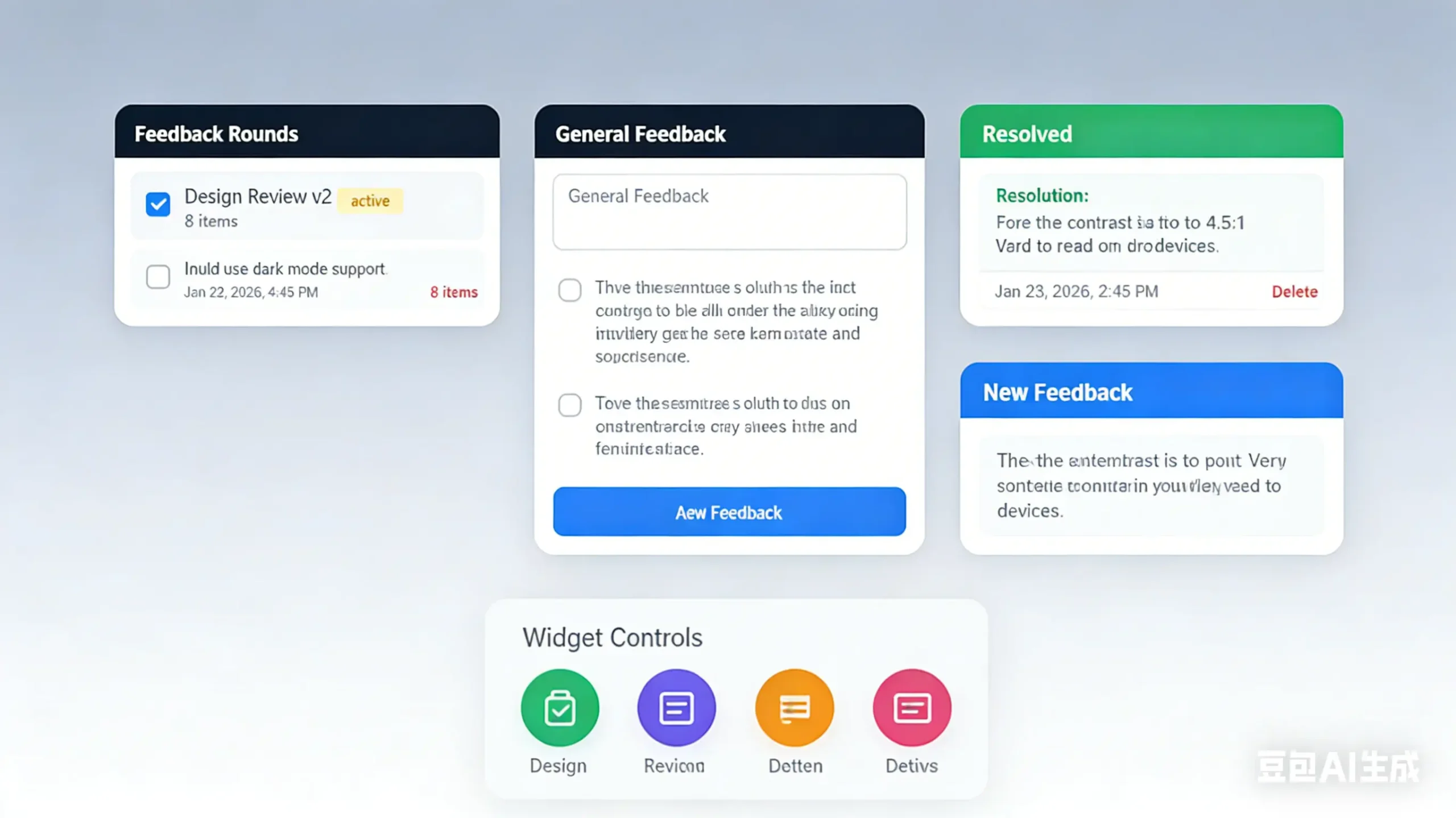
Point Feedback is a visual feedback component for Next.js applications that lets your users click anywhere on a page to drop feedback pins with comments.
It generates four floating buttons that give quick access to all feedback features. You can pin feedback to specific locations on the page or add general feedback through a simple list interface.
The library automatically filters feedback by the current page and tracks resolutions with color-coded markers.
Features
🔄 Feedback Rounds: Organize feedback into rounds for design reviews, QA cycles, and structured review processes.
📄 Page-Aware Filtering: Feedback automatically filters by the current page URL.
🎛️ Full Customizable: Themes, labels, button positions, and behavior are all configurable through props.
💾 Storage Adapters: Built-in support for memory storage, file system storage, Vercel Blob, and custom storage solutions.
🎯 Click-to-Pin Feedback: Click anywhere on the page to place a marker at that exact position.
💬 Feedback List: Collect thoughts and suggestions through a simple list interface.
🎨 Color-Coded Markers: Visual pins show feedback status with different colors for new, resolved, and in-progress items.
📍 Hover Tooltips: See feedback details by hovering over any marker on the page.
Use Cases
- Design QA Reviews: Teams pin specific visual bugs or layout issues directly on the staging environment during quality assurance.
- Client Acceptance Testing: Clients leave comments on specific page elements to request changes before final approval.
- Internal Dogfooding: Developers report edge cases or functional errors found while using their own production builds.
- User Beta Testing: Beta users submit general thoughts or specific problem reports without leaving the application context.
How to Use It
1. Install the package through npm, yarn, or pnpm.
npm install pointfeedbackyarn add pointfeedbackpnpm add pointfeedback2. Add the widget to your Next.js layout file. Import the FeedbackWidget component and place it inside your layout body.
// app/layout.tsx
import { FeedbackWidget } from "pointfeedback";
export default function RootLayout({ children }) {
  return (
    <html>
      <body>
        {children}
        <FeedbackWidget />
      </body>
    </html>
  );
}
3. Create the API route handlers for feedback management. The package exports pre-built handlers for all HTTP methods.
// app/api/feedback/route.ts
import { feedbackHandler } from "pointfeedback/api";
export const GET = feedbackHandler.GET;
export const POST = feedbackHandler.POST;
export const PUT = feedbackHandler.PUT;
export const DELETE = feedbackHandler.DELETE;
4. Add the optional general feedback route if you want to enable the general feedback list feature.
// app/api/feedback/general/route.ts
import { generalFeedbackHandler } from "pointfeedback/api";
export const GET = generalFeedbackHandler.GET;
export const POST = generalFeedbackHandler.POST;
export const DELETE = generalFeedbackHandler.DELETE;
You now have a working feedback system with both pinned and general feedback capabilities.
5. Configure the widget appearance and behavior through props. You can customize API endpoints, button position, theme colors, and labels for internationalization.
<FeedbackWidget
  apiEndpoint="/api/feedback"
  roundsEndpoint="/api/feedback/rounds"
  generalFeedbackEndpoint="/api/feedback/general"
  position="bottom-left"
  theme={{
    primary: "#3b82f6",
    secondary: "#6b7280",
    success: "#22c55e",
    warning: "#f59e0b",
    danger: "#ef4444",
  }}
  labels={{
    addFeedback: "Add Feedback",
    stopFeedback: "Stop",
    placeholder: "Describe your feedback...",
    save: "Save",
    cancel: "Cancel",
    delete: "Delete",
    resolved: "Resolved",
    newFeedback: "New Feedback",
    clickToAdd: "Click anywhere to add feedback",
    feedbackSaved: "Feedback saved!",
    feedbackDeleted: "Feedback deleted!",
    rounds: "Feedback Rounds",
    noRounds: "No rounds found",
    viewAll: "View all feedback",
    generalFeedback: "General Feedback",
    noGeneralFeedback: "No general feedback yet",
    addGeneralFeedback: "Add Feedback",
    generalPlaceholder: "Share your thoughts...",
  }}
  showRoundsButton={true}
  showGeneralFeedback={true}
  feedbackPageUrl="/feedback"
  disabled={false}
  zIndex={99999}
  onFeedbackAdd={(feedback) => console.log("Added:", feedback)}
  onFeedbackDelete={(id) => console.log("Deleted:", id)}
  onGeneralFeedbackAdd={(feedback) => console.log("General:", feedback)}
/>
6. Control widget visibility based on environment variables. Disable the widget in production to restrict it to development environments only.
<FeedbackWidget
  disabled={process.env.NODE_ENV === "production"}
/>
Restrict access to specific users by checking authentication status or user roles.
<FeedbackWidget
  disabled={!user?.isAdmin}
/>
7. Memory storage works by default without any configuration. This adapter stores feedback in memory during the server process lifetime. Data is lost when the server restarts.
import { feedbackHandler } from "pointfeedback/api";
export const GET = feedbackHandler.GET;
export const POST = feedbackHandler.POST;
export const PUT = feedbackHandler.PUT;
export const DELETE = feedbackHandler.DELETE;
Use memory storage for development and testing where persistence is not required.
8. File storage saves feedback to JSON files on the local filesystem. Create directories for feedback and rounds data.
import { createFeedbackHandler, createFileStorage } from "pointfeedback/api";
const storage = createFileStorage({
  feedbackDir: "./data/feedback",
  roundsDir: "./data/rounds",
});
const handler = createFeedbackHandler(storage);
export const GET = handler.GET;
export const POST = handler.POST;
export const PUT = handler.PUT;
export const DELETE = handler.DELETE;
File storage does not work on serverless platforms like Vercel, Netlify, or AWS Lambda. These platforms have read-only and ephemeral filesystems. Use Vercel Blob or a database adapter for production deployments on serverless platforms.
9. Vercel Blob storage persists feedback data for production deployments on Vercel. Install the Vercel Blob package as a peer dependency.
npm install @vercel/blobConfigure the storage adapter with custom prefixes for organizing blob storage keys.
import { createFeedbackHandler, createVercelBlobStorage } from "pointfeedback/api";
const storage = createVercelBlobStorage({
  feedbackPrefix: "feedback",
  roundsPrefix: "rounds",
});
const handler = createFeedbackHandler(storage);
export const GET = handler.GET;
export const POST = handler.POST;
export const PUT = handler.PUT;
export const DELETE = handler.DELETE;
10. Implement the StorageAdapter interface to connect your own database or storage solution. The interface defines methods for getting, saving, updating, and deleting feedback and rounds.
import { createFeedbackHandler, type StorageAdapter } from "pointfeedback/api";
const myStorage: StorageAdapter = {
  async getFeedback(page?: string) {
    // Fetch from your database
    return [];
  },
  async saveFeedback(feedback) {
    // Save to your database
    return feedback;
  },
  async deleteFeedback(id) {
    // Delete from your database
    return true;
  },
  async updateFeedback(id, updates) {
    // Update in your database
    return null;
  },
  async getRounds(page?: string) {
    // Fetch rounds from your database
    return [];
  },
};
const handler = createFeedbackHandler(myStorage);
export const GET = handler.GET;
export const POST = handler.POST;
export const PUT = handler.PUT;
export const DELETE = handler.DELETE;
11. Create feedback rounds by adding JSON files to your rounds directory. Each round organizes feedback items for structured review cycles.
{
  "id": "design-review-v1",
  "name": "Design Review v1",
  "date": "2024-01-15",
  "status": "completed",
  "items": [
    {
      "id": "item-1",
      "x": 45.5,
      "y": 320,
      "comment": "Button needs more contrast",
      "page": "/home",
      "timestamp": "2024-01-15T10:00:00Z",
      "resolved": true,
      "resolution": "Increased contrast ratio to 4.5:1"
    }
  ]
}
Create the rounds API route to fetch available rounds.
// app/api/feedback/rounds/route.ts
import { roundsHandler } from "pointfeedback/api";
export const GET = roundsHandler.GET;
12. Configure Point Feedback for production with authentication and custom styling. Import your authentication handler and check user permissions before rendering the widget.
// app/layout.tsx
import { FeedbackWidget } from "pointfeedback";
import { auth } from "@/lib/auth";
export default async function Layout({ children }) {
  const session = await auth();
  return (
    <html>
      <body>
        {children}
        <FeedbackWidget
          disabled={!session?.user?.isReviewer}
          position="bottom-right"
          theme={{
            primary: "#6366f1",
            success: "#10b981",
          }}
          labels={{
            addFeedback: "Review",
            clickToAdd: "Click to add review note",
          }}
        />
      </body>
    </html>
  );
}
Create the API route with Vercel Blob storage for persistent data.
// app/api/feedback/route.ts
import { createFeedbackHandler, createVercelBlobStorage } from "pointfeedback/api";
const storage = createVercelBlobStorage();
const handler = createFeedbackHandler(storage);
export const GET = handler.GET;
export const POST = handler.POST;
export const PUT = handler.PUT;
export const DELETE = handler.DELETE;
API Reference
Widget Props
apiEndpoint (string): API endpoint for feedback operations. Default is “/api/feedback”.
roundsEndpoint (string): API endpoint for feedback rounds. Default is “/api/feedback/rounds”.
generalFeedbackEndpoint (string): API endpoint for general feedback. Default is “/api/feedback/general”.
position (“bottom-left” | “bottom-right” | “top-left” | “top-right”): Widget button position on the screen. Default is “bottom-left”.
theme (object): Custom color scheme for the widget buttons and markers.
- primary (string): Main button color and new feedback markers. Default is “#3b82f6”.
- secondary (string): View all button color. Default is “#6b7280”.
- success (string): Resolved feedback color and rounds button. Default is “#22c55e”.
- warning (string): In-progress feedback color. Default is “#f59e0b”.
- danger (string): Stop button and delete action color. Default is “#ef4444”.
labels (object): Custom labels for internationalization.
- addFeedback (string): Add feedback button label. Default is “Add Feedback”.
- stopFeedback (string): Stop feedback mode button label. Default is “Stop”.
- placeholder (string): Feedback comment placeholder text. Default is “Describe your feedback…”.
- save (string): Save button label. Default is “Save”.
- cancel (string): Cancel button label. Default is “Cancel”.
- delete (string): Delete button label. Default is “Delete”.
- resolved (string): Resolved status label. Default is “Resolved”.
- newFeedback (string): New feedback status label. Default is “New Feedback”.
- clickToAdd (string): Instruction text when in feedback mode. Default is “Click anywhere to add feedback”.
- feedbackSaved (string): Success message after saving. Default is “Feedback saved!”.
- feedbackDeleted (string): Success message after deleting. Default is “Feedback deleted!”.
- rounds (string): Rounds button label. Default is “Feedback Rounds”.
- noRounds (string): Empty state message for rounds. Default is “No rounds found”.
- viewAll (string): View all feedback button label. Default is “View all feedback”.
- generalFeedback (string): General feedback section title. Default is “General Feedback”.
- noGeneralFeedback (string): Empty state message. Default is “No general feedback yet”.
- addGeneralFeedback (string): Add general feedback button. Default is “Add Feedback”.
- generalPlaceholder (string): General feedback placeholder. Default is “Share your thoughts…”.
showRoundsButton (boolean): Show or hide the rounds button. Default is true.
showGeneralFeedback (boolean): Show or hide the general feedback button. Default is true.
feedbackPageUrl (string | null): URL to feedback overview page. Set to null to hide the button. Default is “/feedback”.
disabled (boolean): Disable the entire widget. Default is false.
zIndex (number): Z-index value for widget layering. Default is 99999.
onFeedbackAdd (function): Callback function when feedback is added. Receives the feedback object.
onFeedbackDelete (function): Callback function when feedback is deleted. Receives the feedback ID.
onGeneralFeedbackAdd (function): Callback function when general feedback is added. Receives the feedback object.
Storage Adapter Interface
getFeedback(page?: string): Fetch all feedback items. Optionally filter by page URL. Returns an array of feedback objects.
saveFeedback(feedback): Save a new feedback item. Returns the saved feedback object with generated ID.
deleteFeedback(id): Delete a feedback item by ID. Returns true if successful.
updateFeedback(id, updates): Update an existing feedback item. Returns the updated feedback object or null.
getRounds(page?: string): Fetch all feedback rounds. Optionally filter by page URL. Returns an array of round objects.
Storage Comparison
| Storage Type | Persistence | Serverless Compatible | Best For |
|---|---|---|---|
| Memory | None (lost on restart) | Yes | Development and testing |
| File | Persistent | No | Self-hosted deployments and Docker |
| Vercel Blob | Persistent | Yes | Vercel production deployments |
| Custom | Depends on implementation | Yes | Any database solution |
API Endpoints
GET /api/feedback
Fetch all feedback items. Add a page query parameter to filter by page URL.
GET /api/feedback?page=/homeResponse structure:
{
  "feedback": [
    {
      "id": "fb_123",
      "x": 45.5,
      "y": 320,
      "comment": "This button is hard to see",
      "page": "/home",
      "timestamp": "2024-01-15T10:00:00Z",
      "resolved": false
    }
  ],
  "count": 1
}
POST /api/feedback
Create a new feedback item. Send the x and y coordinates, comment text, and page URL in the request body.
{
  "x": 45.5,
  "y": 320,
  "comment": "This button is hard to see",
  "page": "/home"
}
PUT /api/feedback
Update an existing feedback item. Include the feedback ID as a query parameter and the updates in the request body.
PUT /api/feedback?id=fb_123{
"resolved": true,
"resolution": "Fixed contrast ratio"
}DELETE /api/feedback
Delete a feedback item. Include the feedback ID as a query parameter.
DELETE /api/feedback?id=fb_123GET /api/feedback/rounds
Fetch all feedback rounds. Add a page query parameter to filter by page URL.
GET /api/feedback/rounds?page=/homeRelated Resources
- Vercel Blob: Vercel Blob is a serverless object storage solution for production deployments on Vercel.
- React Hook Form: React Hook Form is a form validation library that works well for collecting structured feedback data.
- Zustand: Zustand is a state management library that can handle feedback state in complex applications.
FAQs
Q: Does Point Feedback work on serverless platforms?
A: Yes. Point Feedback works on serverless platforms when you use memory storage, Vercel Blob storage, or a custom database adapter. File storage does not work on serverless platforms because the filesystem is read-only and ephemeral.
Q: Can I customize the feedback marker appearance?
A: You can customize marker colors through the theme prop. The widget uses inline styles and does not expose CSS classes. All visual styling happens through the theme configuration object.
Q: How do I restrict feedback to authenticated users?
A: Use the disabled prop with your authentication state. Check if the user is authenticated or has the required role before enabling the widget. The widget respects the disabled prop and will not render any UI when set to true.
Q: Can I use Point Feedback with other frameworks besides Next.js?
A: Point Feedback is built specifically for Next.js App Router. The package depends on Next.js API route handlers and server components. It does not currently support other React frameworks.
Q: How do I migrate from memory storage to persistent storage?
A: Export your feedback data from memory storage through the GET endpoint. Then configure Vercel Blob or file storage and import the data through the POST endpoint. Memory storage does not persist between server restarts so plan the migration before restarting the server.
