The Future of Web Dev
The Future of Web Dev
Chat UI Components for React and shadcn/ui – chatcn
A React chat UI component library built on shadcn/ui with message bubbles, threads, reactions, and 5 layout presets.
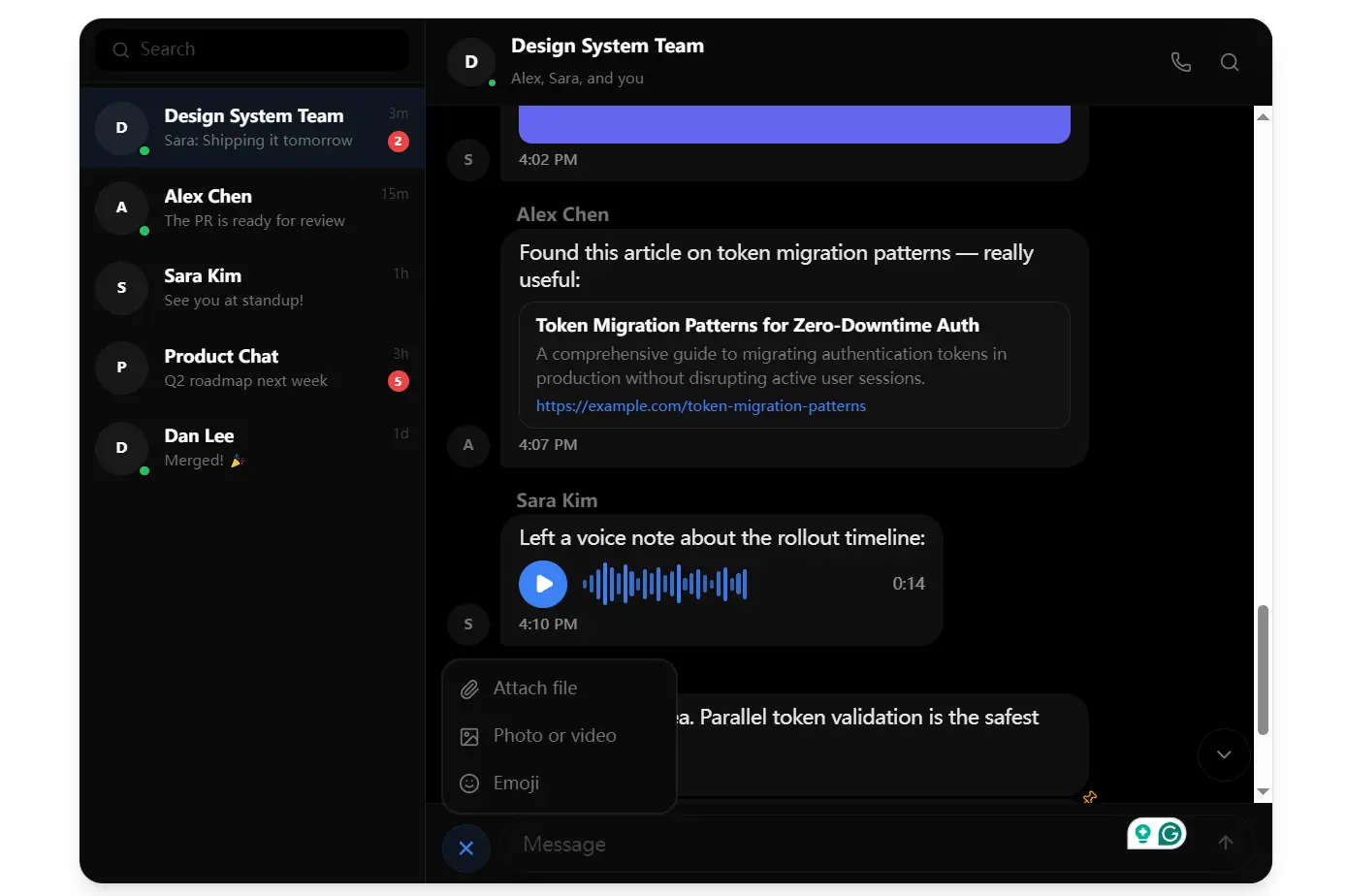
chatcn is a chat component library that provides production-ready messaging UI components for React.
It builds on shadcn/ui and styles all components with Tailwind CSS. Great for AI chatboxes.
Features
💬 Message Display: Bubbles with avatar grouping, reply threading, reaction counts, read receipts, and pinned message support.
✍️ Composer Input: Rich text entry with drag-and-drop file uploads and voice recording controls.
🖼️ Media Rendering: Image previews, file attachments, voice messages, code blocks, and link previews inside message bubbles.
🧵 Threading: Supports both flat and nested thread structures within a conversation.
📋 Conversation Sidebar: A sidebar panel with conversation search, unread message counts, and user presence indicators.
🎨 Four Themes: Lunar, Aurora, Ember, and Midnight.
📐 Five Layout Presets: FullMessenger, ChatWidget, InlineChat, ChatBoard, and LiveChat.
♿ Accessibility: Keyboard navigation, screen reader markup, and reduced-motion handling.
Use Cases
- Customer Support Dashboard: Embed the ChatWidget layout in a support panel to handle live customer conversations with file attachments and typing indicators.
- Team Collaboration Tool: Use the FullMessenger layout with threads to build an internal messaging system where users can reply to specific messages and see read receipts.
- Live Streaming Chat: Implement the LiveChat layout for real-time comments during streams, with message grouping and user presence indicators.
- Code Review Discussions: Combine the code block rendering with threads to let teams discuss specific lines of code inside message bubbles.
How to Use It
1. Install chatcn via shadcn CLI
npx shadcn@latest add https://raw.githubusercontent.com/leonickson1/chatcn/main/public/r/chat.json2. After installation, these files appear in your project:
src/
  components/
    ui/
      chat/
        chat.tsx          # Core chat components
        features.tsx      # Extended feature components
        layouts.tsx       # Pre-built layout wrappers
        hooks.ts          # Utility hooks
        types.ts          # TypeScript type definitions
        security.ts       # Input sanitization utilities
        index.ts          # Barrel exports
  app/
    globals.css           # Theme CSS variables injected here
3. Wrap your chat UI in ChatProvider, pass a currentUser object, and set the active theme:
import { ChatProvider, ChatMessages, ChatComposer } from "@/components/ui/chat"
import type { ChatUser, ChatMessage } from "@/components/ui/chat"
const currentUser: ChatUser = {
  id: "user-1",
  name: "You",
  status: "online",
}
const messages: ChatMessage[] = [
  {
    id: "msg-1",
    senderId: "user-2",
    senderName: "Alice",
    content: "Hey, can you review the PR?",
    timestamp: new Date(),
  },
]
export default function ChatPage() {
  return (
    <ChatProvider currentUser={currentUser} theme="lunar">
      <div className="h-screen flex flex-col">
        <ChatMessages messages={messages} />
        <ChatComposer onSend={(text) => console.log("Sent:", text)} />
      </div>
    </ChatProvider>
  )
}
4. Configure Tailwind CSS
/* app/globals.css */
@import "tailwindcss";
/* chatcn theme variables are injected below this line */
5. Swap the inner layout by importing a pre-built layout component from layouts.tsx:
import { ChatProvider, FullMessenger } from "@/components/ui/chat"
export default function MessengerPage() {
  return (
    <ChatProvider currentUser={currentUser} theme="aurora">
      <FullMessenger conversations={conversations} messages={messages} />
    </ChatProvider>
  )
}
Related Resources
- shadcn/ui: The component system chatcn builds on. Installs components as owned source files.
- Tailwind CSS: The utility-first CSS framework that handles all chatcn styling.
FAQs
Q: Does chatcn work with Tailwind CSS v3?
A: chatcn targets Tailwind CSS v4 specifically. v4 uses CSS-based configuration, and the installer writes theme variables directly into globals.css. Projects running Tailwind v3 need to upgrade before installing chatcn, since the theme variable format differs between versions.
Q: Do the components sync with a real-time backend?
A: chatcn handles UI rendering only. Message state, real-time delivery, and backend sync stay your responsibility.
Q: Can you modify the theme colors after installation?
A: Yes. The installer writes CSS variables into globals.css. Edit those variables directly to adjust colors, spacing, or typography.
Q: Does chatcn work with Next.js App Router?
A: Yes. The component files land in src/components/ui/chat/ as standard React components. Add the "use client" directive at the top of any file that uses React context or event handlers.
Q: What if you need only a subset of the components?
A: All components export through index.ts. Import only what your page needs.