The Future of Web Dev
The Future of Web Dev
Dynamic Pagination in Next.js with Shadcn/UI – Link Pagination
Implement dynamic pagination in Next.js with Shadcn/ui. Easily navigate large datasets with automatic link updates and server component support.
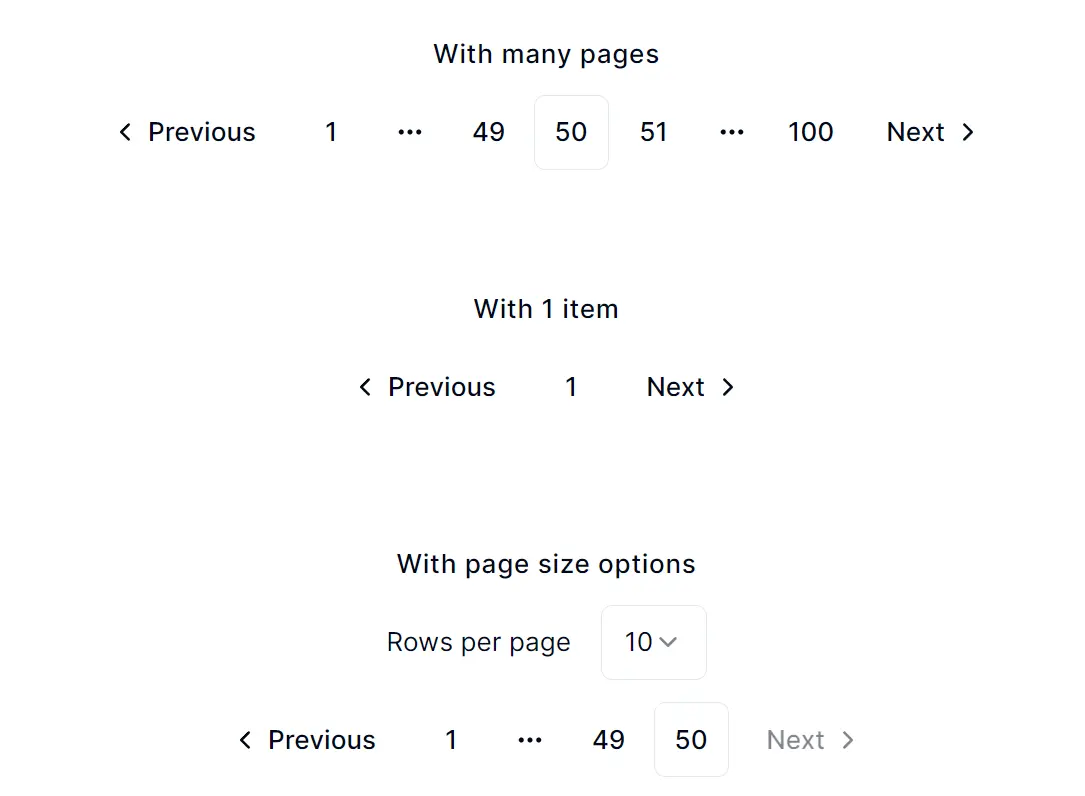
Shadcn/ui Nextjs Link Pagination creates dynamic links for page navigation in Next.js applications. It uses shadcn/ui’s pagination components to update links based on the current page and total pages.
This library generates interactive links that dynamically update as users navigate through large datasets. This proves particularly useful for applications dealing with extensive lists, tables, or content feeds.
By using server-side rendering with Next.js, you can further enhance the user experience. Fetching and rendering pagination data on the server side leads to faster page loads and improved SEO.
Key Features
🔗 Dynamic link generation
🖥️ Next.js server component support
🎨 Customizable styling
📊 Page and pageSize URL parameters
🔢 Automatic page count calculation
How to use it:
1. Copy the code from pagination-with-links.tsx into your project.
"use client";

import { type ReactNode, useCallback } from "react";
import {
  Pagination,
  PaginationContent,
  PaginationEllipsis,
  PaginationItem,
  PaginationLink,
  PaginationNext,
  PaginationPrevious,
} from "./pagination";
import { Select, SelectContent, SelectItem, SelectTrigger, SelectValue } from "./select";
import { usePathname, useRouter, useSearchParams } from "next/navigation";
import { cn } from "@/lib/utils";

export interface PaginationWithLinksProps {
  pageSizeSelectOptions?: {
    pageSizeSearchParam?: string;
    pageSizeOptions: number[];
  };
  totalCount: number;
  pageSize: number;
  page: number;
  pageSearchParam?: string;
}

/**
 * Navigate with Nextjs links (need to update your own `pagination.tsx` to use Nextjs Link)
 *
 * @example
 * ```
 * <PaginationWithLinks
    page={1}
    pageSize={20}
    totalCount={500}
  />
 * ```
 */
export function PaginationWithLinks({
  pageSizeSelectOptions,
  pageSize,
  totalCount,
  page,
  pageSearchParam,
}: PaginationWithLinksProps) {
  const router = useRouter();
  const pathname = usePathname();
  const searchParams = useSearchParams();

  const totalPageCount = Math.ceil(totalCount / pageSize);

  const buildLink = useCallback(
    (newPage: number) => {
      const key = pageSearchParam || "page";
      if (!searchParams) return `${pathname}?${key}=${newPage}`;
      const newSearchParams = new URLSearchParams(searchParams);
      newSearchParams.set(key, String(newPage));
      return `${pathname}?${newSearchParams.toString()}`;
    },
    [searchParams, pathname],
  );

  const navToPageSize = useCallback(
    (newPageSize: number) => {
      const key = pageSizeSelectOptions?.pageSizeSearchParam || "pageSize";
      const newSearchParams = new URLSearchParams(searchParams || undefined);
      newSearchParams.set(key, String(newPageSize));
      router.push(`${pathname}?${newSearchParams.toString()}`);
    },
    [searchParams, pathname],
  );

  const renderPageNumbers = () => {
    const items: ReactNode[] = [];
    const maxVisiblePages = 5;

    if (totalPageCount <= maxVisiblePages) {
      for (let i = 1; i <= totalPageCount; i++) {
        items.push(
          <PaginationItem key={i}>
            <PaginationLink href={buildLink(i)} isActive={page === i}>
              {i}
            </PaginationLink>
          </PaginationItem>,
        );
      }
    } else {
      items.push(
        <PaginationItem key={1}>
          <PaginationLink href={buildLink(1)} isActive={page === 1}>
            1
          </PaginationLink>
        </PaginationItem>,
      );

      if (page > 3) {
        items.push(
          <PaginationItem key="ellipsis-start">
            <PaginationEllipsis />
          </PaginationItem>,
        );
      }

      const start = Math.max(2, page - 1);
      const end = Math.min(totalPageCount - 1, page + 1);

      for (let i = start; i <= end; i++) {
        items.push(
          <PaginationItem key={i}>
            <PaginationLink href={buildLink(i)} isActive={page === i}>
              {i}
            </PaginationLink>
          </PaginationItem>,
        );
      }

      if (page < totalPageCount - 2) {
        items.push(
          <PaginationItem key="ellipsis-end">
            <PaginationEllipsis />
          </PaginationItem>,
        );
      }

      items.push(
        <PaginationItem key={totalPageCount}>
          <PaginationLink href={buildLink(totalPageCount)} isActive={page === totalPageCount}>
            {totalPageCount}
          </PaginationLink>
        </PaginationItem>,
      );
    }

    return items;
  };

  return (
    <div className="flex flex-col md:flex-row items-center gap-3 w-full">
      {pageSizeSelectOptions && (
        <div className="flex flex-col gap-4 flex-1">
          <SelectRowsPerPage
            options={pageSizeSelectOptions.pageSizeOptions}
            setPageSize={navToPageSize}
            pageSize={pageSize}
          />
        </div>
      )}
      <Pagination className={cn({ "md:justify-end": pageSizeSelectOptions })}>
        <PaginationContent className="max-sm:gap-0">
          <PaginationItem>
            <PaginationPrevious
              href={buildLink(Math.max(page - 1, 1))}
              aria-disabled={page === 1}
              tabIndex={page === 1 ? -1 : undefined}
              className={page === 1 ? "pointer-events-none opacity-50" : undefined}
            />
          </PaginationItem>
          {renderPageNumbers()}
          <PaginationItem>
            <PaginationNext
              href={buildLink(Math.min(page + 1, totalPageCount))}
              aria-disabled={page === totalPageCount}
              tabIndex={page === totalPageCount ? -1 : undefined}
              className={page === totalPageCount ? "pointer-events-none opacity-50" : undefined}
            />
          </PaginationItem>
        </PaginationContent>
      </Pagination>
    </div>
  );
}

function SelectRowsPerPage({
  options,
  setPageSize,
  pageSize,
}: {
  options: number[];
  setPageSize: (newSize: number) => void;
  pageSize: number;
}) {
  return (
    <div className="flex items-center gap-4">
      <span className="whitespace-nowrap text-sm">Rows per page</span>

      <Select value={String(pageSize)} onValueChange={(value) => setPageSize(Number(value))}>
        <SelectTrigger>
          <SelectValue placeholder="Select page size">{String(pageSize)}</SelectValue>
        </SelectTrigger>
        <SelectContent>
          {options.map((option) => (
            <SelectItem key={option} value={String(option)}>
              {option}
            </SelectItem>
          ))}
        </SelectContent>
      </Select>
    </div>
  );
}
2. For a basic implementation, use:
<PaginationWithLinks page={1} pageSize={10} totalCount={100} />3. For more complex scenarios, leverage the power of Next.js server components. This approach allows you to manage pagination parameters through URL queries. Here’s an example:
export default async function Example({ searchParams }) {
  const page = parseInt(searchParams.get("page") || "1");
  const pageSize = parseInt(searchParams.get("pageSize") || "20");
  const [data, count] = await getDataWithCount();
  return (
    <div>
      {/* Other code */}
      <PaginationWithLinks page={page} pageSize={pageSize} totalCount={count} />
    </div>
  );
}
4. Customize the component as needed, adjusting styles or adding extra functionality.
Preview: