The Future of Web Dev
The Future of Web Dev
JSON Tree Viewer: Interactive JSON Data Explorer for shadcn/ui

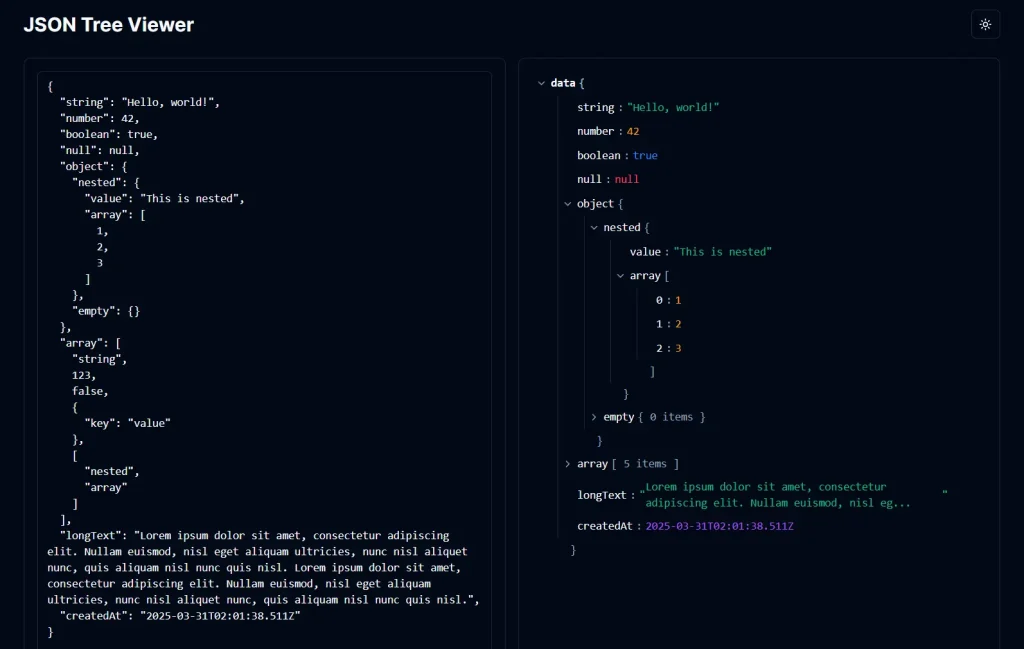
JSON Tree Viewer is a React component designed specifically for applications built with shadcn/ui. It takes your JSON data as input and renders it into an interactive, collapsible tree structure.
The component allows you to expand and collapse different levels of the JSON hierarchy. You can also copy any node (including its children) as formatted JSON directly to your clipboard with a single click.
Features
🌳 Collapsible Tree View: Displays JSON data in an expandable and collapsible tree format.
📋 Node Copying: Allows copying any specific JSON node or subtree to the clipboard.
✂️ Long String Handling: Truncates long strings with an option to expand and view the full content.
🎨 shadcn/ui Integration: Built to fit aesthetically and functionally within shadcn/ui projects.
🚥 Data Type Highlighting: Uses distinct colors for different JSON data types (strings, numbers, booleans, null).
⚙️ Customization: Offers props to set a root name and control the default expansion state.
Use Cases
- Database Record Viewers – Display JSON records from document databases in a more digestible format
- API Response Visualization – Display API responses in a readable format for testing and debugging applications
- Configuration Editors – Create interfaces for users to view and navigate complex configuration files
- Data Inspection Tools – Build developer tools that allow inspection of state or data structures
- Documentation Examples – Show JSON schema or response examples in technical documentation
Related Resources
- shadcn/ui: The UI component library this viewer is designed for. https://ui.shadcn.com/
- Lucide Icons: The icon library used within the component. https://lucide.dev/
- React JSON View: Another popular React component for displaying JSON, offering different features and styling. https://github.com/mac-s-g/react-json-view
- JSON (JavaScript Object Notation): Official documentation explaining the JSON data format. https://www.json.org/
FAQs
Q: Does this component work outside of shadcn/ui projects?
A: While it’s a standard React component, it relies on shadcn/ui components (Tooltip) and utility functions (cn) for styling and functionality. Integrating it outside that ecosystem would require providing alternatives for these dependencies.
Q: How does it handle very large JSON datasets?
A: The component renders the JSON structure directly in the DOM. Very large datasets might impact performance. It virtualizes rendering to some extent by only rendering expanded nodes, but extremely deep or wide structures could still be slow.
Q: Can I customize the appearance (colors, fonts)?
A: Yes, you can customize the appearance using standard Tailwind CSS utility classes by modifying the component’s code or by applying global styles that target the component’s elements. The base styling uses Tailwind classes and CSS variables from shadcn/ui.
Q: How is the ‘Copy’ functionality implemented?
A: It uses the browser’s native navigator.clipboard.writeText API to copy the JSON.stringify output of the selected node data to the clipboard.
Preview