The Future of Web Dev
The Future of Web Dev
JSON Tree Viewer: Interactive JSON Data Explorer for shadcn/ui

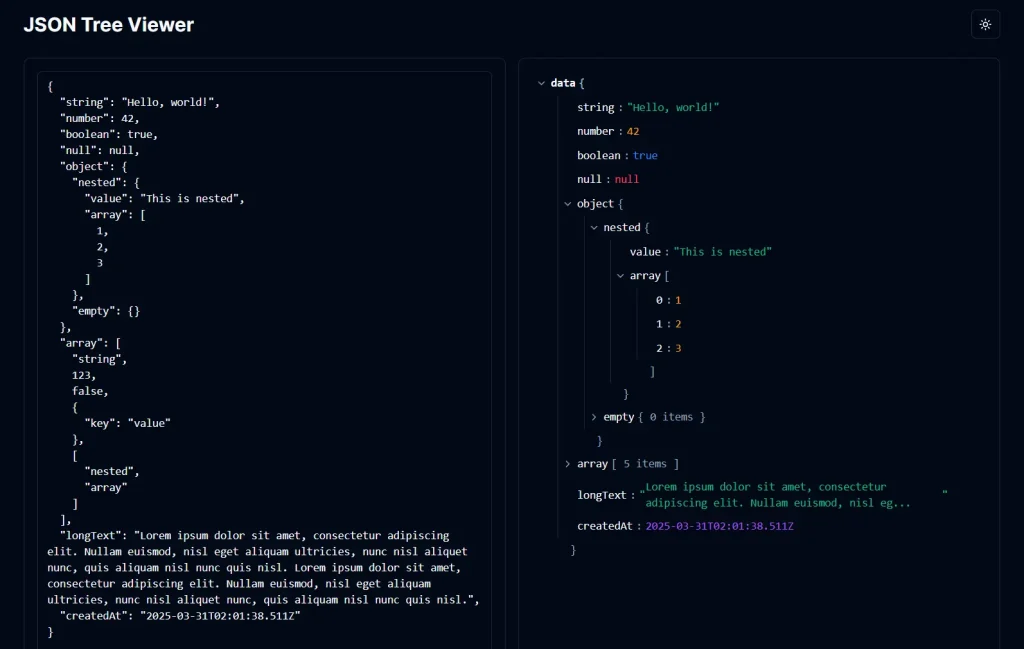
JSON Tree Viewer is a React and shadcn/ui component that renders nested objects and arrays as a collapsible JSON tree.
Each node can be expanded or collapsed, and the copy control writes the selected value or subtree to the clipboard as formatted JSON. The component also shortens long strings, colors primitive values by type, and accepts custom classes for local styling.
The project ships as source code. There is no standalone npm package. Copy the TypeScript component into an existing shadcn/ui project and edit the local file when you need different colors, spacing, or behavior.
Preview
Features
🌳 Expand and collapse nested objects and arrays at each branch.
📋 Copy any value, object, array, or subtree as formatted JSON.
✂️ Shorten strings longer than 80 characters and expand them when you need the full value.
🚥 Distinguish strings, numbers, booleans, null values, and Date objects with type-specific colors.
🎨 Edit the local Tailwind CSS classes to match the surrounding shadcn/ui theme.
⚙️ Set the root label, initial root state, and wrapper classes through four public props.
Use Cases
- Database Record Viewers – Inspect nested JSON records from document databases and backend services.
- API Response Panels – Display API payloads in internal dashboards, test pages, and debugging screens.
- Configuration Inspectors – Present nested application settings or configuration data in a readable tree.
- Developer Panels – Inspect application state, generated data, and structured diagnostic output.
- Documentation Examples – Present JSON request and response examples with expandable nested values.
How To Use the React JSON Tree Viewer
The component imports React, lucide-react, the shadcn/ui Tooltip component, and the standard cn() utility. Add Tooltip to your shadcn/ui project, confirm Lucide is installed, and copy components/json-tree-viewer.tsx from the repository into your local components directory.
The source expects the usual @/components and @/lib aliases from shadcn/ui projects. The original repository uses the Radix UI Tooltip package. Confirm that your local Tooltip file exports TooltipProvider, Tooltip, TooltipTrigger, and TooltipContent. Run these commands if your project does not already have the required dependencies.
pnpm dlx shadcn@latest add tooltip
pnpm add lucide-react
Basic Usage
Import JsonViewer and pass a JavaScript object or array through the required data prop. This example labels the root node as response and adds a border around the viewer.
import { JsonViewer } from "@/components/json-tree-viewer"
const apiResponse = {
  status: "ok",
  user: {
    id: 42,
    roles: ["admin", "editor"],
  },
}
export function ApiResponseViewer() {
  return (
    <JsonViewer
      data={apiResponse}
      rootName="response"
      defaultExpanded={true}
      className="rounded-lg border p-4"
    />
  )
}
JSON Tree Viewer Props
The public JsonViewer component exposes four props. defaultExpanded controls the initial state of the root node. Descendant nodes use the component’s internal depth rules.
| Prop | Type | Default | Description |
|---|---|---|---|
data | any | Required | The object, array, primitive value, or other JavaScript data passed to the tree. |
rootName | string | "root" | The label displayed for the root node. |
defaultExpanded | boolean | true | Sets the initial expanded state of the root node. |
className | string | None | Appends custom classes to the viewer wrapper. |
Component Behavior
- Objects and arrays render recursively with a clickable expand or collapse control.
- The root node follows
defaultExpanded. Expandable nodes close to the root open by default according to their nesting level. - Strings longer than 80 characters show a shortened value, a tooltip, and a control for viewing the complete string.
- The copy button writes
JSON.stringify(data, null, 2)for the selected node tonavigator.clipboard. - Collapsed branches do not mount their descendants. The component does not use list virtualization, and a fully expanded large structure can create many DOM nodes.
- The source file starts with
"use client"because expansion state, copy state, click handlers, and the Clipboard API run in the browser.
Related Resources
- Hierarchical Data Display with Shadcn/ui Tree View
- Interactive Tree View Component with Drag Support for Shadcn/ui
- 10 Best JSON Viewer Tools To Format JSON Strings
FAQs
Q: Does this component work outside of shadcn/ui projects?
A: Yes. The source imports the shadcn/ui Tooltip component and the cn() helper. A React project outside shadcn/ui needs equivalent local components or adjusted imports.
Q: Does JSON Tree Viewer require Next.js?
A: No. The demo repository uses Next.js. The viewer itself is a React client component. Its direct dependencies are React, lucide-react, the Tooltip component, and cn().
Q: Can I edit JSON values inside the tree?
A: No. The viewer displays, expands, collapses, and copies data. The editable textarea in the live demo belongs to the demo page and is not part of the JsonViewer component.
Q: How does it handle very large JSON datasets?
A: Collapsed branches do not render their descendants. The component does not use virtualization. A very deep or wide structure can create a large DOM tree when many branches are open.
Q: Can I customize the colors and typography?
A: Yes. The component uses Tailwind CSS classes and shadcn/ui CSS variables directly in the source file. Edit those local classes to change spacing, typography, borders, and data type colors.
Q: How does the copy control work?
A: The component calls navigator.clipboard.writeText with JSON.stringify(data, null, 2) for the selected node. The copy action includes all nested children of an object or array.
Lastest Update: Sep 14, 2026