The Future of Web Dev
The Future of Web Dev
Block-Based Rich Text Editor with TailwindCSS and shadcn/ui – Mina Rich Editor
Block-based rich text editor built with React, Tailwind CSS, and shadcn/ui. Features tables, images, custom styling, and HTML export.
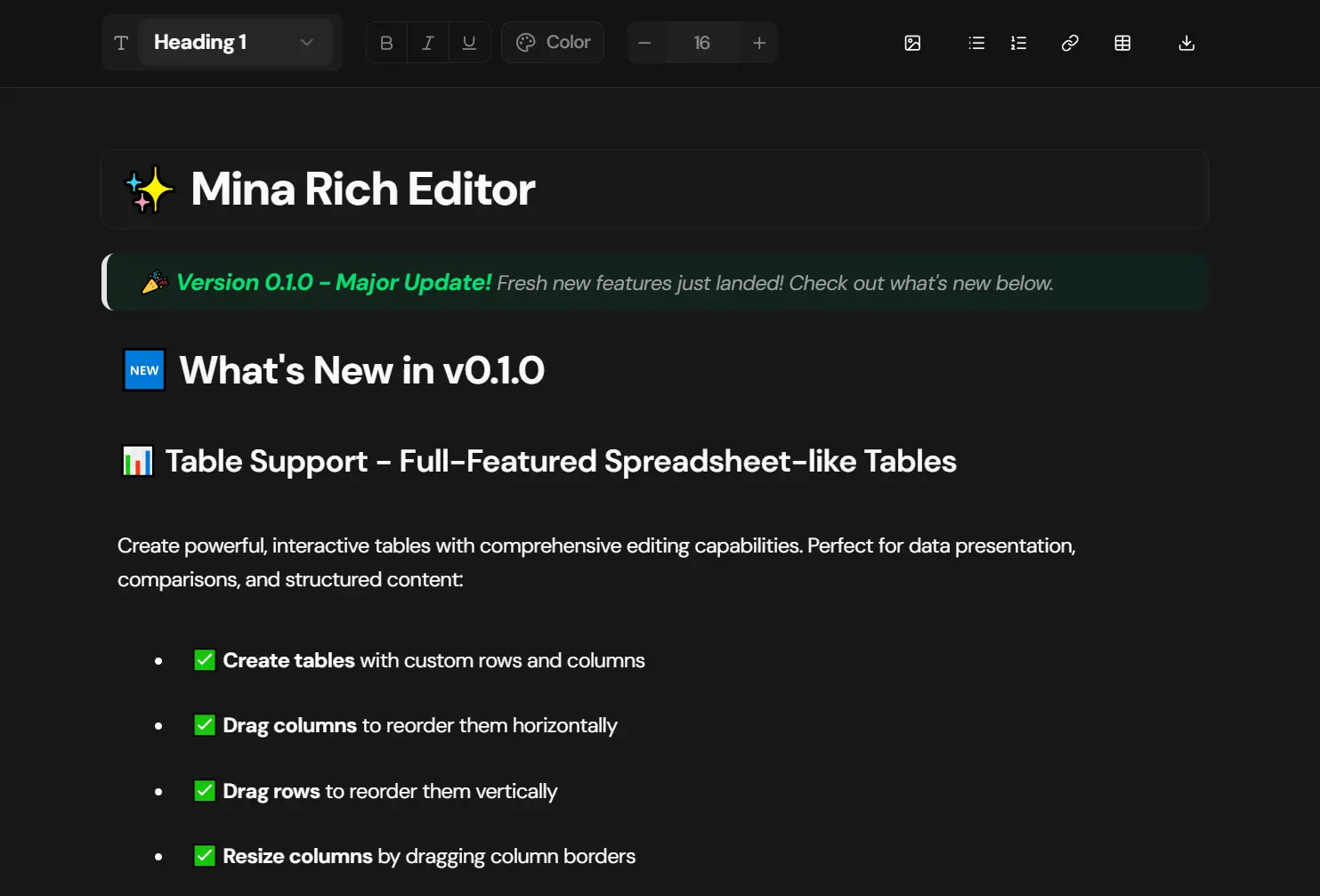
Mina Rich Editor is a block-based rich text editor built with React, TypeScript, Tailwind CSS, and shadcn/ui components.
The editor supports full text formatting alongside multiple block types, including headings, paragraphs, code blocks, blockquotes, ordered and unordered lists, and tables.
You can apply rich formatting like bold, italic, and underline to text, adjust font sizes, apply colors both to text and backgrounds, add links, and upload images in various layouts.
Features
🎨 Block-based architecture with independent, draggable elements.
📝 Rich text formatting including bold, italic, underline, and combined styles.
🏗️ Multiple block types, including h1 through h6 headings, paragraphs, code blocks, blockquotes, and list items.
📊 Full-featured table support with column and row dragging, resizing, adding, and removing capabilities.
🖼️ Image management with single image uploads, grid layouts, and drag-to-reorder functionality.
🖱️ Multi-select images using Ctrl+click to group images into side-by-side layouts or reverse their order.
🎯 Inline element types allowing you to mix different heading styles and text sizes within a single paragraph.
🌈 Color customization with preset Tailwind colors and support for custom hex or RGB values.
📏 Font size control with preset options and custom pixel value input.
🔗 Link support with a modern popover interface for URL management.
⌨️ Keyboard shortcuts for common actions including undo, redo, bold, italic, and underline.
✏️ Custom Tailwind class application through a smart popover interface with preset classes and manual input.
📤 HTML export functionality with all Tailwind classes preserved.
🌓 Dark mode support with beautiful themes that adapt to your application.
🔄 Undo and redo functionality with full history management.
👁️ Read-only mode for displaying published content without editing capabilities.
🎯 Enhanced drag and drop system with smart drop zones and visual feedback.
Use Cases
- Content Management Systems (CMS): Integrate a powerful and customizable editor for creating and managing web content.
- Blogging Platforms: Provide an intuitive writing experience for bloggers with support for rich media and complex layouts.
- Documentation Sites: Build detailed and well-structured technical documentation with support for code blocks and tables.
- Note-Taking Applications: Develop a feature-rich note-taking app with flexible content organization.
Keyboard Shortcuts
| Shortcut | Action |
|---|---|
Enter | Create a new block after the current one. |
Shift + Enter | Create a nested block or add to an existing container. |
Ctrl/Cmd + A | Select all content. |
Backspace/Delete | Delete the current block if it is empty. |
Ctrl/Cmd + B | Toggle bold formatting for the selected text. |
Ctrl/Cmd + I | Toggle italic formatting for the selected text. |
Ctrl/Cmd + U | Toggle underline formatting for the selected text. |
Ctrl/Cmd + Z | Undo the last action. |
Ctrl/Cmd + Shift + Z | Redo the last undone action. |
How to Use It
1. Install Mina Rich Editor and all necessary dependencies
npx shadcn@latest add https://ui-v4-livid.vercel.app/r/styles/new-york-v4/rich-editor.json2. The editor includes a dark mode toggle. To enable this, wrap your application’s root component with the ThemeProvider from next-themes.
// app/layout.tsx
import { ThemeProvider } from "next-themes";
export default function RootLayout({ children }) {
  return (
    <html lang="en" suppressHydrationWarning>
      <body>
        <ThemeProvider attribute="class" defaultTheme="system" enableSystem>
          {children}
        </ThemeProvider>
      </body>
    </html>
  );
}
3. Import and use the EditorProvider and Editor components to create a basic rich text editor.
// app/page.tsx
import { EditorProvider } from "@/components/ui/rich-editor";
import { Editor } from "@/components/ui/rich-editor/editor";
export default function App() {
  return (
    <main>
      <EditorProvider>
        <Editor />
      </EditorProvider>
    </main>
  );
}
4. To display saved content without editing capabilities, render the editor in read-only mode.
import { EditorProvider } from "@/components/ui/rich-editor";
import { Editor } from "@/components/ui/rich-editor/editor";
// Assume `savedContent` is the JSON object from the editor
const savedContent = { /* your saved editor content */ };
export default function ReadOnlyViewer({ content }) {
  return (
    <EditorProvider initialContainer={content}>
      <Editor readOnly={true} />
    </EditorProvider>
  );
}
5. By default, images are stored as base64 strings. For production environments, you should provide a custom handler to upload images to your own server or a cloud storage service.
import { Editor } from "@/components/ui/rich-editor/editor";
async function uploadImageToServer(file: File): Promise<string> {
  const formData = new FormData();
  formData.append("image", file);
  const response = await fetch("/api/upload-image", {
    method: "POST",
    body: formData,
  });
  const result = await response.json();
  return result.url; // The URL of the uploaded image
}
<Editor onUploadImage={uploadImageToServer} />
6. To populate the editor with existing content when it loads, create your initial content structure and pass it to the EditorProvider. You can build this structure manually or use the createDemoContent helper function:
import { EditorProvider } from "@/components/ui/rich-editor"
import { Editor } from "@/components/ui/rich-editor/editor"
import { createDemoContent } from '@/lib/demo-content'
export default function EditorWithContent() {
  const initialContent = {
    id: 'root',
    type: 'container',
    children: createDemoContent(),
    attributes: {}
  }
  return (
    <EditorProvider initialContainer={initialContent}>
      <Editor />
    </EditorProvider>
  )
}
7. When you need to save or display content outside the editor, use the serializeToHTML function to convert your content to clean semantic HTML:
import { serializeToHTML } from "@/components/ui/rich-editor/utils/serialize-to-html"
import { useEditor } from "@/components/ui/rich-editor"
export default function ExportContent() {
  const { state } = useEditor()
  const html = serializeToHTML(state.container)
  return <div dangerouslySetInnerHTML={{ __html: html }} />
}
The resulting HTML preserves all Tailwind classes, semantic structure, and formatting from your edited content.
Related Resources
- shadcn/ui: A collection of re-usable components built using Radix UI and Tailwind CSS.
- Tailwind CSS: A utility-first CSS framework for rapidly building custom user interfaces.
- Tiptap: A headless wrapper around ProseMirror for building rich text editors.
- BlockNote: A block-based rich text editor with a Notion-like experience.
- 10 Best And Open-source Rich Text Editors For React Applications
- 10 Best WYSIWYG Editors For Easier Content Editing