The Future of Web Dev
The Future of Web Dev
700+ UI Sound Effects for Modern Web Apps – soundcn
Add UI sound effects to any React app with shadcn CLI. soundcn offers 700+ CC0-licensed sounds with a built-in Web Audio API hook.
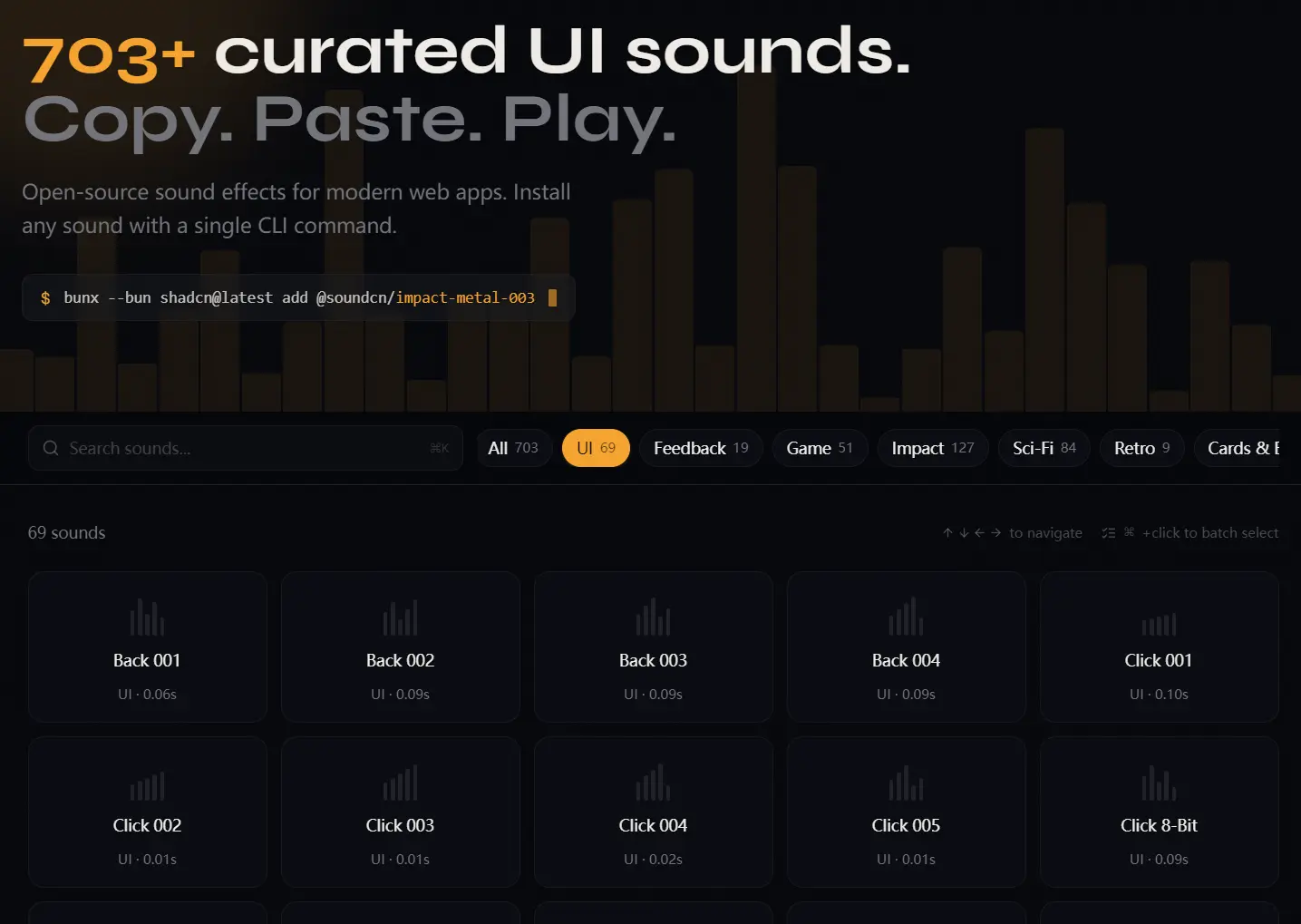
soundcn is an open-source registry of 700+ curated UI sound effects that you can install directly into your codebase using the shadcn CLI.
Each sound effect is a self-contained TypeScript module with an inline base64 data URI, so there are no external audio files to host, no fetch requests at runtime, and no licensing headaches to sort through.
Features
700+ sounds: Clicks, notifications, transitions, UI feedback, game sounds, voiceovers, arcade effects, and more.
Inline base64 data URIs: Every sound is encoded directly into its TypeScript module.
useSound React hook: A built-in hook wraps the Web Audio API for clean, idiomatic playback in functional components.
CC0-licensed audio: All sounds are free for personal and commercial use.
Use Cases
- Micro-Interactions: Play subtle “click” or “pop” sounds when users toggle switches or press primary buttons.
- Form Validation: Provide immediate audio feedback when a user successfully submits data or encounters an input error.
- Gamified Elements: Enhance user engagement by triggering “success” or “level up” chimes when a user completes a task.
- System Notifications: Alert users to background events or status changes even when they are not looking at the specific UI element.
How To Use It
1. Visit soundcn.xyz to preview all available sound effects. The site lets you filter by category and play each effect directly in the browser.
2. soundcn uses the shadcn CLI to copy files into your project. You need to install both the useSound hook and at least one sound module.
# Using npm / npx
npx shadcn@latest add @soundcn/use-sound @soundcn/open-001
# Using pnpm
pnpm dlx shadcn@latest add @soundcn/use-sound @soundcn/open-001
# Using Yarn (via npx shadcn)
npx shadcn@latest add @soundcn/use-sound @soundcn/open-001
# Using Bun
bunx --bun shadcn@latest add @soundcn/use-sound @soundcn/open-001
After the command runs, your project will contain two new files:
src/hooks/use-sound.ts— the playback hooksrc/sounds/open-001.ts— the sound module with its base64 audio data
You can install additional sounds at any time by running the shadcn add command with the sound’s registry name.
3. Import the hook and the sound module, then call useSound to get back a play function. Wire that function to any event handler:
import { useSound } from "@/hooks/use-sound";
// Import the specific sound module installed into your project
import { open001Sound } from "@/sounds/open-001";
export function OpenButton() {
  // useSound returns a tuple; destructure the play function
  const [play] = useSound(open001Sound);
  return (
    // Call play() on any DOM event — click, focus, keydown, etc.
    <button onClick={() => play()}>
      Open Panel
    </button>
  );
}
5. Each useSound call manages its own Audio instance internally. You can compose several sounds in one component with no conflict:
import { useSound } from "@/hooks/use-sound";
import { clickSoftSound } from "@/sounds/click-soft";
import { errorBuzzSound } from "@/sounds/error-buzz";
import { confirmationSound } from "@/sounds/confirmation-001";
export function FormSubmit() {
  const [playClick] = useSound(clickSoftSound);
  const [playError] = useSound(errorBuzzSound);
  const [playConfirm] = useSound(confirmationSound);
  async function handleSubmit() {
    playClick(); // immediate feedback on press
    const result = await submitForm();
    if (result.ok) {
      playConfirm(); // success path
    } else {
      playError(); // error path
    }
  }
  return <button onClick={handleSubmit}>Submit</button>;
}
Available Sound Effects
UI & Navigation: Arcade Mode, Back 001–004, Begin, Bong 001, Click 001–005, Click 8-Bit, Click Soft, Close 001–004, Confirmation 001–004, Drop 001–004, Error 001–008, Error Buzz, Glass 001–006, Glitch 001–004, High Down, High Up, Hold, Hover Tick, Low Down, Low Random, Low Three Tone, Maximize 001–009, Metal Click, Metal Latch, Minimize 001–009, Notification Pop, Open 001–004, Pluck 001–002, Question 001–004, Scratch 001–005, Scroll 001–005, Select 001–008, Success Chime, Switch 001–007, Switch Off, Switch On, Three Tone 1–2, Tick 001–004, Toggle 001–004, Tone 1, Two Tone 1–2.
Physical / Real-World: Belt Handle 1–2, Book Close, Book Flip 1–3, Book Open, Book Place 1–3, Card Fan 1–2, Card Place 1–4, Card Shove 1–4, Card Shuffle, Card Slide 1–8, Cards Pack Open 1–2, Cards Pack Take Out 1–2, Chip Lay 1–3, Chips Collide 1–4, Chips Handle 1–6, Chips Stack 1–6, Cloth 1–4, Cloth Belt 1–2, Creak 1–3, Dice Grab 1–2, Dice Shake 1–3, Dice Throw 1–3, Die Throw 1–4, Door Close 000–4, Door Open 000–2, Draw Knife 1–3, Drop Leather, Handle Coins 1–2, Handle Small Leather 1–2, Metal Pot 1–3, Slime 000–001.
Footsteps: Footstep 00–09, Footstep Carpet 000–004, Footstep Concrete 000–004, Footstep Grass 000–004, Footstep Snow 000–004, Footstep Wood 000–004.
Game & Arcade: Battle Mode, Championship Mode, Choose Your Character, Chop, Coin Collect, Combo, Combo Breaker, Deathmatch, Fight, Flawless Victory, Its A Tie, Jump 8-Bit, Kill Her, Kill Him, Kill It, Knife Slice 1–2, Loser, Multi Kill, Pep Sound 1–5, Phase Jump 1–5, Phaser Down 1–3, Phaser Up 1–7, Player 1–2, Power Up 1–12, Prepare Yourself, Round 1–5, Story Mode, Sudden Death, Survival Mode, Tie, Tie Breaker, Time, War Hold, War Suppressing Fire, Winner.
Sci-Fi & Laser: Force Field 000–004, Laser 1–9, Laser Large 000–004, Laser Retro 000–004, Laser Small 000–004, Low Frequency Explosion 000–001, Space Engine 000–004, Space Engine Large 000–004, Space Engine Low 000–004, Space Engine Small 000–004, Space Trash 1–5, Thruster Fire 000–004, Zap 1–2, Zap Three Tone Down, Zap Three Tone Up, Zap Two Tone 1–2.
Engine & Mechanical: Computer Noise 000–003, Engine Circular 000–004.
Impact Series: Impact Bell Heavy 000–004, Impact Generic Light 000–004, Impact Glass Heavy/Light/Medium 000–004, Impact Metal/Metal Heavy/Metal Light/Metal Medium 000–004, Impact Mining 000–004, Impact Plank Medium 000–004, Impact Plate Heavy/Light/Medium 000–004, Impact Punch Heavy/Medium 000–004, Impact Soft Heavy/Medium 000–004, Impact Tin Medium 000–004, Impact Wood Heavy/Light/Medium 000–004.
Jingles: Jingles Hit 00–16, Jingles NES 00–16, Jingles Pizzi 00–16, Jingles Sax 00–16, Jingles Steel 00–16.
Voiceovers: Voiceover Pack Female 1–10 (plus Congratulations, Correct, Final Round, Game Over, Go, Hurry Up, Its A Tie, Level, Level Up, Mission Completed, Mission Failed, New Highscore, Objective Achieved, Power Up, Ready, Round, Set, Time Over, War variants, Wrong, You Lose, You Win). Voiceover Pack Fighter 1–10 (plus Final Round, Game Over, Ready, You Lose, You Win). Voiceover Pack Male 1–10 (same set as Female).
Alternatives
- use-sound: A well-established React hook for audio playback powered by Howler.js.
- Howler.js: A full-featured audio library for the web with more format support and Web Audio fallback.
- Tone.js: A framework for interactive music and audio synthesis in the browser.
FAQs
Q: Do the base64 sounds bloat my JavaScript bundle?
A: Yes, each sound module adds to your bundle size. A typical short sound effect encoded in base64 runs between 10–100 KB, depending on duration. The key mitigation is tree-shaking: only the sounds you actually import will be included in the final bundle. Import selectively.
Q: The audio doesn’t play on the first user interaction. What’s happening?
A: Browsers block AudioContext from starting until the user has interacted with the page. This is a browser-enforced policy. Call play() only in response to a direct user gesture — a click, keypress, or pointer event. If you’re triggering sounds programmatically (e.g., on a data load), you’ll need to pre-initialize the AudioContext on first user interaction and then resume it for subsequent programmatic calls.
Q: Can I use this with Next.js App Router?
A: Yes. The library uses the useSound hook. You must mark any component using this hook with 'use client' at the top of the file.
Q: Do I need to configure a Webpack or Vite loader for audio files?
A: No additional configuration is required. The sounds are standard TypeScript files containing strings. They import just like any other JavaScript module.