The Future of Web Dev
The Future of Web Dev
Find Component Source Files from Any DOM Node – element-source
Resolve component source locations from DOM elements with element-source. Get full stack traces for React, Vue, Svelte, Solid, and Preact projects.
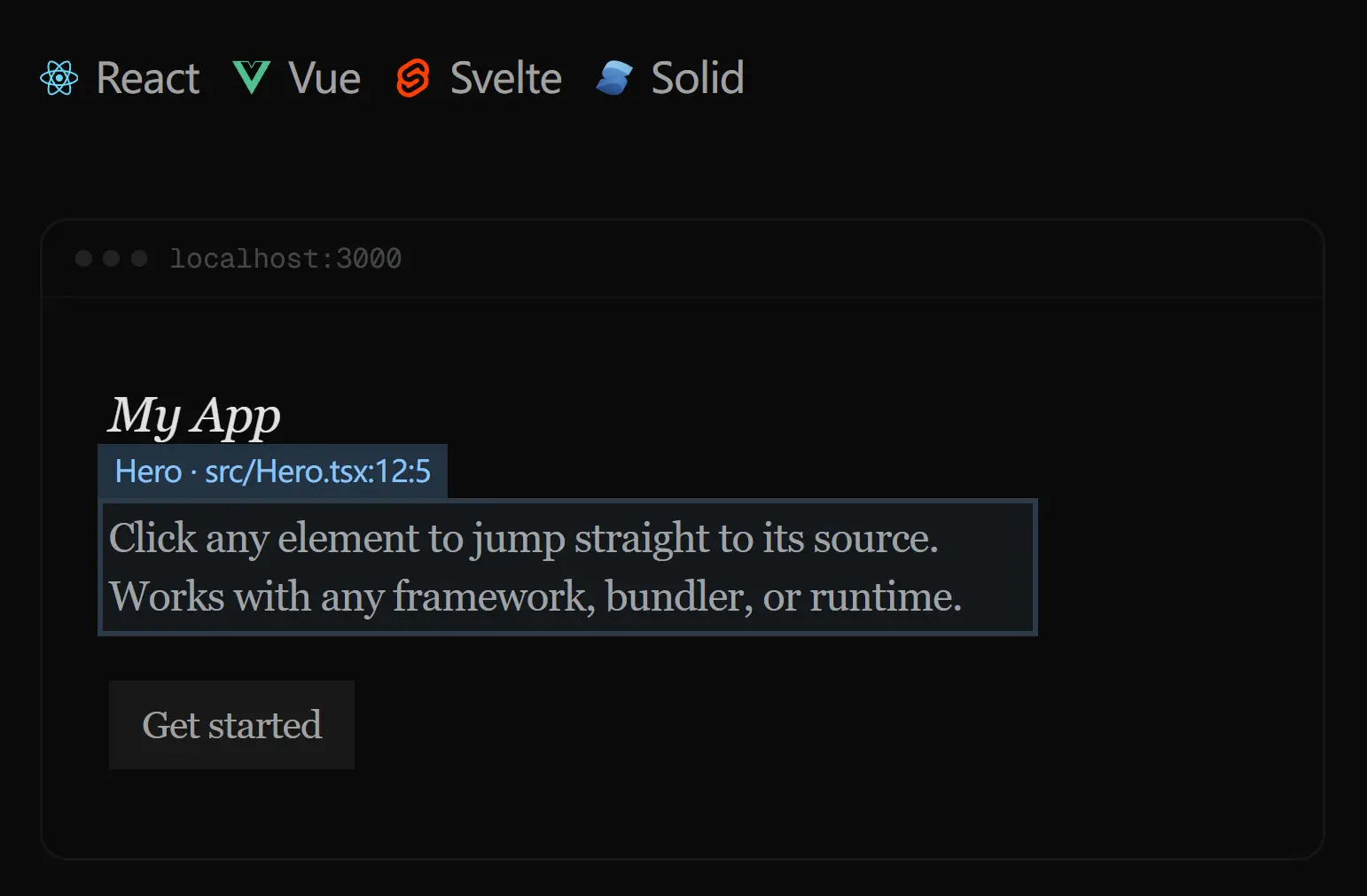
element-source is a DOM inspection library that resolves the source file location, component name, and full component stack for any DOM element at runtime. It reads framework-level debug metadata from React, Preact, Vue, Svelte, and Solid. Each element traces back to the exact file path, line number, and column number in your codebase.
The library exposes an async API centered on resolveElementInfo, with lower-level helpers for targeted queries like resolveSource, resolveStack, and resolveComponentName. Aiden Bai originally built it to power React Grab, a browser tool that passes element source context to coding agents. A precise file path and line number cut the token overhead agents spend locating the relevant file.
It fits naturally into any project where you need runtime source mapping at the element level, from browser devtools to AI-assisted coding workflows.
Features
🔍 Source Resolution: resolveElementInfo returns the file path, line number, column number, and component name for any DOM element.
🗂️ Full Stack Tracing: resolveStack returns the complete chain of component source frames from the target element to the tree root.
🏷️ Component Name Lookup: resolveComponentName returns the nearest user-defined component name for a given DOM node.
🔧 Custom Resolvers: createSourceResolver accepts an array of framework-specific resolvers, so you can configure it for Vue, Svelte, or any combination.
📐 Stack Formatting: formatStack and formatStackFrame convert source frame data into human-readable, stack-trace-style strings.
🏗️ Tag Name Detection: getTagName reads tag names from DOM elements, Ink nodes, and any object with a nodeName property.
Use Cases
- AI Coding Agent Context: Feed precise source file paths and line numbers to coding agents so they navigate directly to the relevant component.
- Browser DevTools Extensions: Build browser extensions that display component origin data when a user inspects or hovers over any element.
- Component Debugging Utilities: Trace any rendered element back through its full component stack to pinpoint layout or logic issues faster.
- Design-to-Code Inspection Tools: Map visible UI elements back to their source files in tools that bridge design review and code editing.
How to Use It
Table Of Contents
Installation
npm install element-sourceIf your project uses Preact, import preact/debug in development. This step makes owner stacks and source locations available for the resolver to read.
// main.tsx (Preact)
import "preact/debug";
Basic Usage with resolveElementInfo
resolveElementInfo is the primary entry point. Pass any DOM element and it returns a promise that resolves to a complete metadata object.
import { resolveElementInfo } from "element-source";
const button = document.querySelector("#root button");
const info = await resolveElementInfo(button);
console.log(info);
// {
//   tagName: "button",
//   componentName: "Counter",
//   source: {
//     filePath: "src/Counter.tsx",
//     lineNumber: 12,
//     columnNumber: 5,
//     componentName: "Counter"
//   },
//   stack: [
//     { filePath: "src/Counter.tsx", lineNumber: 12, columnNumber: 5, componentName: "Counter" },
//     { filePath: "src/App.tsx", lineNumber: 8, columnNumber: 3, componentName: "App" }
//   ]
// }
Resolving Only the Source Location
resolveSource returns just the primary source frame for a given element.
import { resolveSource } from "element-source";
const source = await resolveSource(document.querySelector("button"));
// { filePath: "src/Counter.tsx", lineNumber: 12, columnNumber: 5, componentName: "Counter" }
Resolving the Full Component Stack
resolveStack returns an array of source frames. The array starts from the target element and moves up through the full component tree.
import { resolveStack } from "element-source";
const stack = await resolveStack(document.querySelector("button"));
// [
//   { filePath: "src/Counter.tsx", lineNumber: 12, columnNumber: 5, componentName: "Counter" },
//   { filePath: "src/App.tsx", lineNumber: 8, columnNumber: 3, componentName: "App" }
// ]
Resolving a Component Name
resolveComponentName returns only the nearest user-defined component name for a given element.
import { resolveComponentName } from "element-source";
const name = await resolveComponentName(document.querySelector("button"));
// "Counter"
Creating a Custom Resolver
createSourceResolver constructs a resolver configured for specific frameworks. Import the built-in framework resolvers and pass them in the resolvers array.
import { createSourceResolver, svelteResolver, vueResolver } from "element-source";
const { resolveElementInfo, resolveSource, resolveStack, resolveComponentName } =
  createSourceResolver({
    resolvers: [svelteResolver, vueResolver],
  });
const info = await resolveElementInfo(document.querySelector(".my-component"));
Use this configuration when your project targets Vue or Svelte. The default resolver targets React and Preact.
Formatting Stack Frames
formatStackFrame converts a single source frame object into a stack-trace-style string.
import { formatStackFrame } from "element-source";
const frame = {
  filePath: "src/App.tsx",
  lineNumber: 42,
  columnNumber: 10,
  componentName: "App",
};
console.log(formatStackFrame(frame));
// "\n  in App (at src/App.tsx:42:10)"
formatStack converts an array of frames. Pass an optional maxLines integer to cap the output length.
import { formatStack } from "element-source";
const stack = [
  { filePath: "src/Counter.tsx", lineNumber: 12, columnNumber: 5, componentName: "Counter" },
  { filePath: "src/App.tsx", lineNumber: 8, columnNumber: 3, componentName: "App" },
];
console.log(formatStack(stack));
// "\n  in Counter (at src/Counter.tsx:12:5)\n  in App (at src/App.tsx:8:3)"
console.log(formatStack(stack, 1));
// "\n  in Counter (at src/Counter.tsx:12:5)"
Reading Tag Names
getTagName reads the tag name from a host instance. It handles standard DOM elements, Ink text nodes, and plain objects with a nodeName property.
import { getTagName } from "element-source";
getTagName(document.createElement("div")); // "div"
getTagName({ nodeName: "ink-text" });       // "ink-text"
getTagName({});                             // ""
API Reference
Core Functions
| Function | Signature | Returns |
|---|---|---|
resolveElementInfo | (node: object) => Promise<ElementInfo> | Tag name, component name, source location, and full stack |
resolveSource | (node: object) => Promise<ElementSourceInfo | null> | Primary source frame or null |
resolveStack | (node: object) => Promise<ElementSourceInfo[]> | Array of source frames from element to root |
resolveComponentName | (node: object) => Promise<string | null> | Nearest user-defined component name or null |
createSourceResolver | (options?: ResolverOptions) => ResolverAPI | A configured resolver object with all four resolve methods |
formatStackFrame | (frame: ElementSourceInfo) => string | A formatted stack-trace string for one frame |
formatStack | (stack: ElementSourceInfo[], maxLines?: number) => string | A formatted multi-line stack trace string |
getTagName | (node: object) => string | Tag name string, or empty string if none found |
ElementSourceInfo Shape
| Field | Type | Description |
|---|---|---|
filePath | string | Relative path to the source file |
lineNumber | number | Line number of the component definition |
columnNumber | number | Column number of the component definition |
componentName | string | Name of the component at that frame |
ElementInfo Shape
| Field | Type | Description |
|---|---|---|
tagName | string | HTML tag name of the DOM element |
componentName | string | Name of the nearest user-defined component |
source | ElementSourceInfo | Primary source frame |
stack | ElementSourceInfo[] | Full array of component stack frames |
ResolverOptions
| Option | Type | Description |
|---|---|---|
resolvers | FrameworkResolver[] | Array of framework-specific resolvers to activate |
Related Resources
- React Grab: A browser-based tool that selects elements and passes their source context directly to coding agents; built on element-source.
- Million.js: A React performance compiler by the same author that speeds up rendering through a virtual DOM optimization layer.
- Why-Did-You-Render: A React library that tracks unnecessary re-renders and maps them back to specific component definitions.
- React Developer Tools: The official browser extension for inspecting component trees, props, and state in React applications.
FAQs
Q: Why does resolveSource return null for some elements?
A: Native DOM elements with no framework owner, such as a plain <div> in a static HTML file, carry no component metadata. resolveSource returns null when no framework stack exists on the node.
Q: Do I need extra configuration for Vue or Svelte?
A: Yes. Use createSourceResolver with the corresponding built-in resolvers. Pass vueResolver for Vue projects and svelteResolver for Svelte. The default configuration targets React and Preact only.
Q: What is the difference between resolveElementInfo and calling resolveSource and resolveStack separately?
A: resolveElementInfo runs both lookups in a single call and attaches the tag name and top-level component name to the result. Call resolveSource or resolveStack individually when you only need one piece of that data.
Q: What does the maxLines parameter in formatStack do?
A: It caps the number of frames in the formatted output. Pass 1 to get only the innermost frame. This keeps log output compact when you only need a quick reference to the originating component.