The Future of Web Dev
The Future of Web Dev
Modern Tiptap Rich Text Editor for Svelte – Edra
A Tiptap-based rich text editor for Svelte with headless and shadcn UI flavors, full media support, and JSON output.
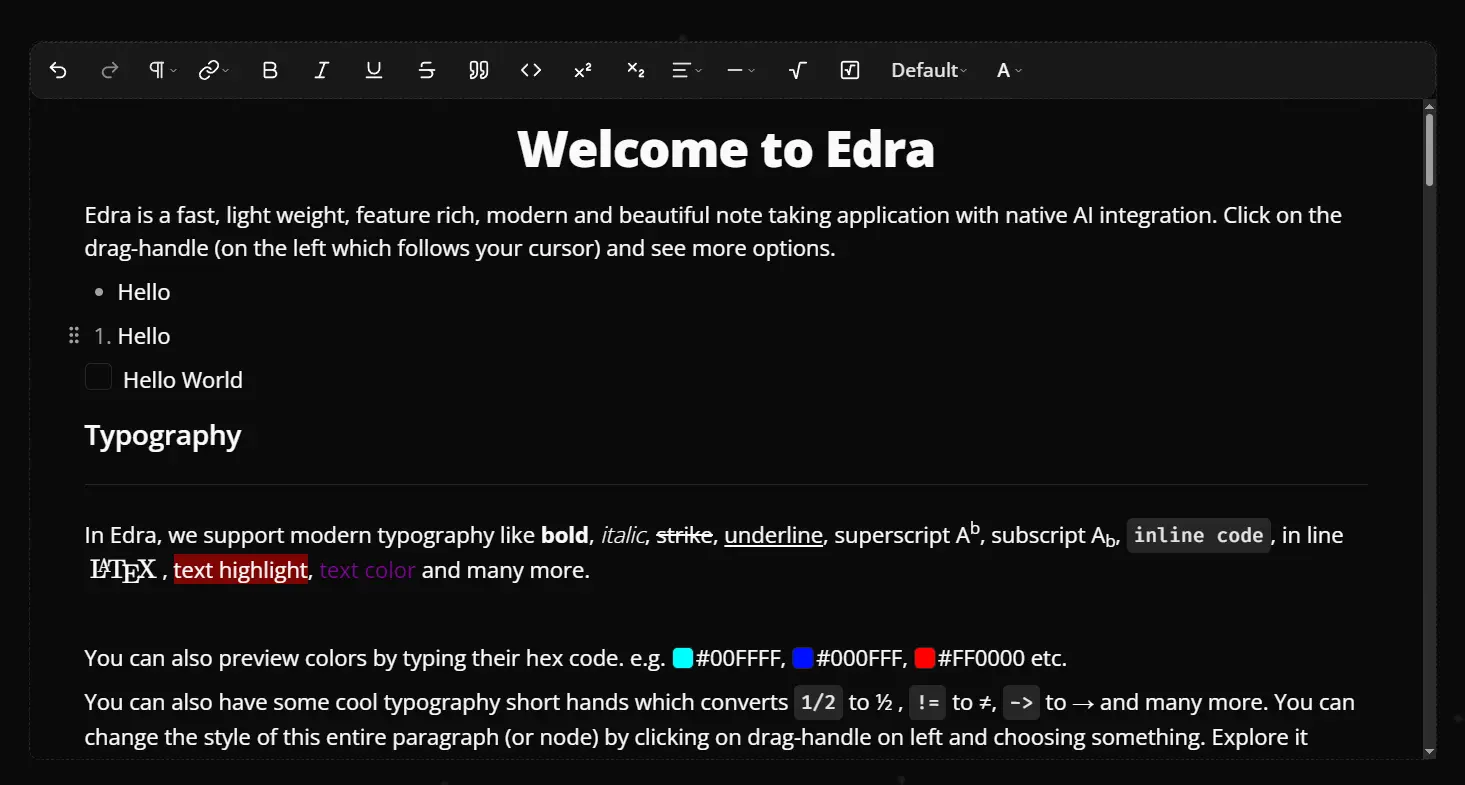
Edra is a modern rich-text editor component built on Tiptap for Svelte-powered web apps. It copies its source directly into your project under src/lib/components/edra, so you own every line of the editor code
The editor currently provides two UI flavors. The headless variant uses plain CSS classes with no UI framework dependency. The shadcn variant integrates shadcn-svelte and Tailwind Typography for a polished, theme-aware appearance.
Both flavors expose the same Tiptap extension set, output identical JSON or HTML, and share the same core props interface.
Features
📝 Rich Text Formatting: Bold, italic, underline, strikethrough, superscript, subscript, text color, highlight, and quick-color selection.
⌨️ Markdown Shortcuts: Trigger common formatting with standard Markdown syntax as you type.
🔠 Font Size Control: Increase or decrease font size per selection via toolbar buttons (headless) or a dropdown (shadcn).
📊 Table Support: Insert a default 3-column × 3-row table, then add, delete, merge, or split rows, columns, and cells.
🖼️ Image, Video, and Audio Embeds: Add media by URL or local file upload, with resize, alignment, and caption controls for each type.
🖥️ IFrame Embeds: Insert iframes from a source URL using the IFramePlaceholder component.
💻 Extended Code Blocks: Syntax highlighting via lowlight with one-dark and one-light themes for dark and light mode.
🧮 Math and LaTeX: Insert inline or block LaTeX expressions using $$ syntax. A specialized editing menu appears for each expression.
🔗 Advanced Link Handling: A bubble menu on every link exposes edit, open, copy, and delete actions.
🔍 Search and Replace: Full text search with case-matching, forward/back navigation, single replace, and replace-all.
↕️ Drag and Drop: Move any editor node by its drag handle.
✂️ Slash Commands: Press / and type a command name to insert headings, tables, images, videos, code blocks, and more.
📋 Bubble Menus: Four context-sensitive floating menus cover general formatting, links, table rows, and table columns.
📑 Table of Contents: Automatically scans headings and generates a navigational list rendered as a floating sidebar (headless flavor) or inline (shadcn flavor).
🌐 Internationalization: A strings.ts file centralizes all editor labels.
📂 File Upload Hooks: Intercept file selections and handle uploads to your own storage backend.
🗒️ Placeholder Text: Ghost text on empty lines is configurable in editor.ts.
Use Cases
- Document Editing Applications: Build CMS dashboards or documentation tools that need structured content output.
- Comment Systems: Implement rich text comments with media attachment support.
- Educational Platforms: Create assignment editors that handle LaTeX equations and code formatting.
- Internal Tools: Add formatted text input to admin interfaces with search/replace and table support.
How to Use It
Table Of Contents
- Install with the Headless UI
- Install with the Shadcn UI
- Basic Shadcn Example
- Capture JSON Output
- Capture HTML Output
- Configure File Upload Behavior
- Adjust the Paste Image Size Limit
- Configure Link Behavior
- Use the Advanced Drag Handle
- Internationalization
- <EdraEditor> Props
- <EdraToolbar> Props
- <EdraBubbleMenu> Props
- Regular Toolbar Commands
- Special Toolbar Commands
Install with the Headless UI
Run the init command for your package manager. This copies the edra folder to src/lib/components/edra and installs all required Tiptap dependencies.
# npm
npx edra@next init headless
# pnpm
pnpm dlx edra@next init headless
# Bun
bunx edra@next init headless
No additional configuration files are required after this step.
Install with the Shadcn UI
The shadcn flavor depends on shadcn-svelte and tailwindcss-typography. Set up both packages first by following their official guides.
After that setup, add the required shadcn-svelte components:
# npm
npx shadcn-svelte add button command dropdown-menu input popover separator tabs textarea tooltip sonner
# pnpm
pnpm dlx shadcn-svelte add button command dropdown-menu input popover separator tabs textarea tooltip sonner
# Bun
bunx shadcn-svelte add button command dropdown-menu input popover separator tabs textarea tooltip sonner
Then run the Edra init command for the shadcn flavor:
# npm
npx edra@next init shadcn
# pnpm
pnpm dlx edra@next init shadcn
# Bun
bunx edra@next init shadcn
This copies src/lib/components/edra into your project with the shadcn-compatible component variants.
Basic Shadcn Example
The example below wires the editor, toolbar, and drag handle together. The editor variable is bound so the toolbar can read and write editor state directly.
<script lang="ts">
  import type { Content, Editor } from '@tiptap/core';
  import {
    EdraEditor,
    EdraToolBar,
    EdraDragHandleExtended
  } from '$lib/components/edra/shadcn';
  let content = $state<Content>();
  let editor = $state<Editor>();
  function onUpdate() {
    content = editor?.getJSON();
  }
</script>
<div class="py-4 text-center text-xl font-bold">
  Shadcn Example
  <div class="bg-background z-50 mt-12 size-full max-w-5xl rounded-md border border-dashed">
    {#if editor && !editor.isDestroyed}
      <EdraToolBar
        class="bg-secondary/50 flex w-full items-center overflow-x-auto border-b border-dashed p-0.5"
        {editor}
      />
      <EdraDragHandleExtended {editor} />
    {/if}
    <EdraEditor
      bind:editor
      {content}
      class="h-120 max-h-screen overflow-y-scroll pr-2 pl-6"
      {onUpdate}
    />
  </div>
</div>
The EdraToolBar and EdraBubbleMenu components require an initialized editor instance. Wrap them in an {#if editor && !editor.isDestroyed} guard.
Capture JSON Output
Use the onUpdate callback to read the editor’s JSON representation whenever the content changes.
function onUpdate() {
  const myOutput = editor?.getJSON();
  saveContent(myOutput);
}
Capture HTML Output
The same callback pattern works for HTML output.
function onUpdate() {
  const myOutput = editor?.getHTML();
  saveContent(myOutput);
}
Configure File Upload Behavior
Pass onFileSelect and onDropOrPaste to handle how files get processed. Both callbacks must return a Promise<string> that resolves to the final media source URL.
<EdraEditor
  bind:editor
  onFileSelect={async (filePath) => {
    const url = await uploadToStorage(filePath);
    return url;
  }}
  onDropOrPaste={async (file) => {
    const url = await uploadToStorage(file);
    return url;
  }}
/>
Adjust the Paste Image Size Limit
By default, Edra accepts pasted images up to 2 MB. Change the limit in $lib/components/edra/editor.ts in your project.
editor.setOptions({
  editorProps: {
    // Accept up to 3 MB
    handlePaste: getHandlePaste(editor, 3)
  }
});
Configure Link Behavior
Links do not open on click by default. To change this, edit Link.configure in $lib/components/edra/editor.ts.
Link.configure({
  openOnClick: true,
  autolink: true,
  defaultProtocol: 'https',
  HTMLAttributes: {
    target: '_blank',
    rel: 'noopener noreferrer'
  }
})
Use the Advanced Drag Handle
For custom drag handle logic, register the DragHandlePlugin in onMount and read the currently hovered node via onMouseMove.
<script lang="ts">
  import { onMount } from 'svelte';
  import { DragHandlePlugin } from '$lib/components/edra/extensions/drag-handle';
  import type { Node } from '@tiptap/pm/model';
  let currentNode: Node | null = $state(null);
  let currentNodePos: number = $state(-1);
  const pluginKey = 'globalDragHandle';
  onMount(() => {
    const plugin = DragHandlePlugin({
      pluginKey,
      dragHandleWidth: 55,
      scrollTreshold: 100,
      dragHandleSelector: '.drag-handle',
      excludedTags: ['pre', 'code', 'table p'],
      customNodes: [],
      onMouseMove: ({ node, pos }) => {
        if (node) currentNode = node;
        currentNodePos = pos;
      }
    });
    editor.registerPlugin(plugin);
    return () => editor.unregisterPlugin(pluginKey);
  });
</script>
Internationalization
All visible editor strings live in $lib/components/edra/strings.ts in your project. Replace or extend the exported object with translated values to localize the interface.
API Reference
<EdraEditor> Props
| Prop | Type | Description |
|---|---|---|
content | Content | Initial editor content. |
editable | boolean | Sets the initial read/write state of the editor. |
editor | Editor | Bindable editor instance. |
element | HTMLElement | Bindable reference to the editor’s root DOM element. |
autofocus | boolean | Focuses the editor on mount when true. |
onUpdate | () => void | Fires each time the editor content changes. |
class | string | Additional CSS classes for the editor container. |
spellcheck | boolean | Enables or disables browser spell checking. |
onFileSelect | (file: string) => Promise<string> | Runs when a file is selected via the file picker. Return the final media URL. |
onDropOrPaste | (file: File) => Promise<string> | Runs when a file is dropped or pasted. Return the final media URL. |
getAssets | (fileType: FileType) => Promise<string[]> | Fetches existing assets by file type for display in media pickers. |
<EdraToolbar> Props
| Prop | Type | Description |
|---|---|---|
editor | Editor | The active editor instance (required). |
class | string | Additional CSS classes for the toolbar container. |
excludedCommands | string[] | Command names to hide from the toolbar. |
children | Snippet<[]> | Custom child components. When passed, these replace the default command set. |
<EdraBubbleMenu> Props
EdraBubbleMenu accepts the same props as EdraToolbar. Custom children replace the default floating toolbar commands.
Regular Toolbar Commands
| Command | Description |
|---|---|
undo | Reverts the last action. |
redo | Re-applies the last undone action. |
heading1 | Toggles H1 formatting. |
heading2 | Toggles H2 formatting. |
heading3 | Toggles H3 formatting. |
link | Prompts for a URL and wraps selected text in a hyperlink. |
bold | Toggles bold on the selection. |
italic | Toggles italic on the selection. |
underline | Toggles underline on the selection. |
strike | Toggles strikethrough on the selection. |
blockquote | Toggles blockquote formatting. |
superscript | Toggles superscript on the selection. |
subscript | Toggles subscript on the selection. |
code | Toggles inline code on the selection. |
codeBlock | Toggles a fenced code block. |
alignLeft | Aligns text left. |
alignCenter | Centers text. |
alignRight | Aligns text right. |
alignJustify | Justifies text. |
bulletList | Toggles an unordered list. |
orderedList | Toggles a numbered list. |
taskList | Toggles a task/checklist. |
audio-placeholder | Inserts an audio placeholder node. |
image-placeholder | Inserts an image placeholder node. |
video-placeholder | Inserts a video placeholder node. |
iframe-placeholder | Inserts an iframe placeholder node. |
color | Resets or removes the current text color. |
highlight | Toggles text highlight on the selection. |
table | Inserts a 3×3 table, or deletes the active table. |
font increment | Increases font size of the selection. |
font decrement | Decreases font size of the selection. |
Special Toolbar Commands
| Command | Description |
|---|---|
fontSize | Renders increase/decrease buttons and displays the current font size. |
quickColor | Opens a color menu for text color and highlight. |
searchAndReplace | Opens the search and replace panel. |
Related Resources
- Tiptap: The headless rich text editor framework that powers Edra’s extension system and document model.
- shadcn-svelte: The Svelte port of shadcn/ui.
- Tailwind CSS Typography: The Tailwind plugin that styles raw HTML prose output, used by the shadcn flavor.
FAQs
Q: Can I add custom Tiptap extensions to the editor?
A: Yes. Because Edra copies its source into your project, you edit $lib/components/edra/editor.ts directly and register any Tiptap extension in the extensions array alongside the defaults.
Q: Can the editor output Markdown instead of JSON or HTML?
A: Tiptap does not ship a Markdown serializer by default. You can install the @tiptap/extension-markdown package and add it to the extensions array in your local editor.ts to get Markdown input and output.
Q: Does EdraDragHandleExtended work with the headless UI flavor?
A: No. EdraDragHandleExtended is only available in the shadcn UI flavor. The standard DragHandle component works in both flavors.
Q: How do I change the dark mode CSS selector for code block highlighting?
A: Open $lib/components/edra/onedark.css in your project and replace the html .dark selector with whichever class or attribute your app uses to activate dark mode.
Q: What happens if I pass children to EdraToolbar?
A: The children replace the default toolbar command set entirely. Use excludedCommands to hide specific commands while keeping the rest of the defaults.