The Future of Web Dev
The Future of Web Dev
Multi-Model AI Chat Playground Built with Next.js – Open-Fiesta
Multi-provider AI testing platform built with Next.js. Compare OpenRouter, Gemini, and local models with clean interface and sharing features.
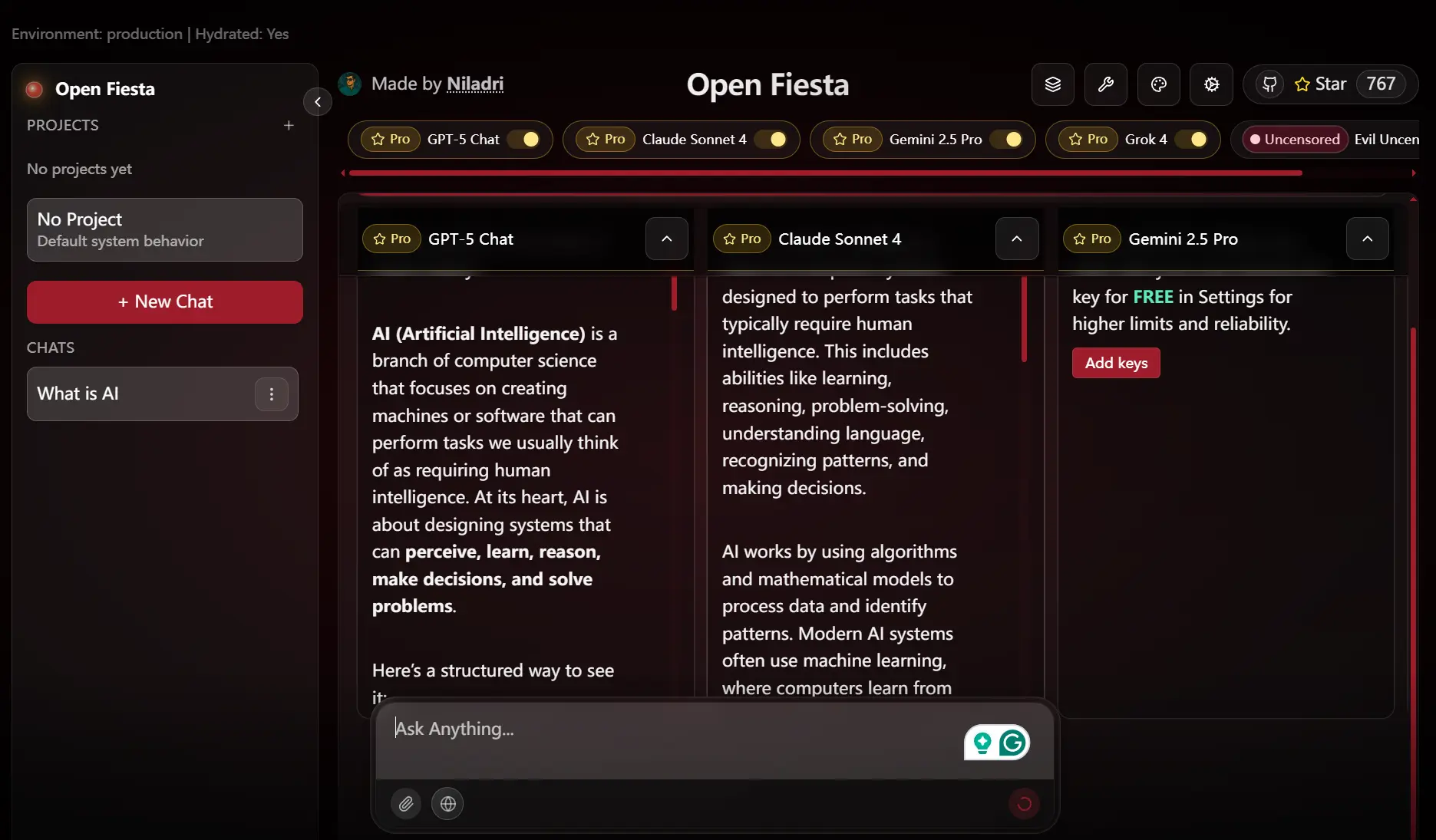
Open-Fiesta is an open-source, multi-model AI chat playground that enables you to interact with and compare outputs from various large language models (LLMs) side by side.
You can select up to five different models for any conversation. The application supports models from Google Gemini and the OpenRouter platform. It also includes optional web search and image attachment capabilities for specific models.
Features
🤖 Multiple AI provider support including Gemini, OpenRouter, and local Ollama models
⚖️ Side-by-side model comparison with up to 5 models running simultaneously
🔍 Optional web search toggle available per message for enhanced context
📸 Image attachment support for compatible models like Gemini
🔗 Conversation sharing through shareable links for team collaboration
⌨️ Keyboard shortcuts and streaming-friendly API responses for smooth interaction
🐳 Docker support for both development and production deployments
🏠 Local model support through Ollama integration
🔧 Runtime API key configuration without requiring environment setup
📱 Responsive design optimized for various screen sizes
How to Use It
1. Clone the project from GitHub and install the required packages using npm.
git clone https://github.com/NiladriHazra/Open-Fiesta.git
cd open-fiesta
npm install
2. Create a local environment file by copying the example file.
cp .env.example .env3. Open the .env file and add the API keys for the services you intend to use. You can also add these keys directly in the application’s settings at runtime.
# For OpenRouter models
OPENROUTER_API_KEY="your_openrouter_key"
# For Google Gemini models
GEMINI_API_KEY="your_gemini_key"
4. Start the development server, and the application will be available at http://localhost:3000.
npm run devOllama Integration
Open-Fiesta supports models running locally through Ollama.
1. Make sure your Ollama instance is running and configured to accept external connections.
export OLLAMA_HOST=0.0.0.0:11434
ollama serve
2. In your .env file, set the OLLAMA_URL to point to your Ollama instance.
OLLAMA_URL="http://localhost:11434"3. In the Open-Fiesta application, navigate to the “Custom Models” section and add the names of your local Ollama models, such as llama3 or mistral. The system will verify their existence.
Docker Deployment
To run a development environment with hot-reloading, use Docker Compose.
npm run docker:devTo build and run an optimized production image, use the following commands.
# Build the production image
npm run docker:build
# Run the production container
npm run docker:run
If you are running the application in a Docker container and want to connect to an Ollama instance on your host machine, use http://host.docker.internal:11434 as the OLLAMA_URL.
Related Resources
- OpenRouter – API platform providing access to multiple large language models with unified pricing and interface documentation.
- Google AI Studio – Official documentation and tools for integrating Google’s Gemini models into applications.
- Ollama – Platform for running large language models locally with simple installation and model management.
- Next.js App Router – Modern React framework documentation covering the App Router architecture used in Open-Fiesta.
FAQs
Q: Can I use Open-Fiesta without providing API keys upfront?
A: Yes, you can configure API keys at runtime through the application’s settings interface.
Q: Can I add models that are not in the default catalog?
A: Yes, you can add custom models, particularly those from a local Ollama instance. Navigate to the “Custom Models” section in the app settings to add and validate your local models.
Q: How does the conversation sharing feature work?
A: The application generates a unique, shareable link that encodes the conversation data. Anyone with the link can view the entire chat history, but they cannot continue the conversation from that link.
Q: Are shared conversations secure?
A: Shared conversations create public links that anyone with the URL can access. Avoid sharing sensitive information in conversations you plan to make public.
Q: Can I deploy Open-Fiesta to my own server?
A: Yes, the project includes Docker configuration for both development and production deployments. Use the provided Docker commands or deploy the Next.js application to any compatible hosting platform.
Q: What is the purpose of post-processing DeepSeek R1 outputs?
A: Open-Fiesta post-processes outputs from the DeepSeek R1 model to remove its internal reasoning tags and convert its Markdown formatting to plain text. This improves the readability of the final output while keeping the core content intact.