The Future of Web Dev
The Future of Web Dev
Minimal Portfolio Template with Spotify/GitHub/Discord Integrated – Cooked-folio
Build a developer portfolio with live Discord status, Spotify tracks, and contribution graphs. Powered by Next.js and Tailwind CSS.
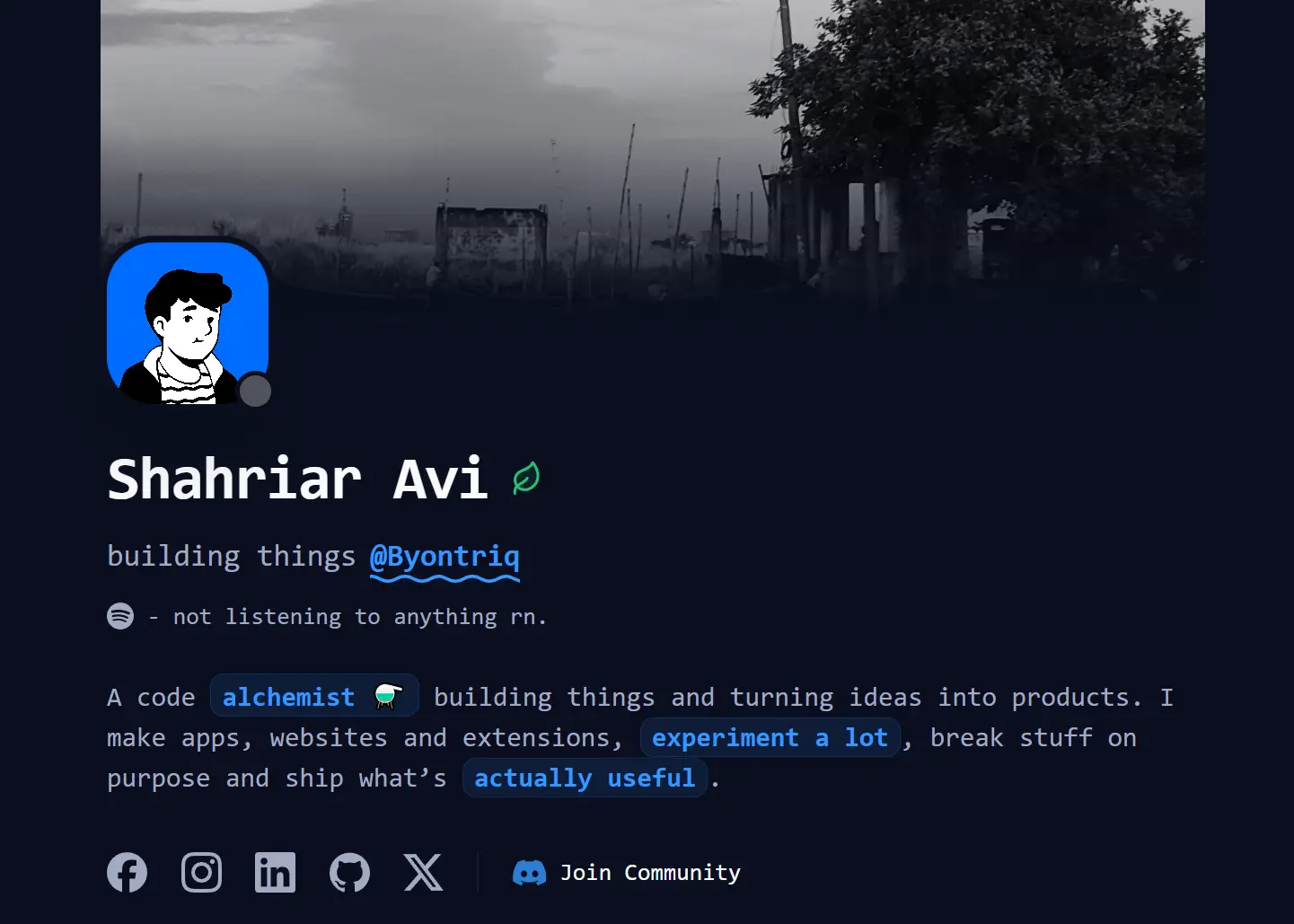
Cooked-folio is a web template that helps you create personal portfolio sites using Next.js and Tailwind CSS.
You can use it to quickly build a minimal personal site that displays Discord activity, current Spotify tracks, and GitHub contributions without sacrificing load times.
The template includes preconfigured API routes that connect to Discord’s Lanyard API, Spotify’s Web API, and GitHub’s GraphQL API.
All environment variables follow a clear structure that you can populate from the included example file.
Features
⚡ One-Click Deployment: Deploy directly to Vercel through a single click.
🎮 Discord Presence: Display real-time Discord status through Lanyard API connection.
🎵 Spotify Now Playing: Show currently playing tracks with album art and song metadata fetched from Spotify’s Web API.
📊 GitHub Contributions Heatmap: Render contribution history as an interactive heatmap using GitHub’s GraphQL API.
🎨 Slide to Vibe Page: Create an audio-reactive experience with synchronized animations controlled through Framer Motion.
💬 Discord Webhook Contact Form: Route contact submissions directly to a Discord channel.
🌓 Theme Toggle: Switch between dark and light modes.
📈 Vercel Analytics: Track page views and visitor metrics.
Use Cases
- Developer Portfolio Site: Build a personal homepage that showcases projects, experience, and real-time activity across platforms.
- Freelancer Landing Page: Create a professional presence with integrated contact forms and links to booking platforms like Cal.com.
- Tech Community Profile: Display open-source contributions and current interests through GitHub and Spotify integrations.
- Personal Brand Hub: Centralize social media presence and professional information in one customizable location.
How to Use It
1. Clone the repository from GitHub and install dependencies. You can use npm or bun as your package manager.
git clone https://github.com/shahriaravi/cooked-folio.git
cd cooked-folio
npm install
2. Start the development server to preview the template locally. The site runs at http://localhost:3000 by default. You can now view all pages and test the layout before configuring external integrations.
npm run dev3. Create an environment file and add your credentials for each service.
cp .env.example .env.local4. Edit src/lib/config.ts to update personal information. This file exports several constants that populate the site.
// =================================================================================
// 2. PERSONAL DETAILS & LINKS
// =================================================================================

export const BANNER_IMAGE = "https://cdn.discordapp.com/attachments/1346582212983918642/1449929873643536446/IMG_20250915_175942771.jpg?ex=6940afec&is=693f5e6c&hm=c9c6fb703d01193df0a555a5e5bd29f41db98665161eea43e4c7a68c24a4c365&";

// External Links
export const RESUME_URL = "https://drive.google.com/file/d/1WKa36vE76iBqOAcucFTeVxGwsFmSim9g/view?usp=drive_link";
export const DISCORD_LINK = "https://discord.gg/wG9qpfvuQQ";
export const CAL_URL = "https://cal.com/shahriaravi/15m";
export const FIVERR_URL = "https://www.fiverr.com/shahriaravi/develop-a-high-performance-custom-website-with-modern-design";

...
5. Configure site-wide metadata in src/lib/site-config.ts. This file exports a siteConfig object and a constructMetadata function.
// =================================================================================
// 1. BASE CONFIGURATION
// =================================================================================

const BASE_URL = process.env.NEXT_PUBLIC_URL || "https://avi.byontriq.xyz";

export const siteConfig = {
  name: "avi",
  username: "shahriaravi_",
  description: "code alchemist ⚗️ building things. turning ideas into products. founder @byontriq",
  url: BASE_URL,
  ogImage: "/og-image.png?v1",
  links: {
    twitter: "https://twitter.com/shahriaravi_",
    github: "https://github.com/shahriaravi",
  },
};

...
6. Push your repository to GitHub. Connect it to Vercel through their dashboard. Vercel detects the Next.js framework automatically and configures build settings. Add all environment variables from .env.local to the Vercel project settings under the Environment Variables section.
7. You can also click the one-click deploy button to automate this process. It clones the repository to your GitHub account and creates a new Vercel project with prompts for each required variable.
Related Resources
- Next.js: React framework that handles server-side rendering and static site generation with built-in routing.
- Tailwind CSS: Utility-first CSS framework that styles components through composable class names.
- Framer Motion: Animation library for React that declaratively animates components with physics-based transitions.
- Lanyard API: Service that exposes Discord presence data through REST and WebSocket endpoints.
FAQs
Q: Can I use this template without the Discord integration?
A: You can remove Discord features by deleting the presence components and skipping the DISCORD_USER_ID environment variable.
Q: How do I change the color scheme?
A: Edit the Tailwind configuration in tailwind.config.ts to modify color values. The theme toggle switches between light and dark variants automatically.
Q: Does the Spotify integration work with free accounts?
A: Yes. The Spotify Web API works with both free and premium accounts. You need an active Spotify application registration regardless of account tier.
Q: Can I add more sections to the portfolio?
A: You can create new sections by adding components to the src/components/sections directory and importing them into the main page component.
Q: How often does the presence data update?
A: The Discord presence component fetches data every 10 seconds. Spotify now-playing updates occur every 15 seconds. You can adjust these intervals in the component polling logic.