The Future of Web Dev
The Future of Web Dev
Next.js Portfolio Template with Playdate Design & GitHub OAuth
Create a unique developer portfolio with Playdate-inspired design using Next.js, TailwindCSS, Prisma, and GitHub OAuth. Deploy to Vercel instantly.
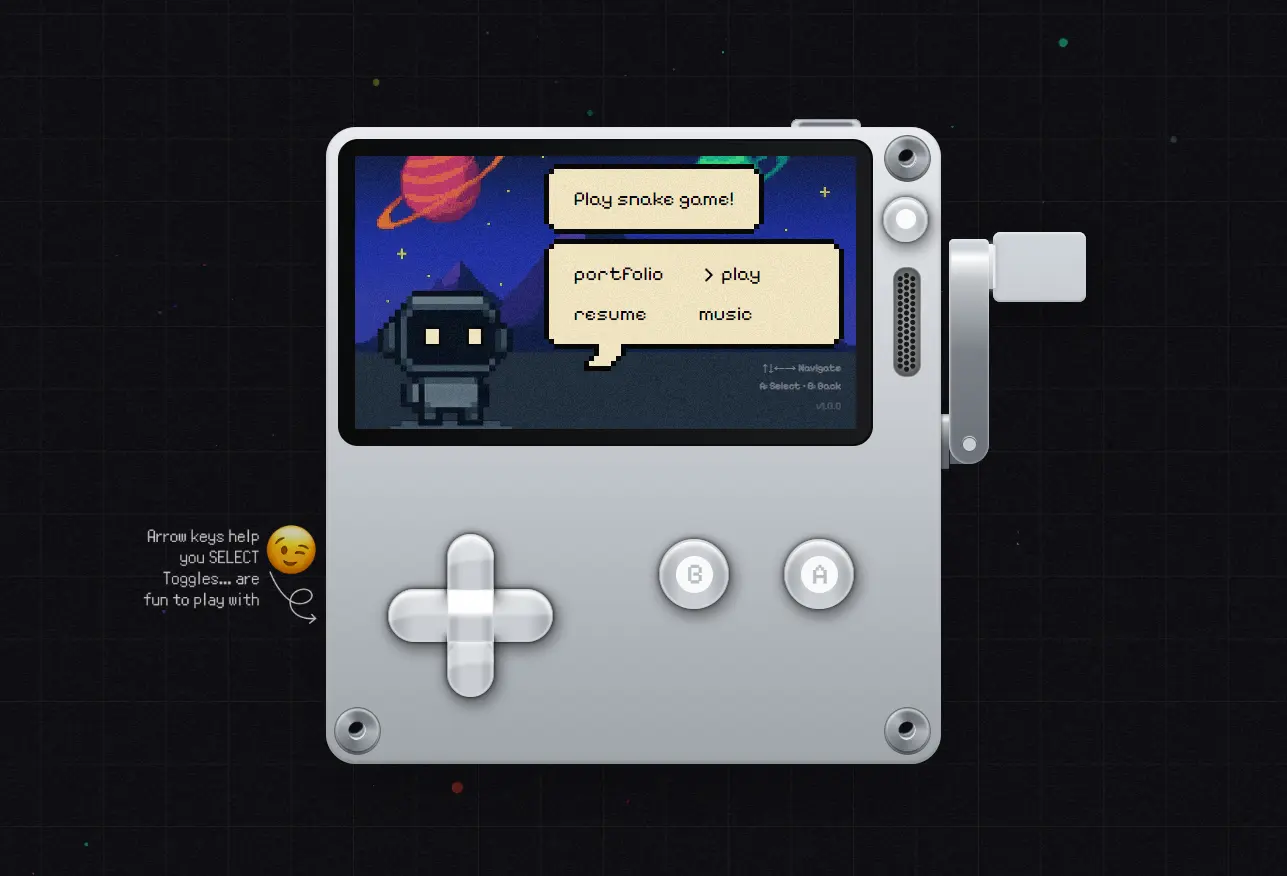
Stark’s Portfolio is a modern, interactive, full-stack portfolio template for developers built with Next.js, Prisma, and shadcn/ui.
It replicates the Playdate handheld console interface that features a black-and-white screen and simulated D-pad controls.
Features
🎮 Playdate-inspired interface with black-and-white monochrome design that mimics a handheld gaming device.
🔐 Built-in authentication system supporting GitHub and Google OAuth through Better Auth.
🎨 Pre-built accessible UI components using shadcn/ui for consistent design and improved user experience.
✨ Smooth animations and transitions powered by Framer Motion to enhance interactivity.
🗄️ Database integration with Prisma ORM supporting PostgreSQL, MySQL, and SQLite.
🔍 Analytics tracking through Umami for monitoring portfolio traffic and user behavior.
🎯 State management using Zustand for application state handling.
🔄 Server-side data fetching with TanStack Query for optimized API calls and caching.
Use Cases
- Personal Portfolio You can use this template to create a personal website that highlights your skills and projects.
- Project Showcase The unique interface is ideal for showcasing creative coding projects, game development work, or other interactive experiences.
- Online Resume It can function as an interactive online resume to capture the attention of potential employers or clients.
How to Use It
1. Clone the repository from GitHub.
git clone https://github.com/NotStark/portfolio.git
cd portfolio
2. Install the necessary dependencies.
npm install3. Configure your environment variables. Create a new file named .env in the root of the project and copy the contents from the .env.example file. You will need to populate this file with your own credentials and settings.
# Your GitHub username (
NEXT_PUBLIC_GITHUB_USERNAME="your-github-username"

#  whether your available for work or not
NEXT_PUBLIC_AVAILABLE_STATUS=true

# Base URL of your dloyed app
# Example: "https://yourdomain.com"
NEXT_PUBLIC_APP_URL="https://yourdomain.com"

# Umami website ID
NEXT_PUBLIC_UMAMI_WEBSITE_ID="your-umami-site-id"


# 🗄️ PostgreSQL / MySQL / SQLite connection string for Prisma ORM
DATABASE_URL="postgresql://user:password@localhost:5432/your_db_name"

# GitHub OAuth credentials
GITHUB_CLIENT_ID="your-github-client-id"
GITHUB_CLIENT_SECRET="your-github-client-secret"

# Google OAuth credentials
GOOGLE_CLIENT_ID="your-google-client-id"
GOOGLE_CLIENT_SECRET="your-google-client-secret"

# GitHub Personal Access Token
# Example: ghp_XXXXXXXXXXXXXXXXXXXXXXXXXXXX
GITHUB_TOKEN="your-github-access-token"

# Secret key for BetterAuth — used to sign and verify sessions/tokens
BETTER_AUTH_SECRET="your-better-auth-secret"

# URL where BetterAuth API is hosted (usually app URL)
BETTER_AUTH_URL="https://yourdomain.com"

# Umami Admin API Key
UNAMI_API_KEY="your-umami-api-key"
Your .env file will contain several important variables. For the application to function correctly, you must provide your GitHub username, application URL, and optionally an Umami website ID for analytics. You also need to set your availability status.
For the backend, you will need to provide a database connection string for Prisma. This can be for PostgreSQL, MySQL, or SQLite. You will also need to add your GitHub and Google OAuth credentials for authentication, along with a GitHub Personal Access Token. Finally, configure the secret key and URL for Better Auth.
4. Generate the Prisma Client to interact with your database.
npx prisma generate5. Run the development server, and your portfolio website should now be running locally at http://localhost:3000.
npm run dev6. For deployment, the template is optimized for Vercel. You can connect your GitHub repository to Vercel, add your environment variables in the project settings, and deploy.
Related Resources
- Next.js Commerce: A starter kit for building high-performance e-commerce sites with Next.js.
- shadcn-portfolio: A minimal and modern portfolio template built with Next.js and shadcn/ui, featuring blog functionality and Framer Motion animations.
- Next.js Boilerplate: Discover more starter templates for getting started with Next.js and React quickly.
FAQs
Q: Can I customize the Playdate aesthetic or change the design?
A: Yes, you can modify the design by adjusting Tailwind CSS classes in your component files. The monochrome Playdate theme is implemented through CSS, so you can experiment with different color schemes and layouts while keeping the core functionality intact.
Q: Which database should I choose for my portfolio?
A: PostgreSQL is recommended for production deployments due to its reliability and performance. SQLite works well for development and small-scale projects. MySQL is another solid choice if that is your preference or existing infrastructure.
Q: Do I need to host my own server or can I use a serverless option?
A: Vercel handles both frontend and backend through serverless functions, so you do not need to manage your own server. Your API routes run as serverless functions, and Vercel manages scaling automatically.
Q: How do I add my GitHub projects to the portfolio automatically?
A: The template can fetch your GitHub profile data using the GitHub API through the GITHUB_TOKEN you configured. You can query your repositories and display them on your portfolio without manually entering data.
Q: Is the template optimized for search engines?
A: Yes, Next.js provides built-in SEO features including server-side rendering and static generation. You can add meta tags, Open Graph tags, and structured data to improve your portfolio’s visibility in search results.