The Future of Web Dev
The Future of Web Dev
Visual No-Code Editor for shadcn/ui – UI Builder
Design and build UIs visually with the shadcn/ui UI Builder. No code required!
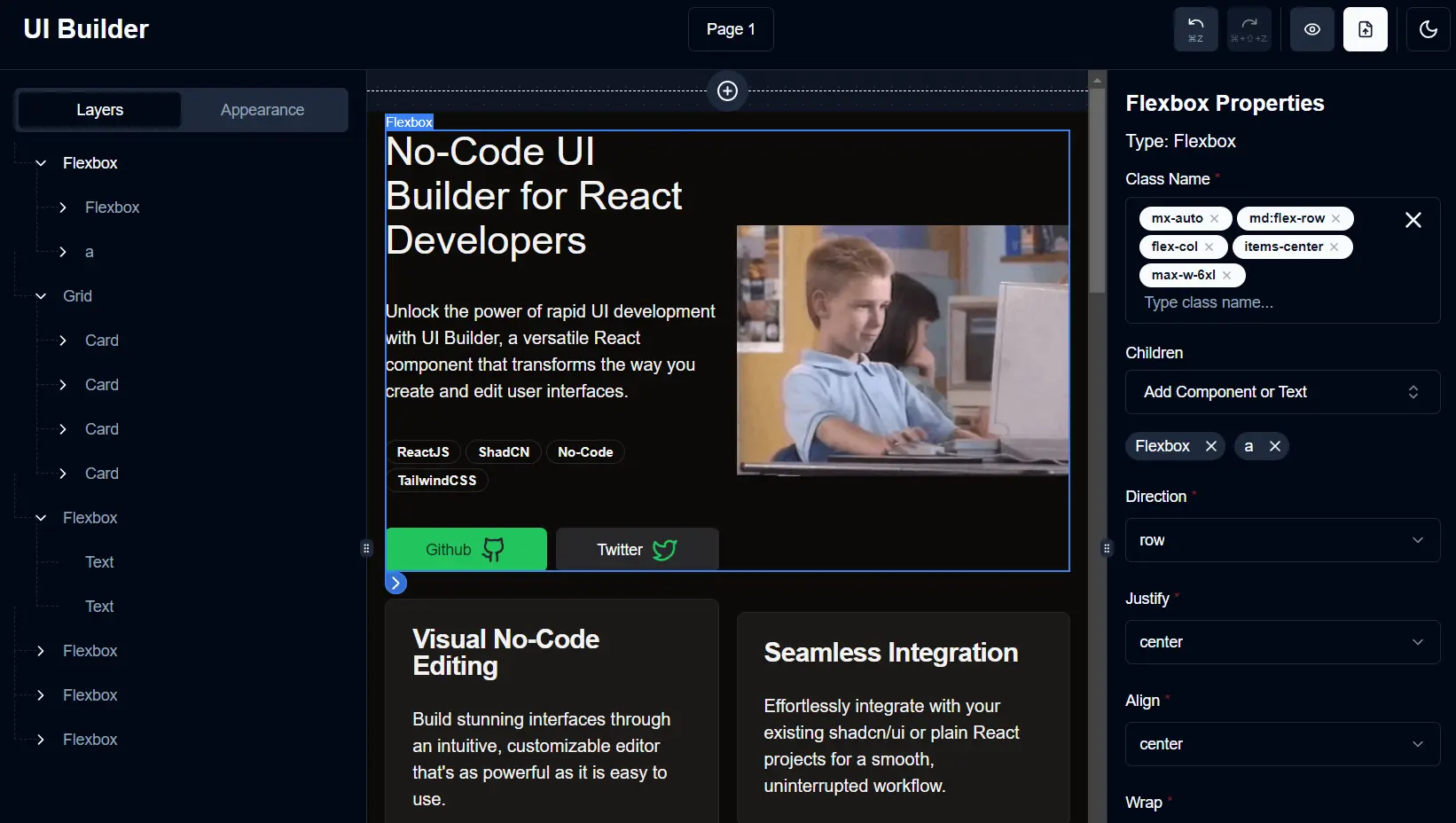
UI Builder is a React component that enables developers and designers to visually create and modify user interfaces using shadcn/ui or your own components.
It is ideal for rapid prototyping and development of landing pages, forms, dashboards, and more. It can function as an internal tool for prototyping or as a feature within a product, enabling users to build applications visually.
Features
🧩 shadcn/ui Integration: Works seamlessly with the shadcn/ui component library.
🧱 Custom Components: Extend functionality by incorporating your own components.
🔄 State Management: Control and manipulate the UI state programmatically using callbacks.
📝 Zod Schema Validation: Validate component properties using Zod schemas for type safety and data integrity.
✨ Visual Editor: Drag-and-drop interface for intuitive UI construction.
💾 Local Storage Persistence: UI state is saved locally, preserving work across sessions.
➡️ Layer Renderer: Render finalized UIs without the editor for production environments.
🤖 Component Registry Generation: Automate component definition generation to save time and effort.
Use Cases
- Rapid Prototyping: Quickly create UI mockups and prototypes to visualize and test designs before writing code.
- Landing Page Development: Design and build landing pages with various layouts and components without coding expertise.
- Internal Tooling: Replace or supplement Storybook for internal component exploration and documentation.
- No-Code Application Builders: Empower users to create their own applications visually, similar to platforms like Shopify or Webflow.
- Dashboard Creation: Build interactive dashboards with charts, graphs, and other data visualization components.
Installation and Usage
Installation:
For projects utilizing shadcn/ui:
npx shadcn@latest add https://raw.githubusercontent.com/olliethedev/ui-builder/main/registry/block-registry.jsonFor new projects with UI Builder:
npx shadcn@latest init https://raw.githubusercontent.com/olliethedev/ui-builder/main/registry/block-registry.jsonEnsure style variables are used for proper theming. Address dependencies if necessary:
npm install [email protected]
npm install -D @types/lodash.template @tailwindcss/typography @types/react-syntax-highlighter react-docgen-typescript tailwindcss-animate ts-morph ts-to-zod
Basic Usage:
import UIBuilder from "@/components/ui/ui-builder";
export function App() {
  return <UIBuilder />;
}
Usage with Initial State and onChange:
import UIBuilder from "@/components/ui/ui-builder";
import { PageLayer } from "@/lib/ui-builder/store/layer-store";
const initialLayers = [/* Your initial layer configuration */];
const App = () => {
  const handleLayersChange = (updatedLayers) => {
    console.log(updatedLayers); // Save to database or perform other actions
  };
  return <UIBuilder initialLayers={initialLayers} onChange={handleLayersChange} />;
};
export default App;
Related Resources
- shadcn/ui: The underlying component library that UI Builder integrates with. https://ui.shadcn.com/
- Zod: A schema declaration and validation library used by UI Builder. https://zod.dev/
- React: The JavaScript library for building user interfaces that UI Builder is built upon. https://reactjs.org/
FAQs
Q: Can I use UI Builder with my existing React project?
A: Yes, UI Builder can be integrated into existing React projects, especially those using shadcn/ui.
Q: Does UI Builder support custom components?
A: Yes, you can extend UI Builder to include your own custom components.
Q: How does UI Builder store the created UI designs?
A: By default, UI Builder uses browser local storage to persist designs across sessions.
Q: Can I export the created designs as code?
A: While not explicitly mentioned, UI Builder likely provides a way to export designs as React components or JSX.
Q: Is UI Builder suitable for production use?
A: UI Builder can be used in production, particularly for internal tools or as part of a no-code platform offering.