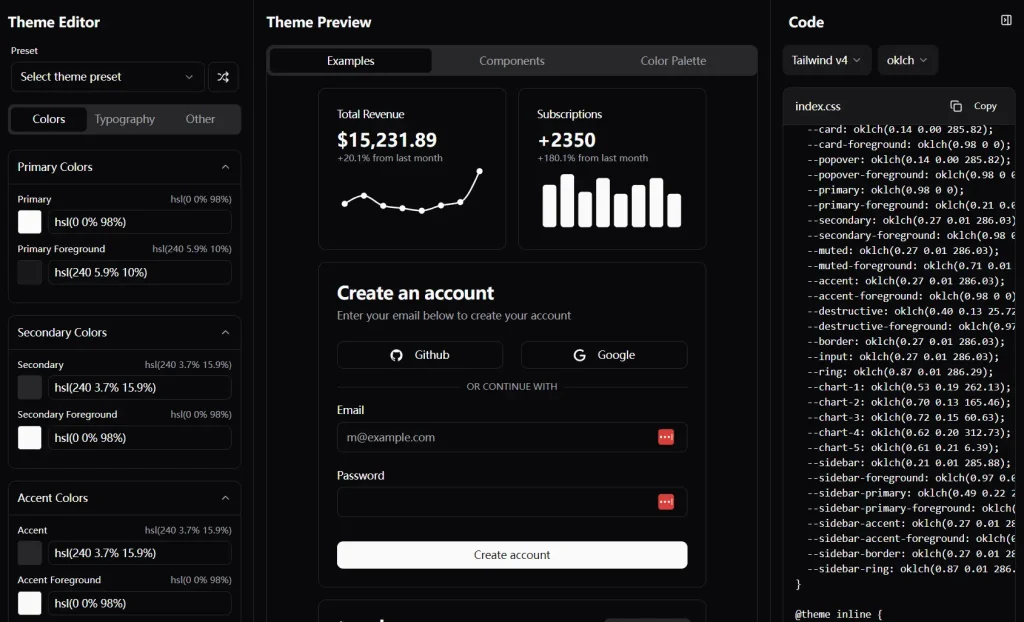
tweakcn is a visual theme editor built specifically for shadcn/ui components. This tool allows you to customize the appearance of these components using a no-code interface, complete with Tailwind CSS support.
The core function of tweakcn is to provide visual control over the styling of shadcn/ui elements. You get a real-time preview of your changes, which makes the design process more intuitive. You can adjust colors, dimensions, typography, and even interactive effects.
Features
🎨 Visual Theme Customizer: Modify shadcn/ui themes with a real-time preview, no coding required.
🌈 Full Color Control: Set background, text, and border colors to match your brand.
🔤 Typography Options: Choose font sizes, weights, and text transformations.
📤 Code Export: Generate React component code or CSS for Tailwind integration.
⚙️ Advanced Button Customization: Fine-tune every aspect of your buttons, from colors to hover effects.
📏 Dimension Adjustments: Control padding and border radius for pixel-perfect layouts.
✨ Effects and States: Add shadows, transitions, and customize hover, focus, and active states.
Use Cases
- Customizing UI components for a corporate website.
- Rapidly prototyping design variations for client review.
- Standardizing button designs across a design system.
- Experimenting with theme presets to refine visual identity.
- Integrating custom components into existing React projects.
Development
1. Clone the repository:
   git clone https://github.com/jnsahaj/tweakcn.git
   cd tweakcn
2. Install the required dependencies:
npm install3. Start the development server:
npm run dev4. Open http://localhost:8080 in your browser.
Usage
tweakcn currently focuses on button customization. The interface provides visual controls for aspects like background color, text color, padding, border-radius, and more.
You modify these properties, and the changes are shown in a real-time preview. Once satisfied, you can export the generated code as a React component or as CSS compatible with Tailwind.
Related Resources
- shadcn/ui: The component library that tweakcn is built to customize. https://ui.shadcn.com/
- Tailwind CSS: The utility-first CSS framework used for styling. https://tailwindcss.com/
FAQs
Q: Does tweakcn generate standalone components or do I need to include shadcn/ui in my project?
A: You still need to include shadcn/ui in your project. tweakcn generates customized versions of shadcn/ui components that you can use within your existing shadcn/ui implementation.
Q: Can I save my custom themes for future use?
A: While the current beta version doesn’t support saving custom themes, this feature is on the roadmap and will be included in future releases.
Q: Will tweakcn support all shadcn/ui components?
A: Yes, the roadmap includes plans to add support for all shadcn/ui components. The beta currently focuses on the Button component.
Q: Is tweakcn compatible with other UI libraries?
A: No, tweakcn is specifically designed for shadcn/ui components. It leverages the architecture of shadcn/ui and Tailwind CSS to provide its customization capabilities.
Q: What are the system requirements for tweakcn?
A: You need Node.js 18+ and a package manager like npm, yarn, or pnpm.
Preview