The Future of Web Dev
The Future of Web Dev
SvelteKit Dashboard Starter Template with RBAC and Multi-Tenancy – SvelterApp
A SvelteKit dashboard starter with RBAC, multi-tenant support, Auth.js, Prisma, and Tailwind CSS 4. Clone and start building.
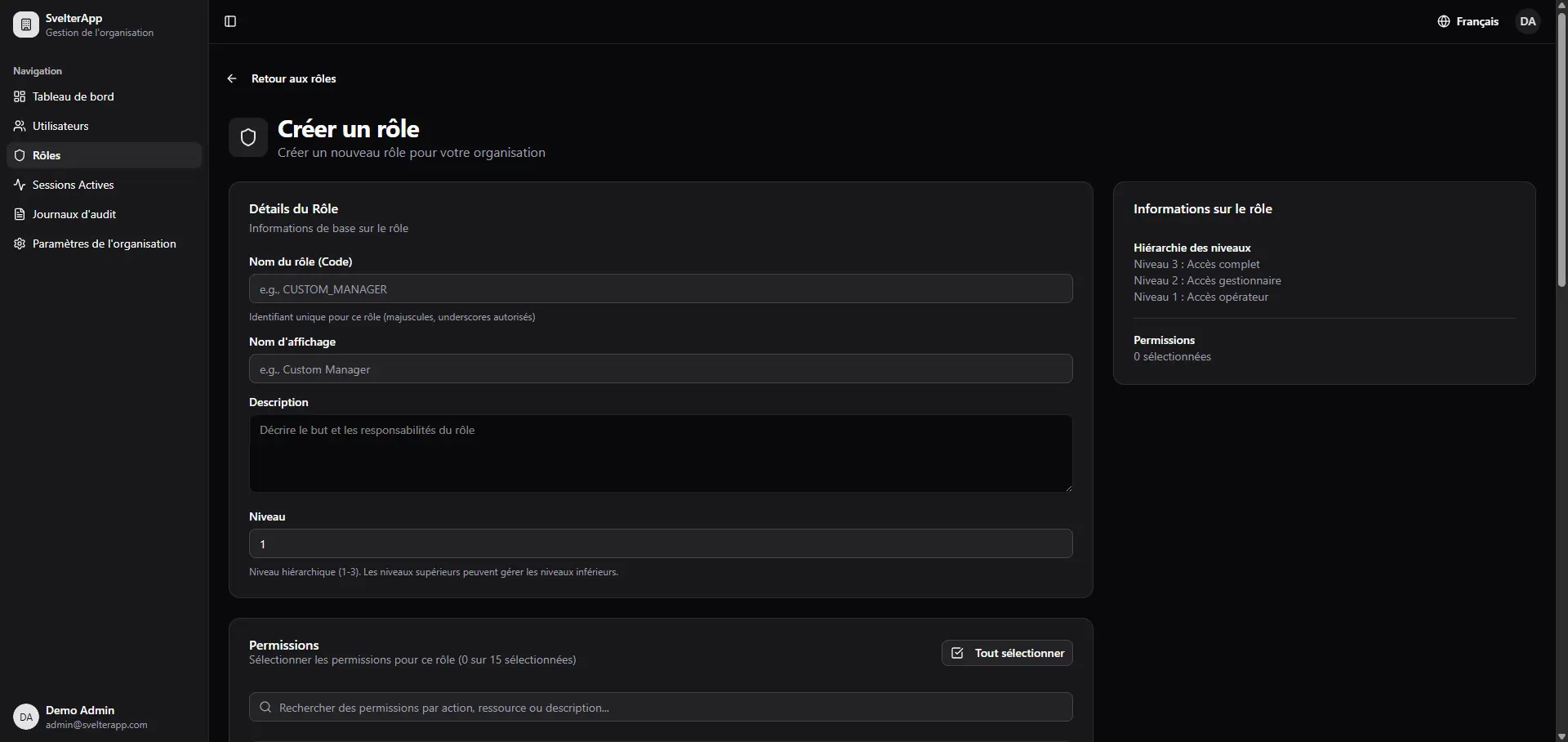
SvelterApp is a SvelteKit dashboard starter template that features fully functional Role-Based Access Control system, multi-tenant organization support, and a complete authentication flow. Built on top of Svelte with runes ($state, $derived, $effect), SvelteKit, TypeScript, Prisma, and PostgreSQL.
The template connects Auth.js for session management, Shadcn-svelte and Tailwind CSS 4 for the UI layer, Paraglide.js for compile-time internationalization, and Resend for transactional email. The RBAC logic lives in src/lib/server/rbac/ and follows a resource:action permission pattern, so route guards like requirePermission(event, 'users:create') read clearly and stay consistent across the codebase.
Features
🔐 Authentication System: Auth.js handles email/password login, password reset, email verification, session management, and email change confirmation with a Prisma adapter for database-backed sessions.
🛡️ Role-Based Access Control: A four-tier role hierarchy (SUPER_ADMIN → ADMIN → MANAGER → OPERATOR) with granular resource:action permissions, route-level guards, and permission-based UI rendering scoped to each organization.
🏢 Multi-Tenant Architecture: Each organization operates as an isolated tenant with its own user base, role assignments, settings, and tax identifier fields.
👥 User Management: Full CRUD for users, an invitation system, active session tracking, profile management, and an email change workflow with confirmation.
📊 Audit Logging: Every action logs the user, IP address, user agent, and metadata. The dashboard exposes a filterable audit log view with export support.
🌍 Internationalization: Paraglide.js handles compile-time i18n across English, French, and Arabic with RTL layout support and a language switcher built into the UI.
🎨 UI Layer: Shadcn-svelte components sit on top of Tailwind CSS 4. Dark mode toggles via mode-watcher. Data tables, toast notifications via Svelte Sonner, and Lucide Svelte icons are all wired in.
📧 Email Service: Resend handles transactional emails. HTML templates are pre-built for password reset, invite, and email verification flows.
✅ Form Handling: SvelteKit Superforms and Formsnap manage form state and submission. Zod schemas validate all inputs server-side.
🔷 Type Safety: TypeScript runs strict mode throughout. Prisma generates a fully typed client from the schema.
Use Cases
- SaaS Applications: Build a multi-tenant SaaS platform where each customer organization has isolated data, its own admin users, and role-scoped access to features.
- Admin Dashboards: Deploy an internal admin panel that needs granular permission control, audit trails, and user invitation flows without building those systems from scratch.
- Enterprise Internal Tools: Stand up a management tool for teams where different staff levels (managers, operators) see and act on different parts of the interface.
- Startup MVPs: Prototype a product that needs authentication, organization management, and access control working before the first users arrive.
How to Use It
1. Clone the Repository from GitHub.
git clone https://github.com/SaiefBrahim/SvelterApp.git
cd SvelterApp
2. Install Dependencies
pnpm install
# or
npm install
3. Copy the example environment file:
cp .env.example .envOpen .env and fill in the following variables:
# Database
DATABASE_URL="postgresql://postgres:postgres@localhost:5432/svelterapp?schema=public"
# Auth.js Configuration
AUTH_SECRET="your_auth_secret"
AUTH_TRUST_HOST=true
# Application
ENVIRONMENT="development"
PUBLIC_APP_NAME="Svelter App"
PUBLIC_APP_URL="http://localhost:5173"
# Resend Email Service (optional for development)
RESEND_API_KEY=
MAILER_ADDRESS="SvelterApp <[email protected]>"
4. Generate a cryptographically secure AUTH_SECRET with this command:
npx auth secretThe output will print a ready-to-paste secret. Copy it directly into the AUTH_SECRET field in .env.
5. Set Up the Database:
# Generate the Prisma Client from schema.prisma
pnpm db:generate
# Apply migrations to create all tables
pnpm db:migrate
# Seed roles, permissions, a super admin user, and sample data
pnpm db:seed
The seed script creates four system roles (SUPER_ADMIN, ADMIN, MANAGER, OPERATOR), assigns default permissions to each, and generates a super admin account:
- Email:
[email protected] - Password:
admin123
Change this password before any production deployment.
6. Compile i18n Messages. Paraglide.js requires a compilation step to generate type-safe message functions from the translation files in messages/:
Paraglide.js requires a compilation step to generate type-safe message functions from the translation files in messages/:
pnpm lang:compile7. Start the Development Server. The app runs at http://localhost:5173. Log in with the seeded super admin credentials to access the full dashboard.
pnpm dev8. Available Scripts:
| Command | Description |
|---|---|
pnpm dev | Start the development server at localhost:5173 |
pnpm build | Compile the app for production |
pnpm preview | Serve the production build locally |
pnpm check | Run Svelte type-checking via svelte-check |
pnpm db:generate | Regenerate the Prisma Client from schema.prisma |
pnpm db:push | Push schema changes directly without a migration file |
pnpm db:migrate | Apply pending migrations to the database |
pnpm db:seed | Seed roles, permissions, and the default super admin |
pnpm db:studio | Open Prisma Studio in the browser |
pnpm db:reset | Drop and recreate the database — destructive |
pnpm lang:compile | Compile Paraglide.js i18n message files |
Related Resources
- SvelteKit: The full-stack Svelte framework that handles routing, SSR, and server-side logic for this template.
- Shadcn-svelte: A Svelte port of the shadcn/ui component system, where components are copied into your codebase as editable source files.
- Auth.js: A multi-framework authentication library that covers sessions, OAuth providers, and database adapters, including the Prisma adapter used here.
- Paraglide.js: A compile-time i18n library from the Inlang ecosystem that generates typed message accessor functions with zero runtime overhead.
FAQs
Q: Can I swap PostgreSQL for a different database?
A: Prisma 7 ships with driver adapters that support MySQL, SQLite, and CockroachDB. Change the provider field in prisma/schema.prisma, update DATABASE_URL accordingly, and re-run pnpm db:generate and pnpm db:migrate. Auth.js session strategy depends only on the Prisma adapter, not on a specific database engine.
Q: Does the email system work in local development without a Resend API key?
A: Yes. RESEND_API_KEY is optional for development. When left empty, email actions (password reset, invitations) will either skip sending or log to the console depending on the service implementation. Set the key only when you need to test actual delivery.
Q: How do I add a new role beyond the four defaults?
A: Add the role definition to prisma/seed.ts in the roles array, assign the appropriate permissions in DEFAULT_ROLE_PERMISSIONS, and run pnpm db:seed. Then reference the role name in route guards using requireRole(event, 'YOUR_ROLE') or rely on the existing permission guards with the new role’s assigned permissions.
Q: What happens if I run pnpm db:reset?
A: This command drops the entire database, re-runs all migrations from scratch, and re-seeds. All existing data is lost. It is safe on a development machine when you need a clean state, but never run it against a production database.
Q: Can I deploy this to Vercel or another serverless platform?
A: SvelteKit supports multiple adapter targets. To deploy on Vercel, install @sveltejs/adapter-vercel and update svelte.config.js. The Prisma connection setup may require using @prisma/adapter-neon or a connection pooler like PgBouncer depending on whether your PostgreSQL instance supports serverless-friendly pooling.