The Future of Web Dev
The Future of Web Dev
Modern Dashboard Starter Template with Tailwind and Vite
Quickly build modern admin dashboards with Timo Dash. This starter kit features Vite, Tailwind CSS, Chart.js, and light/dark themes.
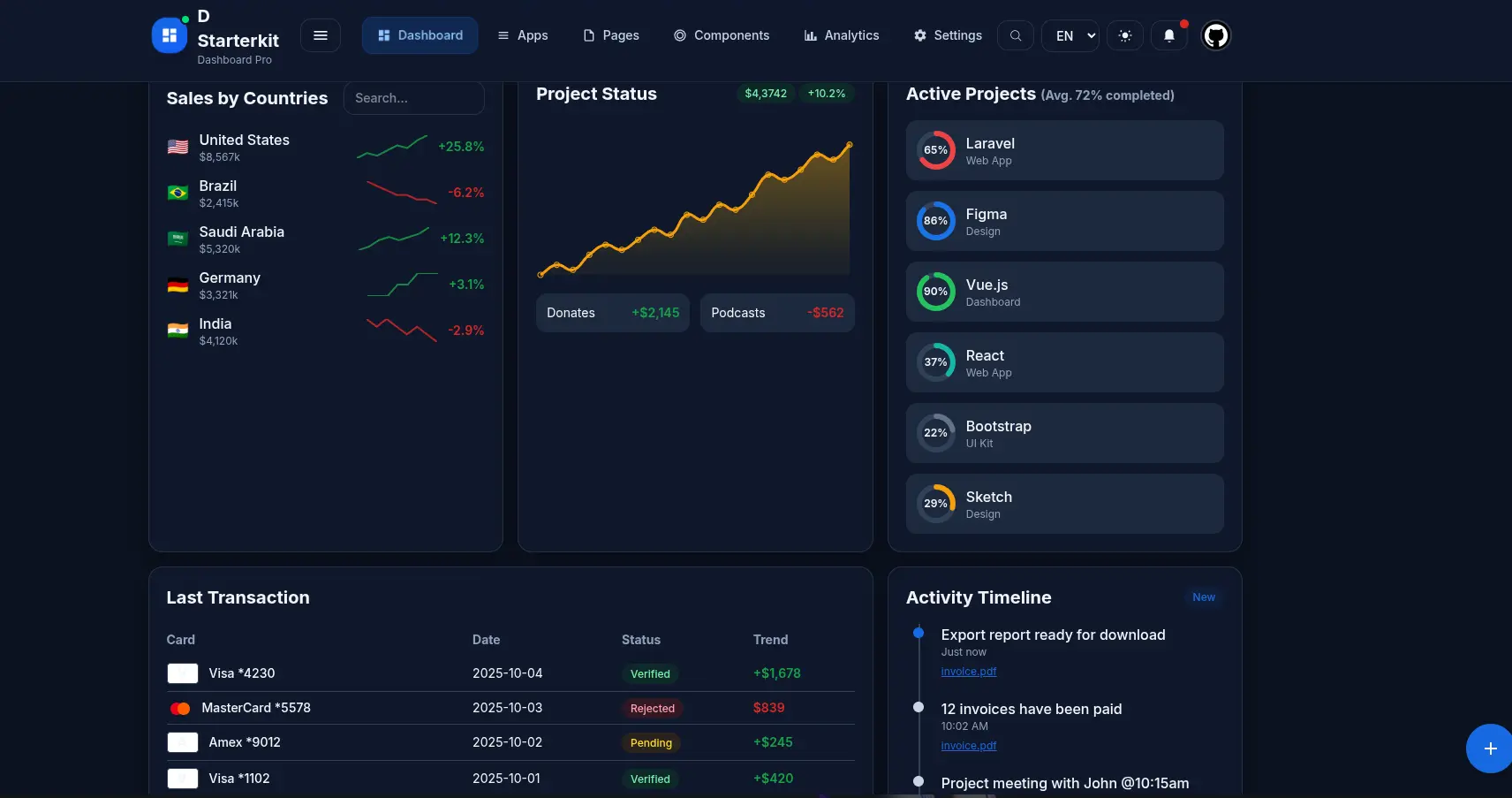
Timo Dash is a modern dashboard starter kit that combines Vite, Tailwind CSS, and Chart.js to help you build admin panels and data visualization applications.
The kit includes pre-built components for dashboard elements like KPI cards, data tables, navigation systems, and activity timelines. You can clone the repository and have a working dashboard running locally in minutes.
Features
⚡ Fast development workflow with Vite’s hot module replacement and build optimization.
🎨 Light and dark theme system with automatic persistence in localStorage.
📊 Pre-configured Chart.js with bar charts, radar charts, area charts, and more.
🧩 Reusable component library including header navigation, KPI cards, data tables, and progress indicators.
🎯 CSS custom properties for easy color and styling customization across themes.
📂 Six main navigation sections with dropdown menus and mobile drawer support.
Use Cases
- Admin Dashboards: Build back-end interfaces for managing application data, users, and settings.
- Analytics Platforms: Create platforms to monitor website traffic, user engagement, and other metrics with detailed charts.
- Data Visualization Tools: Develop custom tools for analyzing and presenting complex datasets in a graphical format.
- Project Management Interfaces: Construct dashboards to track project progress, timelines, and team activities.
- E-commerce Store Management: Assemble a control panel for online store owners to manage products, orders, and view sales data.
How to Use It
1. Clone the repository from GitHub
git clone https://github.com/omaralalwi/timo-dash.git
cd timo-dash
2. Install the necessary project dependencies.
npm install3. Start the development server. This server provides a live preview of your application and automatically reloads the page when you make changes to the source code.
npm run devThe terminal will display a local URL, typically http://localhost:5173. Open this URL in your web browser to see the Timo Dash dashboard.
4. To create a production-ready version of your application, run the build command.
npm run buildThis process bundles all your assets and outputs them to the dist directory. You can then deploy the contents of this directory to your web server.
5. You can customize the dashboard’s appearance by editing the CSS custom properties. The main color scheme is defined in the @theme block within the src/styles.css file. For example, you can change the primary and success colors like this.
@theme {
  --color-primary: #3B82F6;
  --color-success: #10B981;
  /* other color variables */
}
6. Chart configurations are located in src/charts.js. You can modify this file to change chart types, data, and visual options according to your needs.
Related Resources
- Vite offers the build tooling and development server that powers Timo Dash’s fast refresh and optimized production builds.
- Tailwind CSS provides the utility-first CSS framework used throughout the template for responsive design and theme customization.
- Chart.js delivers the charting library that renders all data visualizations in the dashboard.
- Heroicons supplies the icon set used in navigation menus and UI components.
FAQs
Q: How do I connect Timo Dash to a backend API for real data?
A: Replace the sample data in src/charts.js and component files with API calls using the Fetch API or libraries like Axios. You’ll need to handle loading states, error handling, and data transformation to match the expected format for charts and tables. The template structure supports adding API integration without major refactoring.
Q: Does Timo Dash support authentication and user management?
A: The template includes a profile menu UI but does not implement authentication logic. You need to add authentication yourself using solutions like Auth0, Firebase Authentication, or custom JWT-based systems. The template provides the UI foundation for login flows and user settings.
Q: Can I add new pages or routes to Timo Dash?
A: The template is a single-page application without a routing library. You can add client-side routing by integrating libraries like Page.js or Navigo, or convert the project to a multi-page application by creating additional HTML files and updating the Vite configuration.