The Future of Web Dev
The Future of Web Dev
Next.js AI Chatbot Starter Template: Supabase Integration
Create an AI chatbot using Next.js, Vercel's AI SDK & Supabase. Quick setup, deploy with ease. Start building your chatbot today!

This is an open-source AI chatbot starter template that helps developers to quickly integrate AI capabilities into their web applications.
This template is built with Next.js and the AI SDK by Vercel, and leverages Supabase for robust database management, file storage, and authentication.
Features
🤖 Vercel AI SDK: Offers a unified interface for interacting with large language models. It has built-in support for streaming and real-time responses.
💅 Styling with shadcn/ui: Uses Tailwind CSS for styling. It includes component primitives from Radix UI for accessibility and flexibility.
🔌 Multiple Model Providers: Comes with OpenAI’s gpt-4o by default. You can switch to Anthropic, Cohere, and others with the AI SDK.
🚀 Next.js App Router: Delivers advanced routing capabilities. It improves both navigation and overall application performance.
💾 Supabase Integration: Combines Supabase Postgres for data storage. It uses Supabase Auth for secure user authentication and Supabase File Storage for file management.
🔄 Real-time Updates: Supports real-time subscriptions. This ensures your chatbot’s conversations are updated live.
Use Cases
- Customer Support Automation: Build a chatbot that handles common customer queries. This template allows you to integrate a helpdesk system using Supabase to store conversation history. It offers instant support and reduces the load on human agents.
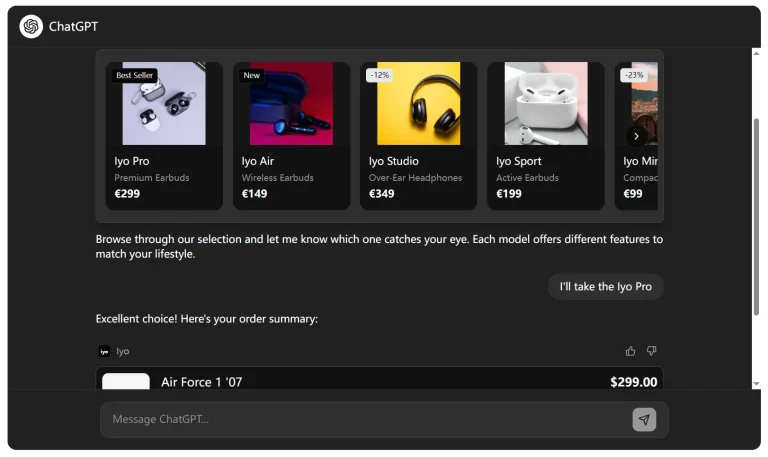
- E-commerce Product Recommendations: Create a chatbot that guides users through product discovery. It can provide personalized recommendations based on user preferences and interactions. With the AI SDK, the chatbot can understand natural language queries and suggest relevant products.
- Interactive Learning Guides: Develop educational chatbots that help users learn new skills or navigate complex software. The chatbot can provide step-by-step instructions, answer questions, and offer tips.
- Personalized User Onboarding: Implement a chatbot that welcomes new users and guides them through your application. It can demonstrate key features, and answer initial questions. It helps users get comfortable quickly.
- Internal Knowledge Base: Use the chatbot as an internal tool for employees to access company information quickly. It can answer HR questions, provide IT support, and retrieve documents. Supabase’s real-time capabilities ensure the information is always up-to-date.
Installation
Prerequisites
- Node.js 18+
- pnpm (
npm install -g pnpm) - Git
- A code editor (VS Code recommended)
Supabase Setup
1. Install the Supabase CLI:
- Mac:
brew install supabase/tap/supabase - Windows (PowerShell):
scoop bucket add supabase https://github.com/supabase/scoop-bucket.git; scoop install supabase - Linux:
brew install supabase/tap/supabase - NPM/Bun:
npx supabase <command>
2. Create a Supabase Project:
npx supabase projects create -i "ai-chatbot-supabase"Save the project ID and database password shown after creation.
3. Link Your Project:
   npx supabase init
   npx supabase link --project-ref your-project-id
4. Configure Environment Variables. Create a .env.local file:
   NEXT_PUBLIC_SUPABASE_URL=<api-url>
   NEXT_PUBLIC_SUPABASE_ANON_KEY=<anon-key>
5. Initialize Database Schema:
   supabase db push
   supabase db reset --dry-run
Local Development
1. Clone and Install:
   git clone https://github.com/your-username/ai-chatbot-supabase.git
   cd ai-chatbot-supabase
   pnpm install
2. Start Development Server:
pnpm devThe application will be available at http://localhost:3000.
3. Development Commands:
   pnpm build          # Build for production
   pnpm start          # Start production server
   pnpm lint           # Run ESLint
   pnpm type-check     # Run TypeScript checks
Usage Example
// Basic chatbot implementation
import { OpenAIStream, StreamingTextResponse } from 'ai'
import { Configuration, OpenAIApi } from 'openai-edge'
const openai = new OpenAIApi(new Configuration({
  apiKey: process.env.OPENAI_API_KEY
}))
export async function POST(req: Request) {
  const { messages } = await req.json()
  const response = await openai.createChatCompletion({
    model: 'gpt-4o',
    stream: true,
    messages
  })
  const stream = OpenAIStream(response)
  return new StreamingTextResponse(stream)
}
FAQs
Q: Can I use different AI providers?
A: Yes, the template supports multiple providers like OpenAI, Anthropic, and Cohere with minimal configuration changes.
Q: Is authentication included?
A: The template includes Supabase authentication with multiple provider support and robust security features.
Q: How difficult is deployment?
A: Deployment is streamlined with Vercel, requiring just a few environment variable configurations.
Q: Can I customize the UI?
A: Absolutely. The template uses shadcn/ui and Tailwind CSS, allowing extensive customization.
Q: What performance optimizations are included?
A: The template leverages Next.js’s React Server Components, streaming responses, and built-in asset optimization.
Related Resources
Preview