The Future of Web Dev
The Future of Web Dev
Copy-paste React Components for AI Chat UI – Nexus UI
AI chat UI components for React built on shadcn, Tailwind, and Radix UI. Copy-paste into any project and own the code.
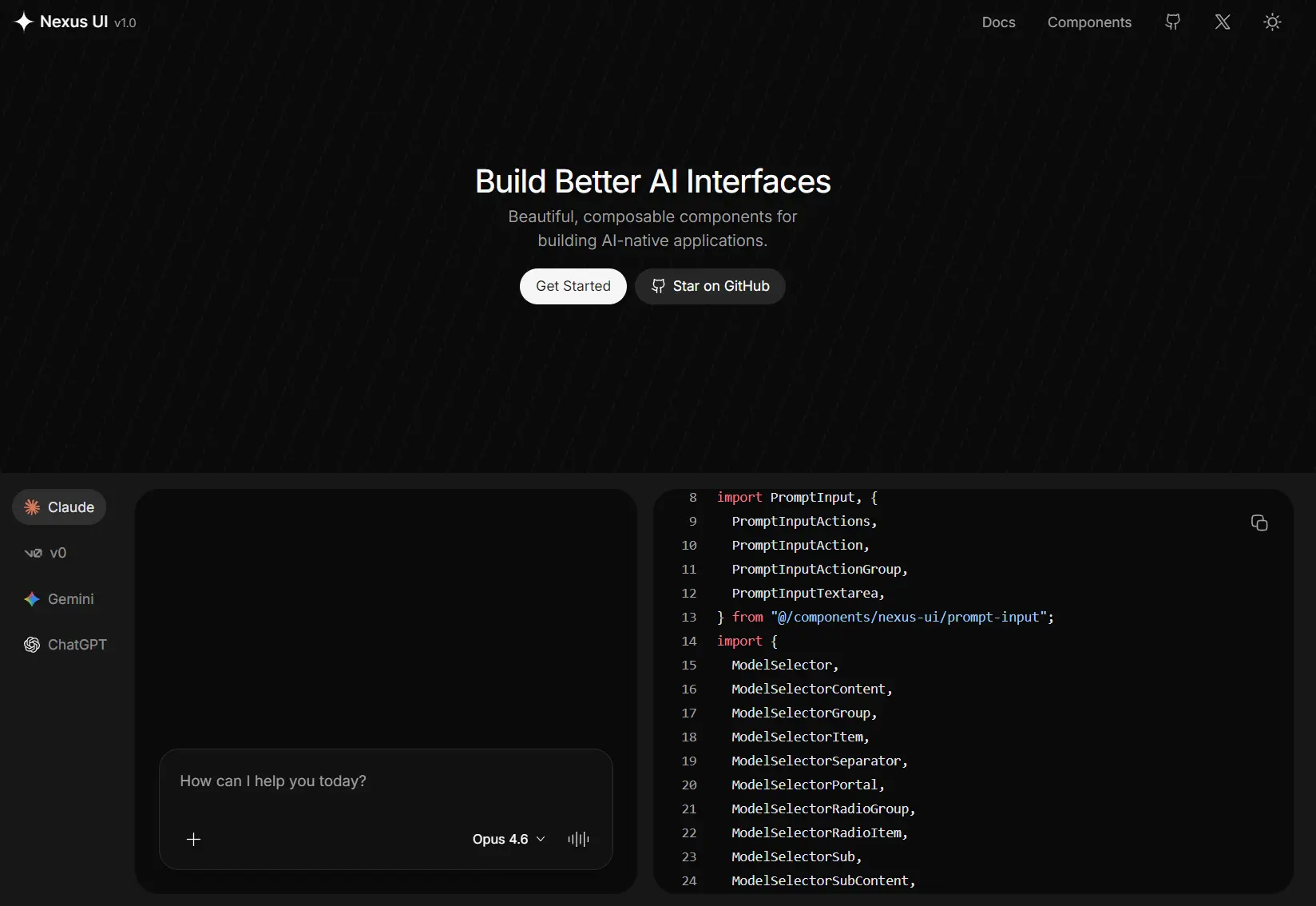
Nexus UI is a React component library designed for the specific UI patterns found in AI-powered chat applications like ChatGPT and Claude.
It currently comes with 7 UI components for streaming chat, model selection, file attachments, and message threading, all built on React, TypeScript, Tailwind CSS, and Radix UI primitives.
Features
🧩 Composable UI: Small, single-purpose primitives that combine into full chat experiences.
⚡ AI SDK Compatibility: Works with the useChat hook and the Vercel AI SDK.
🎨 shadcn/ui Theming: Reads design tokens and theme values from your existing shadcn/ui configuration.
📋 Copy-Paste: Components copy into your project as editable source files.
🗣️ Voice and Multimodal Support: Connects to ElevenLabs and other AI services for voice-enabled interfaces.
💬 Prompt Input: Auto-resizing chat textarea with configurable action slots for buttons and controls.
📎 File Attachments: Full attachment workflow with file preview, upload wiring, and message display variants.
🔄 Thread Management: Scrollable message thread container with automatic stick-to-bottom behavior and a jump-to-bottom control.
🤖 Model Selector: Dropdown menu for switching AI models, with radio groups, sub-menus, and custom list items.
💡 Suggestion Chips: Prompt suggestion chips that guide users toward common inputs.
📝 Message Layout: Chat message component with markdown rendering, avatar support, action buttons, and inline attachment display.
Use Cases
- Build a customer support chatbot UI with file upload and markdown message rendering.
- Assemble an AI coding assistant interface with live model switching and streamed output display.
- Create a voice-enabled AI app that connects to ElevenLabs for audio responses.
- Prototype a multimodal chat tool where users can attach images and documents alongside text prompts.
How to Use It
Prerequisites
Nexus UI requires shadcn/ui in your project. Run the initializer first if it is not already set up:
npx shadcn@latest initInstall UI components with shadcn CLI (Recommended)
npx shadcn@latest add @nexus-ui/prompt-input
npx shadcn@latest add @nexus-ui/model-selector
npx shadcn@latest add @nexus-ui/suggestions
npx shadcn@latest add @nexus-ui/attachments
...
Or pull a specific component by its registry URL
npx shadcn@latest add https://nexus-ui.dev/r/prompt-input.jsonSwap prompt-input for any available component slug. This method works without configuring the @nexus-ui registry scope.
Or via Nexus UI CLI
Run the Nexus UI CLI interactively to browse and select components:
npx nexus-ui-cli@latestTo add specific components in a single command, pass their names as arguments:
npx nexus-ui-cli@latest add prompt-input model-selector suggestions attachmentsCustom Registry Configuration
To use the @nexus-ui scope with a custom or self-hosted registry, add a registries block to components.json:
{
  "registries": {
    "@nexus-ui": "https://nexus-ui.dev/r/{name}.json"
  }
}
The {name} placeholder gets replaced with the component slug at install time.
Basic Usage: Chat Input
Import PromptInput and its sub-components from your local nexus-ui directory after installation:
import { Button } from "@/components/ui/button";
import PromptInput, {
  PromptInputActions,
  PromptInputAction,
  PromptInputActionGroup,
  PromptInputTextarea,
} from "@/components/nexus-ui/prompt-input";
import { ArrowUp02Icon, PlusSignIcon } from "@hugeicons/core-free-icons";
import { HugeiconsIcon } from "@hugeicons/react";
export default function ChatInput() {
  return (
    <PromptInput>
      <PromptInputTextarea />
      <PromptInputActions>
        <PromptInputActionGroup>
          <PromptInputAction asChild>
            <Button className="size-8 rounded-full bg-transparent text-gray-900 hover:bg-gray-200 dark:text-white dark:hover:bg-gray-700">
              <HugeiconsIcon
                icon={PlusSignIcon}
                strokeWidth={2.0}
                className="size-4"
              />
            </Button>
          </PromptInputAction>
        </PromptInputActionGroup>
        <PromptInputActionGroup>
          <PromptInputAction asChild>
            <Button className="size-8 rounded-full bg-gray-700 text-white hover:bg-gray-600">
              <HugeiconsIcon
                icon={ArrowUp02Icon}
                strokeWidth={2.0}
                className="size-4"
              />
            </Button>
          </PromptInputAction>
        </PromptInputActionGroup>
      </PromptInputActions>
    </PromptInput>
  );
}
Available UI Components
| Component | Description |
|---|---|
PromptInput | Root container for the chat input area |
PromptInputTextarea | Auto-resizing textarea for user text input |
PromptInputActions | Container for action buttons placed inside the input |
PromptInputAction | Individual action slot; accepts asChild to forward to a custom element |
PromptInputActionGroup | Groups related action buttons within the actions bar |
Suggestions | Renders prompt suggestion chips to guide user input |
ModelSelector | Dropdown for AI model selection with radio groups, sub-menus, and custom items |
Attachments | Composable attachment component with file preview, upload wiring, and display variants |
Message | Chat message layout with markdown rendering, optional avatar, action buttons, and attachment display |
Thread | Scrollable message thread container with stick-to-bottom behavior and a jump-to-bottom control |
Citation | Inline chip for showing a source reference with hover preview (favicon, label, and card copy for title, description, and link). |
Related Resources
- shadcn/ui: Copy-paste React component library built on Radix UI and Tailwind CSS.
- Vercel AI SDK: TypeScript toolkit for building AI applications.
- Radix UI: Unstyled, accessible component primitives for React.
- ElevenLabs: Voice AI platform.
FAQs
Q: Does Nexus UI work with Vite, or only with Next.js?
A: The components are framework-agnostic React code.
Q: Can I add Nexus UI components without shadcn/ui?
A: No. The shadcn CLI and the @nexus-ui registry scope both read from components.json. Run npx shadcn@latest init before adding any Nexus UI components.
Q: How do I update a component after copying it in?
A: Re-run the add command for that component. The CLI overwrites the existing file.
Q: Can Nexus UI components pull in additional shadcn/ui dependencies automatically?
A: Yes. The shadcn CLI resolves and installs component dependencies declared in the Nexus UI registry manifest. If a Nexus UI component depends on a shadcn/ui primitive you have not installed yet, the CLI adds it alongside the Nexus UI component files.