The Future of Web Dev
The Future of Web Dev
Tauri Desktop App Scaffolding with shadcn/ui – tauri-ui
Tauri shadcn/ui starter CLI scaffolds desktop apps with Vite, Next.js, React Router, Astro, or TanStack Start.
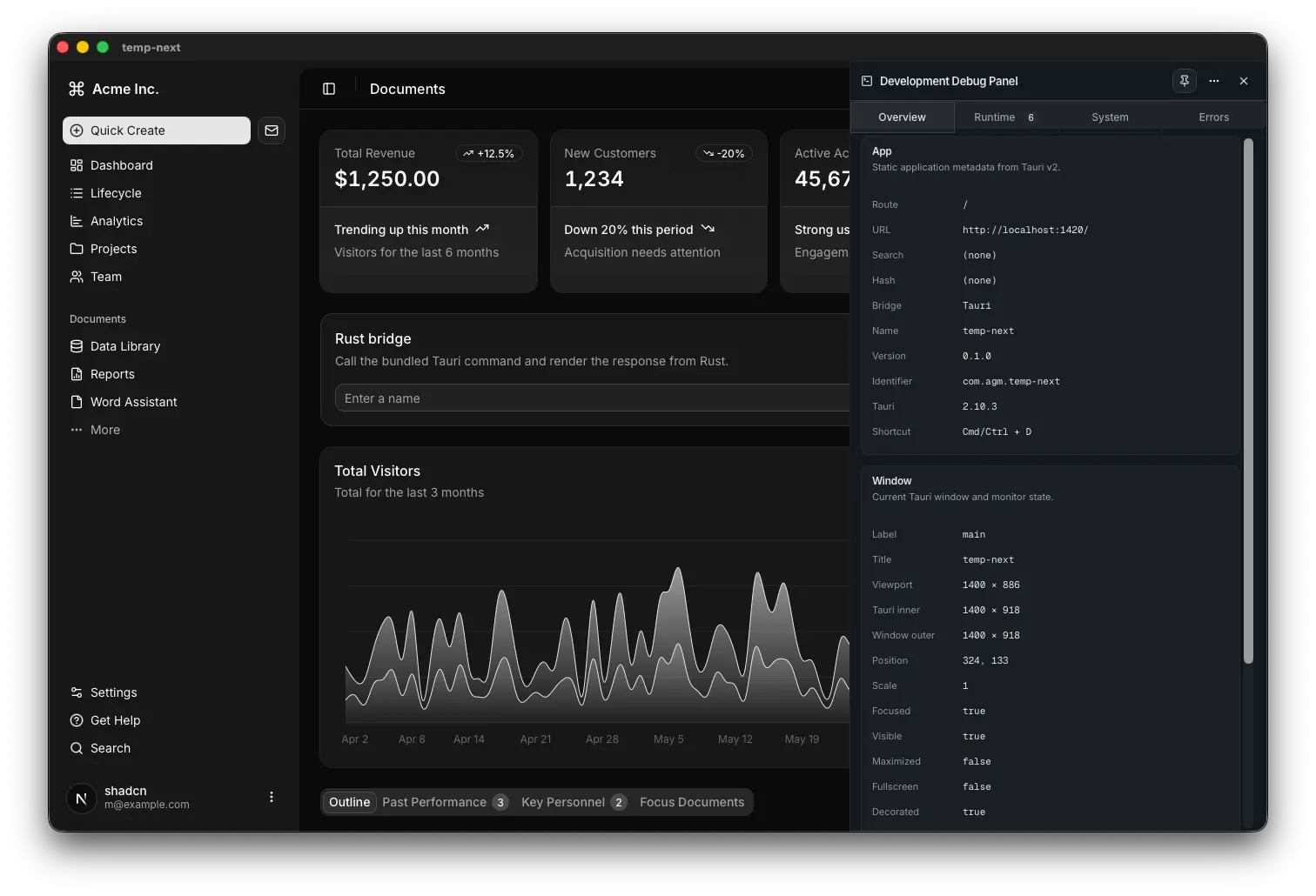
tauri-ui is a Tauri scaffolding workflow that creates desktop app projects with shadcn/ui frontends and native Tauri shells.
It uses the official shadcn/ui CLI, runs create-tauri-app, combines the frontend with src-tauri, and applies desktop app defaults early in the generated project.
The CLI supports Vite, Next.js, React Router, Astro, and TanStack Start. Each adapter receives framework aware patching for mount points, layouts, route shells, and development helpers.
You can scaffold a new desktop app, add optional batteries, manage those batteries later, and keep the project close to upstream tooling.
It’s ideal for developers who want a practical Tauri and shadcn/ui starter for desktop applications.
Features
⚡ One Command Scaffolding: Creates a shadcn/ui frontend and Tauri shell from a single CLI flow.
🧱 Multiple Frontend Choices: Supports Vite, Next.js, React Router, Astro, and TanStack Start.
🖥️ Desktop Defaults: Handles startup flash, external links, scroll behavior, text selection, and window placement.
🧩 Optional Batteries: Adds starter UI, runtime examples, release automation, and binary size tuning.
🛠️ Debug Panel: Shows app state, routes, window data, runtime events, logs, system paths, and host diagnostics.
🔁 Battery Management: Adds, updates, removes, and lists project batteries after scaffolding.
📦 Release Workflow: Creates GitHub Actions automation for platform specific desktop builds.
📐 Size Tuning: Adjusts release settings for smaller Tauri binaries.
Use Cases
- Build a Tauri desktop app with a shadcn/ui frontend.
- Start a Vite based desktop utility with desktop focused defaults.
- Create a Next.js desktop shell with client safe development helpers.
- Add a debug inspector to an existing tauri-ui project.
How to Use It
Requirements
Install the following before running the CLI:
- Bun
- Node.js 18+
- Rust toolchain
- Tauri system dependencies for your platform (Windows, macOS, or Linux)
Scaffold a New Project
Run the interactive CLI with no arguments:
bunx create-tauri-ui@latestThe CLI prompts you to pick a frontend template, a shadcn preset, and which optional batteries to include. After scaffolding completes, start the project:
cd my-app
bun install
bun run tauri dev
Scaffold with a Specific Template
Pass --template to skip the prompt and accept defaults with --yes:
bunx create-tauri-ui@latest my-app --template vite --yesAccepted template values: vite, next, react-router, astro, start.
Scaffold into a Named Directory
bunx create-tauri-ui@latest my-appNote that scaffolding into the current directory (.) is not supported.
Apply a shadcn Preset
bunx create-tauri-ui@latest my-app --preset b6GOPH2Zu --yesThe CLI accepts presets in three equivalent forms: b0, --preset b0, or --preset=b0. You can paste directly from a preset site without cleaning the value.
Skip the Starter Dashboard
bunx create-tauri-ui@latest my-app --template next --no-starter --yesEnable Size Optimization
bunx create-tauri-ui@latest my-app --template vite --size-optimize --yesThis writes the following Cargo profile configuration to src-tauri/Cargo.toml:
[profile.dev]
incremental = true
[profile.release]
codegen-units = 1
lto = true
opt-level = "s"
panic = "abort"
strip = true
It also sets removeUnusedCommands: true in the Tauri config:
{
  "build": {
    "removeUnusedCommands": true
  }
}
Add a Release Workflow at Scaffold Time
bunx create-tauri-ui@latest my-app --template vite --workflow --yesThe workflow battery writes a GitHub Actions file with a platform matrix, Tauri Action wiring, and release asset uploads.
Full Flag Example
bunx create-tauri-ui@latest my-app \
  --template vite \
  --preset b0 \
  --starter \
  --workflow \
  --size-optimize \
  --yes
First Checks After Scaffolding
After the project opens in Tauri dev mode, run these checks before committing the project structure:
- Confirm the window opens without a white startup flash.
- Click an external link and verify it opens in the system browser.
- Toggle the debug panel with Cmd/Ctrl+D.
- Run a production build once.
Recommended First Edits
- Set your real Tauri app identifier.
- Replace the default app icon.
- Remove any starter or example batteries you do not plan to keep.
Manage Batteries After Scaffolding
You do not need to decide which batteries to include at scaffold time. Run these commands inside any existing tauri-ui project:
bunx create-tauri-ui@latest list                       # show installed and available batteries
bunx create-tauri-ui@latest add debug-panel            # install a battery
bunx create-tauri-ui@latest update debug-panel         # pull the latest version
bunx create-tauri-ui@latest remove debug-panel         # uninstall
The CLI detects your frontend template from package.json. No manifest file is written to your repo. Updates are idempotent: existing mounts, imports, and plugin registrations are preserved and will not be duplicated.
Bump the Debug Panel in an Existing Project
cd my-app
git status                                    # confirm a clean working tree
bunx create-tauri-ui@latest update debug-panel --yes
git diff                                      # review what changed
Add the Release Workflow to an Existing Project
bunx create-tauri-ui@latest add workflow \
  --target-os macos-latest,ubuntu-latest,windows-latest \
  --yes
Remove a Battery Before Publishing
bunx create-tauri-ui@latest remove debug-panel --yesAfter removal, the CLI prints a manual checklist for any native or npm dependencies (such as tauri-plugin-log) that it cannot delete automatically. The app continues to build either way.
API Reference
Core Flags
| Flag | Values | Description |
|---|---|---|
-t, --template <name> | vite | next | start | react-router | astro | Frontend template to scaffold |
--identifier <value> | String | Tauri app identifier |
--preset <value> | String | shadcn preset to pass through |
-y, --yes | Boolean | Accept all defaults |
-f, --force | Boolean | Overwrite an existing target directory |
-v, --version | — | Print CLI version |
-h, --help | — | Print help text |
Optional Battery Flags
| Flag | Description |
|---|---|
--starter / --no-starter | Include or exclude the starter dashboard |
--invoke-example / --no-invoke-example | Include or exclude the Rust invoke example |
--workflow / --no-workflow | Include or exclude the GitHub Actions release workflow |
--size-optimize / --no-size-optimize | Include or exclude Cargo size optimization |
Battery Management Subcommands
| Command | Description |
|---|---|
list | Show install status for all supported batteries |
add <battery> | Install a battery |
update <battery> | Re-apply a battery using the current CLI’s templates |
remove <battery> | Delete a battery’s owned files and revert framework wiring |
Battery Management Flags
| Flag | Description |
|---|---|
--dir <path> | Target project directory (default: current working directory) |
--target-os <list> | Comma-separated platforms for the workflow battery |
-f, --force | Overwrite an existing battery or skip safety checks |
-y, --yes | Accept defaults and skip confirmations |
Supported Batteries
| ID | Description |
|---|---|
debug-panel | Dev-only inspector for state, host diagnostics, invokes, runtime events, and plugin logs |
workflow | GitHub Actions release workflow that builds and publishes per platform |
Template Status
| Template | Status |
|---|---|
| Vite | Smoke-tested end to end |
| Next.js | Stable |
| React Router | Stable |
| Astro | Stable |
| TanStack Start | Experimental — validate carefully after generator changes |
Related Resources
- Tauri: The Rust-based framework for building desktop apps with web frontends.
- shadcn/ui: A component collection built on Radix UI and Tailwind CSS.
- create-tauri-app: The official Tauri project scaffolding CLI.
- Bun: The JavaScript runtime and package manager.
FAQs
Q: Does tauri-ui maintain its own template files separately from upstream?
A: No. It orchestrates the official shadcn/ui CLI and create-tauri-app, then applies a small patch and asset layer on top. The generated output comes directly from those upstream tools.
Q: Can I add a battery to a project that scaffolded without it?
A: Yes. Run bunx create-tauri-ui@latest add <battery> inside the project directory. The CLI auto-detects your frontend template and installs the battery using the same logic that runs at scaffold time, including required shadcn primitives, framework entrypoint patching, and any Tauri plugin registrations.
Q: Does the debug panel appear in production builds?
A: No. The debug panel mounts in development mode only. It has zero impact on production output, including binary size.
Q: Which template is the safest starting point?
A: Vite. It is the simplest reference path and the one that receives the most complete smoke-testing. TanStack Start is still experimental and needs extra validation after any generator changes.