The Future of Web Dev
The Future of Web Dev
Localization UI Components for React & Tailwind CSS – Babelize Elements
Install a searchable React language switcher through shadcn. Native locale labels, flags, keyboard controls, and editable component source.
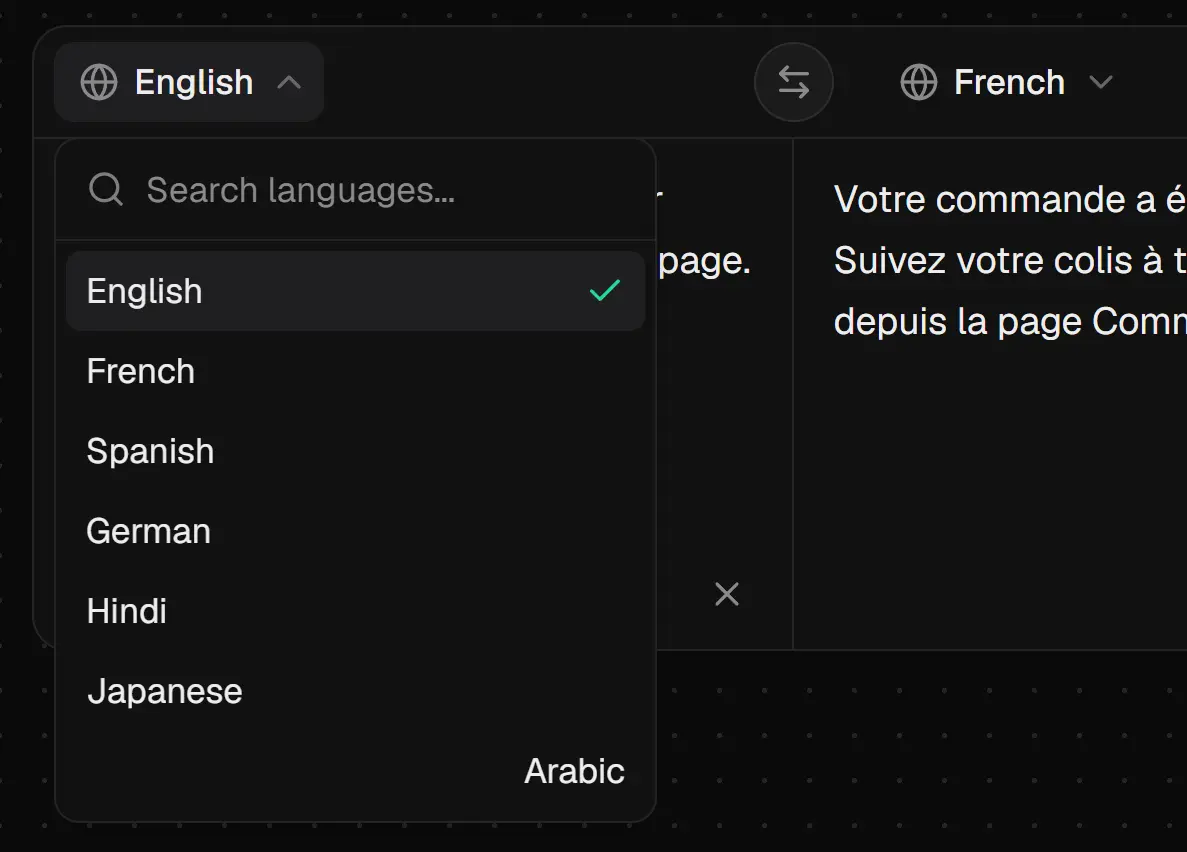
Babelize Elements is a React and Tailwind CSS component library that adds language selectors, international phone fields, localized navigation, and translation review panels to multilingual apps.
The five components can be installed individually through the shadcn CLI or together through npm, and their locale controls connect to an existing i18n setup.
Features
- Native and English language labels, optional country flags, and automatic RTL detection.
- Searchable locale and country menus with keyboard navigation.
- Controlled and uncontrolled state with typed React callbacks.
- A segmented language selector with a spring-animated active indicator.
- shadcn/ui semantic theme tokens and per-part styling through
classNames. - International dialing codes and configurable country choices for phone forms.
Available Components
| Component | Description |
|---|---|
LanguageSwitcher | Searchable language dropdown with native labels, flags, and RTL-aware options. |
LanguageSwitcherPill | Animated segmented language selector with keyboard navigation and RTL-aware text. |
PhoneInput | International phone input with a searchable country menu and 50 country entries. |
NavBar | Responsive navigation with a language menu, mobile layout, CTA, and optional GitHub link. |
TranslationWidget | Source and translation text panes with editing, locale selection, swap, copy, and loading UI. |
How To Use It
Install a Component Through shadcn/ui
Initialize shadcn/ui if your project has no components.json. This creates the theme setup and the cn utility that registry components expect.
npx shadcn@latest initInstall components through the @babelize registry. The CLI writes them under the ui alias in components.json and shared hooks under its lib alias.
npx shadcn@latest add @babelize/language-switcher
# Other options:
npx shadcn@latest add @babelize/language-switcher-pill
npx shadcn@latest add @babelize/phone-input
npx shadcn@latest add @babelize/navbar
npx shadcn@latest add @babelize/translation-widget
Babelize Elements also has a bundled installer. This creates cn when that utility is missing:
npx @babelize/elements add language-switcherBasic Usage: Language Switcher
Create components/locale-switcher.tsx in a Next.js App Router project. This example manages the selected language locally. Connect onValueChange to your application’s i18n library or localized navigation to change the page language.
"use client";
import { useState } from "react";
import { LanguageSwitcher } from "@/components/ui/language-switcher";
const locales = [
  { code: "en", label: "English" },
  { code: "fr", label: "Français" },
  { code: "ar", label: "العربية" },
];
export function LocaleSwitcher() {
  const [locale, setLocale] = useState("en");
  return (
    <LanguageSwitcher
      locales={locales}
      value={locale}
      onValueChange={setLocale}
      label="native"
      showFlags
    />
  );
}
Install the Full npm Package
Install the full package with NPM:
npm install @babelize/elementsPoint Tailwind at the package’s compiled files. In a standard Next.js project with app/globals.css, use:
@import "tailwindcss";
@source "../node_modules/@babelize/elements/dist";
Example: Translation Review With Working Locale Swap
The translation panel edits text supplied by your application. It does not call a translation API. For the swap button to work with controlled values, supply change handlers for both locale codes and both text fields.
"use client";
import { useState } from "react";
import { TranslationWidget } from "@/components/ui/translation-widget";
const locales = [
  { code: "en" },
  { code: "fr" },
  { code: "ar" },
];
export function TranslationReview() {
  const [sourceLocale, setSourceLocale] = useState("en");
  const [targetLocale, setTargetLocale] = useState("fr");
  const [sourceText, setSourceText] = useState("Your order is ready for pickup.");
  const [targetText, setTargetText] = useState(
    "Votre commande est prête à être récupérée."
  );
  return (
    <TranslationWidget
      locales={locales}
      sourceLocale={sourceLocale}
      targetLocale={targetLocale}
      onSourceLocaleChange={setSourceLocale}
      onTargetLocaleChange={setTargetLocale}
      sourceText={sourceText}
      targetText={targetText}
      onSourceChange={setSourceText}
      onTargetChange={setTargetText}
      maxLength={500}
    />
  );
}
Alternatives and Related Resources
- Flagcn: React Flag Components & Picker for shadcn/ui
- ISO-Compliant Country Dropdown & Phone Input Components for shadcn/ui
- Add Phone Input with Country Validation to Shadcn/ui
FAQs
Q: Does Babelize Elements translate text or change the website language automatically?
A: No. The language controls report locale changes to your application. TranslationWidget displays and edits text that you pass into it. Connect your own translation service or i18n library for actual translation and locale updates.
Q: Why are npm-installed components missing their styles?
A: Add the package’s dist directory to Tailwind’s source scanning and configure shadcn semantic theme tokens. Registry-installed source files reside under project aliases that Tailwind already scans.
Q: Why is the TranslationWidget swap button disabled?
A: The button cannot exchange controlled text or locale values that have no corresponding change callback. Supply handlers for the controlled fields or use the uncontrolled default* props.
Q: Does PhoneInput validate international phone numbers?
A: The public callback returns the entered number and selected country’s calling-code data. Apply your own country-specific validation before submitting the form.
Q: Can I use Babelize Elements in Next.js App Router?
A: Yes. Use a client component for stateful locale controls and callbacks. When importing from npm, the package marks its UI component entry as a client boundary.