The Future of Web Dev
The Future of Web Dev
Solid Glass: Glass Theme and AI Agent Components for shadcn/ui
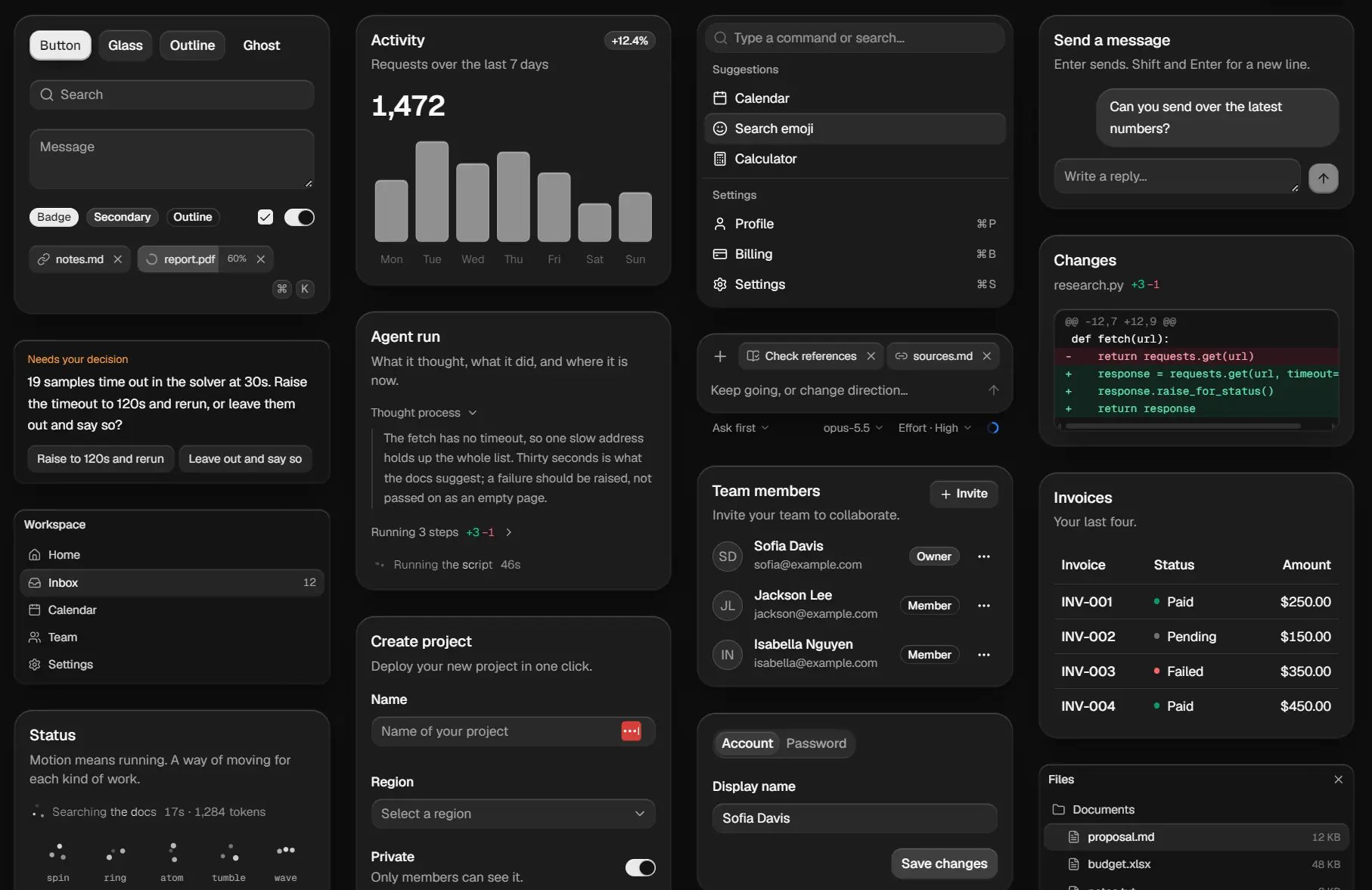
Solid Glass is a React and Tailwind CSS design system for shadcn/ui that gives existing components a restrained glass theme and adds UI components for AI agents.
Its subtle edge highlights and shadows keep text readable, and the registry has a complete Agent Workspace with chat sessions, files, tool activity, and background tasks.
Features
- One CSS stylesheet for existing shadcn/ui components, selected through familiar classes and
data-slotattributes. - Opaque glass panels, subtle border highlights, and soft shadows for a restrained glass appearance.
- Light and dark themes, with dark mode as the primary design.
- Twelve original React components for AI prompts, activity indicators, tool results, and user decisions.
- An Agent Workspace block with a session sidebar, chat thread, file browser, and task panels.
- Editable local TSX source installed through the shadcn registry.
- CSS tokens for glass borders, blur, colors, and corner radius, plus an interactive theme creator.
How To Use It
1. Install the Theme
Initialize shadcn/ui if necessary. Select the Base UI component style. Solid Glass uses React 19 and Tailwind CSS 4, and its reference project uses the base-nova shadcn style.
npx shadcn@latest initInstall the theme stylesheet from the GitHub-backed registry:
npx shadcn@latest add deeplethe/solid-glass/solid-glassThe theme item writes src/solid-glass.css. Check that components.json has the correct tailwind.css file location and that its ui and utils aliases match the project before installing additional components.
2. Import the Stylesheet
For a Next.js App Router project using src/app/globals.css, import the theme after Tailwind and shadcn styles:
@import "tailwindcss";
@import "tw-animate-css";
@import "shadcn/tailwind.css";
@import "../solid-glass.css";
In a Vite project with src/index.css, the last line is @import "./solid-glass.css";. Remove the color-variable blocks that shadcn init created in :root and .dark, since Solid Glass defines those variables itself. Keep any unrelated custom CSS.
Import the global stylesheet once from your Next.js root layout. Solid Glass uses the .dark class on <html> for dark mode. Set that class on the root element for a fixed dark theme or let your existing theme provider control it.
3. Basic Usage: Display an Agent Activity
Install an original Solid Glass component:
npx shadcn@latest add deeplethe/solid-glass/status-glyphGive the animated glyph a text label for the agent state. Its five activity animations respect the reduced-motion preference.
"use client"
import { StatusGlyph } from "@/components/ui/status-glyph"
export function AgentActivity() {
  return (
    <div role="status" className="flex items-center gap-2 text-sm">
      <StatusGlyph activity="searching" />
      <span>Searching project files</span>
    </div>
  )
}
4. Install the Composer or Workspace
The Composer registry item declares lucide-react, Button, and Dropdown Menu dependencies. The workspace block declares its required Solid Glass components and shadcn/ui dependencies, including Button and Kbd. The shadcn CLI writes component source into directories determined by components.json.
npx shadcn@latest add deeplethe/solid-glass/composer
npx shadcn@latest add deeplethe/solid-glass/agent-workspace
Advanced Example: A Controlled AI Message Composer
Composer calls onSubmit with the entered string. Connect that callback to your chat state or request handler. This example stores the last submitted prompt locally.
"use client"
import { useState } from "react"
import { Composer } from "@/components/ui/composer"
export function AgentPromptBox() {
  const [prompt, setPrompt] = useState("")
  const [submitted, setSubmitted] = useState("")
  function submitPrompt(message: string) {
    setSubmitted(message)
    setPrompt("")
  }
  return (
    <div className="mx-auto max-w-xl space-y-3">
      <Composer
        value={prompt}
        onValueChange={setPrompt}
        onSubmit={submitPrompt}
        textareaProps={{ "aria-label": "Message to agent" }}
        placeholder="Ask about the project files..."
      />
      {submitted && (
        <p className="text-sm text-muted-foreground" aria-live="polite">
          Last submitted: {submitted}
        </p>
      )}
    </div>
  )
}
Available Solid Glass Components
| Component | Description |
|---|---|
| Accordion | Expandable content sections. |
| Alert | Inline notice or warning. |
| Alert Dialog | Modal confirmation for consequential actions. |
| Ask Card | Agent question with options that call back with the selected answer. |
| Aspect Ratio | Content container with a fixed ratio. |
| Attachment | File or image attachment with metadata, upload state, and actions. |
| Avatar | Person or account image with fallback. |
| Badge | Compact label or status. |
| Breadcrumb | Page hierarchy navigation. |
| Bubble | Chat bubble with alignment, variants, and reactions. |
| Button | Action button and state variants. |
| Button Group | Connected buttons and segmented actions. |
| Calendar | Month-based date calendar. |
| Card | Titled content container with header and body. |
| Carousel | Sliding content gallery. |
| Chart | Chart wrapper, theme styling, and legends. |
| Checkbox | Boolean and multi-selection controls. |
| Collapsible | Show or hide a section of content. |
| Combobox | Searchable choice input. |
| Command | Searchable command menu. |
| Composer | Controlled message input, attachments, send/stop actions, and keyboard submission. Includes ComposerFooter, ComposerFooterEnd, and ComposerPick. |
| Context Menu | Actions opened from a context interaction. |
| Context Ring | Token-usage ring with a popover showing context-window details. |
| Dialog | Modal content and forms. |
| Diff View | Unified text patch viewer with inserted and removed lines. |
| Dot Loader | Animated three-dot progress indicator. |
| Drawer | Panel that opens over the page. |
| Dropdown Menu | Menu of commands and choices. |
| Empty | Placeholder for an empty view. |
| Field | Label, input, error, and help-text composition. |
| Hover Card | Supplementary content shown on hover. |
| Input | Single-line text input. |
| Input Group | Input with attached actions or text. |
| Input OTP | One-time-password entry. |
| Item | Content row with media, title, description, and actions. |
| Kbd | Keyboard key or shortcut display. |
| Label | Form-control label. |
| Marker | Inline conversation status, note, or separator. |
| Menubar | Menu groups for application commands. |
| Message | Chat message layout with avatar, header, and footer. |
| Message Scroller | Conversation scrolling for streamed responses and history. |
| Native Select | Browser-native select control. |
| Navigation Menu | Links and nested site navigation. |
| Pagination | Movement across paginated results. |
| Panel | Layout panel with a title bar, optional actions, and close button. Includes PanelRow. |
| Popover | Floating interactive content. |
| Progress | Determinate progress indicator. |
| Questionnaire | Multi-step questions with single-choice, multiple-choice, and text answers. |
| Radio Group | Single selection from multiple options. |
| Reasoning | Expandable text for an agent’s reasoning or thinking status. |
| Resizable | Adjustable split-panel layout. |
| Scroll Area | Scrollable content region. |
| Select | Dropdown selection control. |
| Separator | Divider between content sections. |
| Sheet | Side-mounted dialog panel. |
| Sidebar | Application navigation and side panels. |
| Skeleton | Loading placeholders for pending content. |
| Slider | Numeric value selection. |
| Spinner | Animated activity indicator. |
| Status Glyph | Three-point indicator for thinking, searching, running, writing, and compacting. |
| Switch | On/off setting control. |
| Table | Rows, columns, and tabular data. |
| Tabs | Switch between related content panels. |
| Tag | File or tool label with upload progress, error text, and remove action. |
| Task Notice | Results of background tasks: completed, failed, or stopped. |
| Textarea | Multiline text entry. |
| Toast | Brief notification message. |
| Toggle | Pressed and unpressed button states. |
| Toggle Group | Grouped toggle controls. |
| Tool Steps | Expandable tool calls showing inputs, outputs, errors, and file patches. Exports StepGroup, StepList, and StepRow. |
| Tooltip | Short contextual control labels. |
| Turn Status | Agent activity, elapsed time, generated-token count, and optional details. |
Use the Agent Workspace Block
The Agent Workspace includes the chat thread, session list, file tree, and background-task panels. For the standard @/components alias, the block installs as components/agent-workspace.tsx (or src/components/agent-workspace.tsx in a src project). It occupies the viewport (h-svh with a 640px minimum height), making a dedicated full-height page appropriate. The included sessions, file entries, and timed replies are demo data. Connect real messages, tool activity, files, and your AI backend before use in an application.
Create a Next.js App Router page at src/app/agent/page.tsx:
"use client"
import AgentWorkspace from "@/components/agent-workspace"
export default function AgentPage() {
  return <AgentWorkspace />
}
Styling and Customization
Solid Glass defines shadcn/ui color variables and glass styling tokens in src/solid-glass.css. The Create page previews glass thickness, tint, chart color, typography, radius, edge highlights, and blur. Put project-specific overrides after the theme import:
.dark {
  --glass-rim: oklch(1 0 0 / 22%);
  --glass-blur: blur(18px);
}
Geist and Geist Mono are the stylesheet’s preferred typefaces, with system-font fallbacks. Install the optional font packages if the project needs those fonts:
npm install @fontsource-variable/geist @fontsource-variable/geist-monoThen import @fontsource-variable/geist and @fontsource-variable/geist-mono in the global stylesheet before the Solid Glass styles.
Alternatives and Related Resources
- 40+ Apple Liquid Glass-inspired UI Components for Next.js – glass-ui
- Better Design: 30+ shadcn/ui Design Systems for SaaS Dashboards & Landing Pages
- AI Chatbot UI Blocks for shadcn/ui & Next.js Projects – Manifest UI
- Copy-paste React Components for AI Chat UI – Nexus UI
- LocalMode UI: 100+ shadcn AI Components for Browser & Cloud