The Future of Web Dev
The Future of Web Dev
audiocn: React Audio Components for shadcn/ui
Get real dB controls, live audio analysis, device capture, waveform data, and editable React source from one shadcn registry.
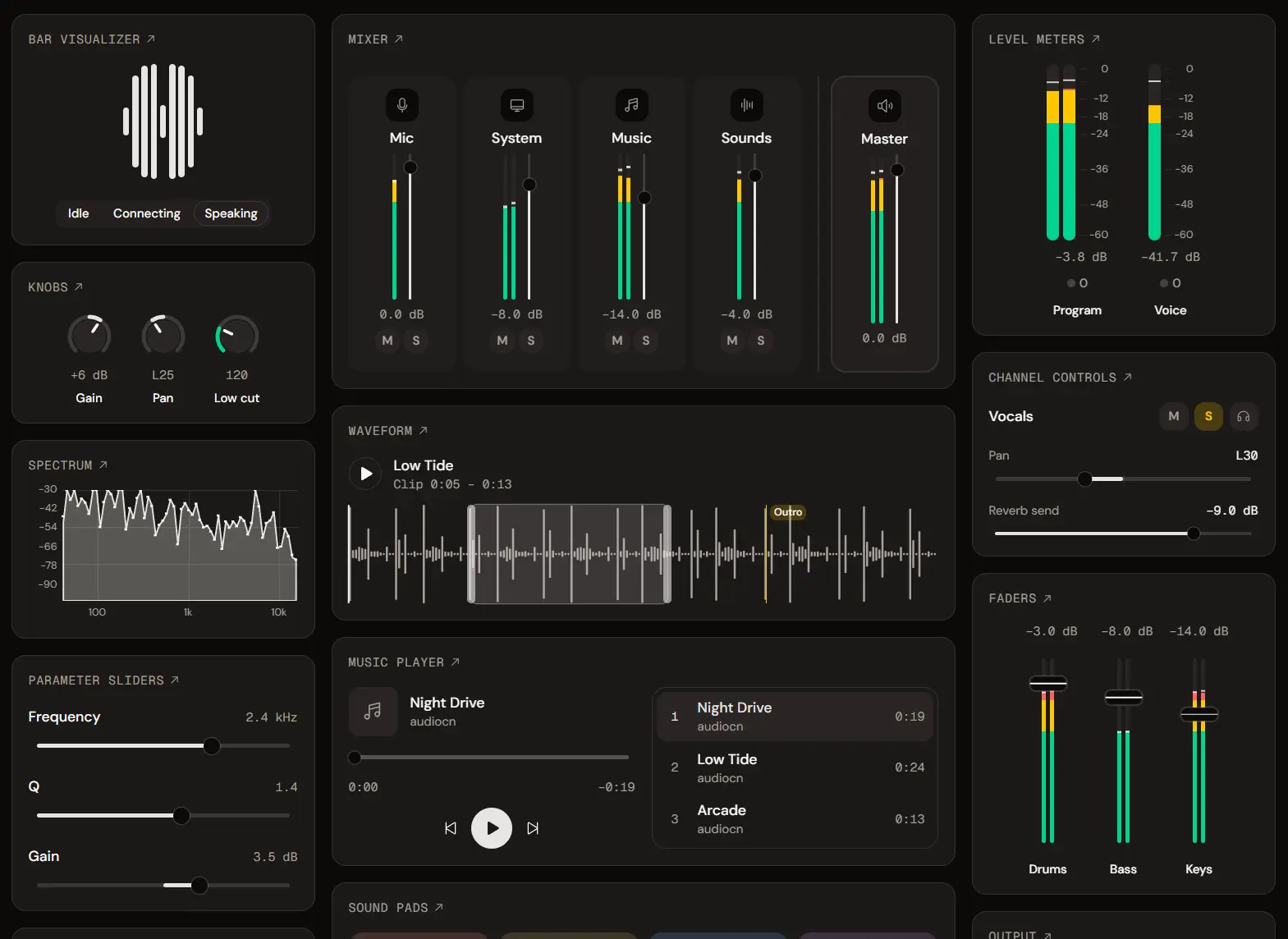
audiocn is a React and shadcn/ui component registry that installs audio meters, visualizers, controls, players, and mixer UI as editable source files.
It is built for browser audio apps that work with real dB values and Web Audio data. The shadcn CLI copies each registry item into the project, where the code can be edited locally.
Features
- 20+ React audio components for metering, visualization, mixing, playback, and sound triggering.
- 6+ audio blocks for system mixing, microphone setup, soundboards, music playback, system-audio controls, and quick audio access.
- 15+ hooks for capture, analysis, mixer state, playback, devices, waveform data, frame sources, and audio state.
- Tailwind CSS styling with shadcn theme tokens and six audio-specific color tokens.
- Base UI primitives for interactive controls.
- Decibel-based meters, faders, and mixer controls.
- Animation-frame painting for meters and visualizers outside React render cycles.
- Keyboard control, ARIA meter state, and reduced-motion behavior.
Use Cases
- Recording and streaming dashboards with peak/RMS meters, clipping state, gain, pan, mute, solo, and monitoring.
- Microphone setup screens with device selection, live levels, gain, mute, and permission state.
- Music or podcast players with waveform seeking, track navigation, loop, playback rate, and volume.
- Soundboards and browser audio apps that need hotkeys, short-sound playback, system-audio capture, or reusable mixer controls.
How to Use audiocn
Initialize shadcn/ui
Run the initializer when the project does not have a components.json file:
npx shadcn@latest initRegister audiocn
Set the @audiocn namespace in components.json:
{
  "registries": {
    "@audiocn": "https://audiocn.dev/r/{name}.json"
  }
}
Install a Component or Block
Install components with the shadcn CLI:
npx shadcn@latest add @audiocn/level-meterThe System Audio Mixer pulls in most of the library:
npx shadcn@latest add @audiocn/system-audio-mixerBasic Usage
import { LevelMeter } from "@/components/ui/level-meter";
export const MicLevel = ({ peakDb }: { peakDb: number }) => (
  <LevelMeter aria-label="Microphone level" peakDb={peakDb} />
);
Default File Placement
The CLI follows the aliases in components.json. A project using src/ or custom aliases receives the files under those mapped locations.
| Default Location | Contents |
|---|---|
components/ui/* | Component source files |
hooks/use-*.ts | Frame-source, Web Audio, playback, device, and mixer hooks |
lib/audio/*.ts | Decibel math, ballistics, tapers, frame loops, frame sources, and shared audio types |
app/globals.css | Audio theme tokens |
Available Components
| Category | Components | Main Task |
|---|---|---|
| Meters and visualizers | Level Meter, dB Scale, dB Readout, Clip Indicator, Bar Visualizer, Electric Bar Visualizer, Electric Waveform, Smooth Waveform, Live Waveform, Waveform, Spectrum | Peak/RMS metering, clipping, frequency bands, live signals, recorded clips, spectrum data |
| Controls | Fader, Parameter Slider, Knob, Pan Control, Channel Toggle, Volume Control, Audio Device Select | Gain and parameter input, pan, mute, solo, monitor, player volume, device selection |
| Mixer | Channel Strip, Mixer | Channel layouts, shared meter settings, keyboard navigation, master controls |
| Sounds and music | Audio Player, Track List, Sound Pad | Transport, seeking, playlists, short-sound triggering |
Audio Blocks
| Block | Main Task |
|---|---|
| System Audio Mixer | Microphone, system audio, music, sound pads, channel controls, metering, master output |
| Music Player | Playlist playback, waveform seeking, shuffle, repeat, volume, ducking |
| Soundboard | Sound pads, hotkeys, trigger modes, volume, stop-all control, drag-and-drop |
| Microphone Setup | Device selection, live preview, metering, gain, mute, level checks |
| Quick Audio Popover | Microphone and system-audio controls inside a toolbar popover |
| System Audio Settings | System-audio capture, level control, metering |
Audio Hooks
| Hook | Main Task |
|---|---|
useMicrophone | Opens a microphone as a MediaStream |
useSystemAudio | Captures system or tab audio through the browser screen-share picker |
useAudioAnalyser | Creates meter and visualizer frame sources from a stream, media element, or AudioNode |
useWebAudioMixer | Connects mixer state to a Web Audio graph with ducking, monitor sends, and a limited master |
useMixer | Manages gain, mute, solo, pan, monitor, and master state with no attached audio graph |
useAudioPlayer | Manages playback state for an owned audio element |
useSound | Plays short decoded sounds from memory |
useWaveformData | Decodes an audio file into cached waveform peaks |
useAudioDevices | Tracks audio input or output devices, permission state, and device changes |
useDemoSignal | Generates speech, music, tone, or noise frame data for previews and tests |
useAudioContext | Returns the shared or supplied AudioContext and resumes it after the first user gesture |
useFrameSource | Subscribes a callback to a frame source with automatic cleanup |
useLevel | Samples meter data into React state at a low rate for labels and conditional UI |
useClipHold | Tracks clipping, hold time, clip count, and reset state |
useReducedMotion | Reads the system reduced-motion preference |
useAudioConfig | Reads config from the nearest mixer or channel strip |
LevelMeter API
| Prop | Type / Default | Purpose |
|---|---|---|
source | FrameSource<MeterFrame> | null | Live meter frames |
peakDb | number | Declarative mono peak level in dBFS |
rmsDb | number | Declarative mono RMS level in dBFS |
channels | ChannelLevel[] | Declarative multi-channel levels |
channelCount | number / 1 | Tracks rendered before frame data arrives |
minDb | number / -60 | Bottom of the displayed range |
maxDb | number / 0 | Top of the displayed range |
zones | MeterZone[] / DEFAULT_ZONES | ok, warn, and clip level zones |
ballistics | "peak" | "vu" | "instant" | Partial<BallisticsOptions> / "peak" | Meter movement model |
taper | "linear" | "audio" | Taper / "linear" | Scale law |
orientation | "horizontal" | "vertical" / "horizontal" | Meter direction |
variant | "solid" | "segmented" | "gradient" / "solid" | Meter rendering style |
segments | number / 24 | LED segment count |
size | "sm" | "default" | "lg" / "default" | Track thickness |
actionsRef | Ref<LevelMeterActions> | Direct paint(frame) and reset() access |
Styling and Theming
audiocn uses standard shadcn tokens for normal component styling. Installing the first registry item writes six audio tokens to the project CSS. Each token also has a -foreground counterpart for text, and the token names are available as Tailwind colors.
| Token | Purpose |
|---|---|
--meter-ok | Normal level zone |
--meter-warn | Warning level zone |
--meter-clip | Clip zone and clip light |
--channel-mute | Pressed mute state |
--channel-solo | Pressed solo state |
--channel-monitor | Pressed monitor state |
Override an Audio Token
:root {
  --meter-ok: oklch(0.72 0.12 200);
}
.dark {
  --meter-ok: oklch(0.78 0.12 200);
}
Alternatives and Related Resources