The Future of Web Dev
The Future of Web Dev
SVG Avatar Generator for React and shadcn/ui – blobz
Create repeatable illustrated user avatars and adds reusable React and shadcn/ui components for profile images, account menus, and team lists.
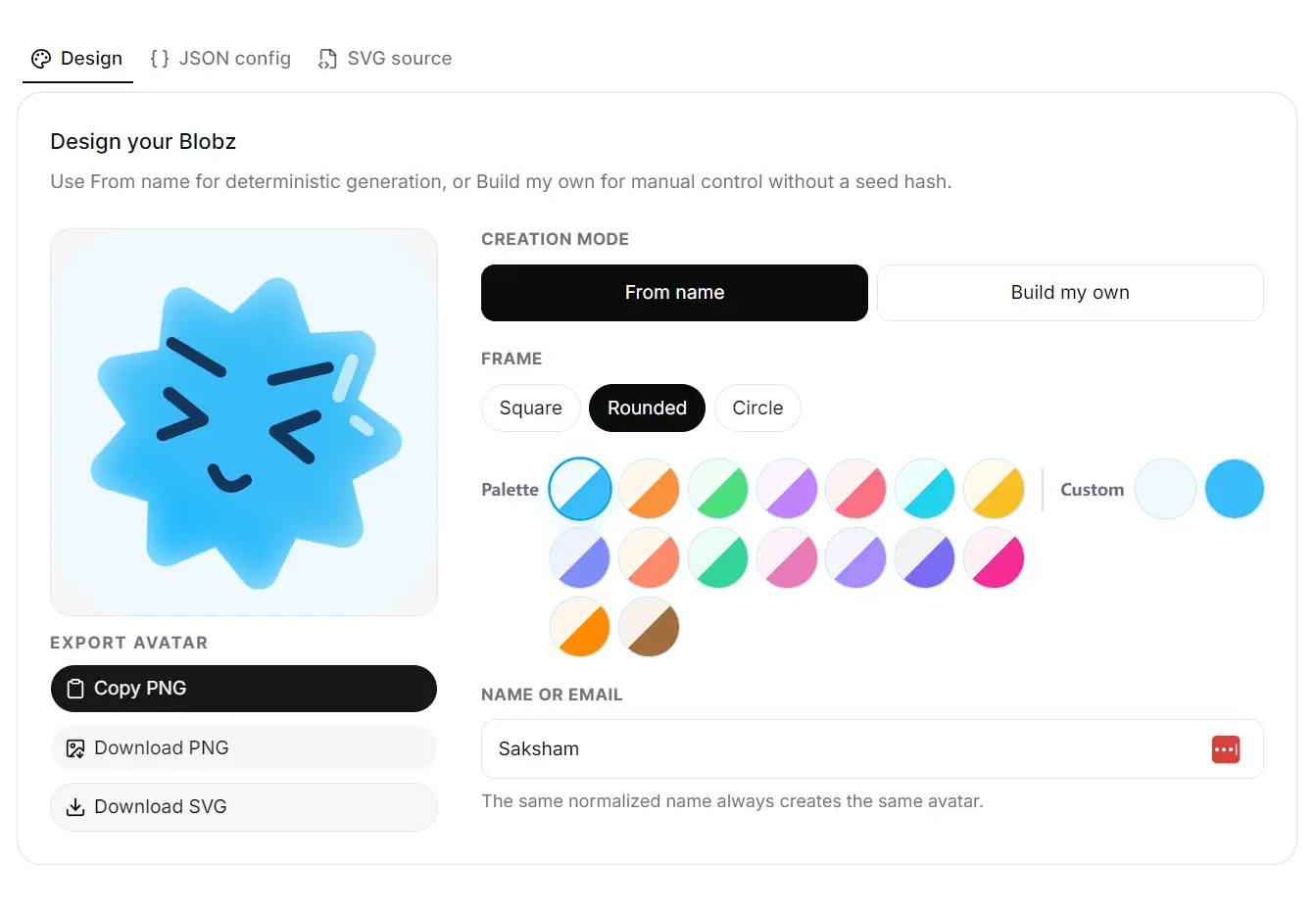
Blobz is an open-source SVG avatar toolkit with a React library, a shadcn/ui registry, and a framework-independent TypeScript generator.
It creates recognizable faces from stable user IDs and supplies avatar fallbacks, profile components, and ready-made account, team, and chat UI.
Features
- Local SVG rendering with no image upload or hosted request.
- 21 silhouettes, 14 eye styles, 13 mouths, and 8 eyebrow styles.
- Custom two-color palettes and circular, rounded, or square frames.
- Image fallbacks, presence badges, unread counts, and overlapping avatar groups.
- Editable shadcn/ui component source installed through the shadcn CLI.
- Custom face definitions with explicit facial features.
How to Use Blobz
1. Install the shadcn/ui Avatar
Run the registry command in an existing shadcn/ui project:
npx shadcn@latest add @blobz/avatarThe CLI adds avatar.tsx to the UI location configured in components.json, commonly components/ui/avatar.tsx. It installs the registered dependencies, including @base-ui/react and @blobz/react, and adds CSS variables for online and away statuses.
import {
  Avatar,
  AvatarFallback,
  AvatarImage,
} from "@/components/ui/avatar";
type MemberAvatarProps = {
  userId: string;
  displayName: string;
  photoUrl?: string;
};
export function MemberAvatar({
  userId,
  displayName,
  photoUrl,
}: MemberAvatarProps) {
  return (
    <Avatar frame="circle" size="lg">
      <AvatarImage src={photoUrl} alt={`${displayName}'s photo`} />
      <AvatarFallback
        name={userId}
        alt={`Illustrated avatar for ${displayName}`}
      />
    </Avatar>
  );
}
AvatarFallbackrenders the generated face when the image has not loaded, fails, or has no URL.
Add a full account menu with its required registry components:
npx shadcn@latest add @blobz/avatar-account-menu2. Use the React package directly
Install the standalone React component library when you do not need the shadcn/ui registry:
npm install @blobz/reactimport { Avatar } from "@blobz/react";
export function UserAvatar() {
return (
<Avatar
name="janaki-ammal"
alt="Janaki's illustrated avatar"
palette={["#f2f1f4", "#7c6cf2"]}
frame="rounded"
size={64}
loading="lazy"
/>
);
}3. Generate raw SVG with TypeScript
Install the framework-independent generator for Node.js, Bun, or browser applications:
npm install @blobz/avatar-corecreateAvatar returns SVG markup, numeric feature selections, and readable feature descriptions:
import { createAvatar } from "@blobz/avatar-core";
const { svg, choices, features } = createAvatar({
  name: "janaki-ammal",
  palette: ["#f2f1f4", "#7c6cf2"],
  frame: "rounded",
});
For a manually specified face, use
createCustomAvatarfrom the core package orCustomAvatarfrom@blobz/react/custom.
Available shadcn/ui Components and Blocks
Components
| Component | Description |
|---|---|
@blobz/avatar | Image and generated fallback, status and count badges, and avatar groups. |
@blobz/avatar-profile | Identity row with a name, description, and actions. |
@blobz/avatar-chip | Compact identity chip with an optional remove button. |
@blobz/profile-card | Compact or featured profile card with actions. |
@blobz/testimonial-card | Testimonial card with an image or generated avatar. |
Blocks
| Block | Description |
|---|---|
@blobz/avatar-account-menu | Account dropdown with a profile header and configurable actions. |
@blobz/avatar-team-list | Team roster with names, roles, statuses, and actions. |
@blobz/avatar-select | Person selector with avatars in the trigger and options. |
@blobz/group-chat | Chat transcript with participant avatars and a typing indicator. |
@blobz/user-table | People table with roles, statuses, and last-seen details. |
Avatar Props and Customization
| Component / prop | Values or behavior |
|---|---|
Avatar.frame | circle, rounded, square |
Avatar.size | sm, default, lg, xl |
Avatar.variant | default, elevated, outline |
AvatarFallback.name | String or number used to generate the face. |
AvatarFallback.palette | Two hex colors: background and body. |
AvatarFallback.choices | Numeric overrides for selected facial features. |
AvatarBadge.status | online, away, busy, offline |
AvatarBadge.position | bottom-end, bottom-start, top-end, top-start |
AvatarCount.count | Unread count; values above 99 display as 99+. |
AvatarGroupCount.count | Number of additional people shown as +N. |
Alternatives and Related Resources