The Future of Web Dev
The Future of Web Dev
Nuxt Pages Plus: Parallel & Modal Routes for Nuxt
Extend Nuxt Pages with parallel routers, shareable modal URLs, nested route outlets, and manual routing.
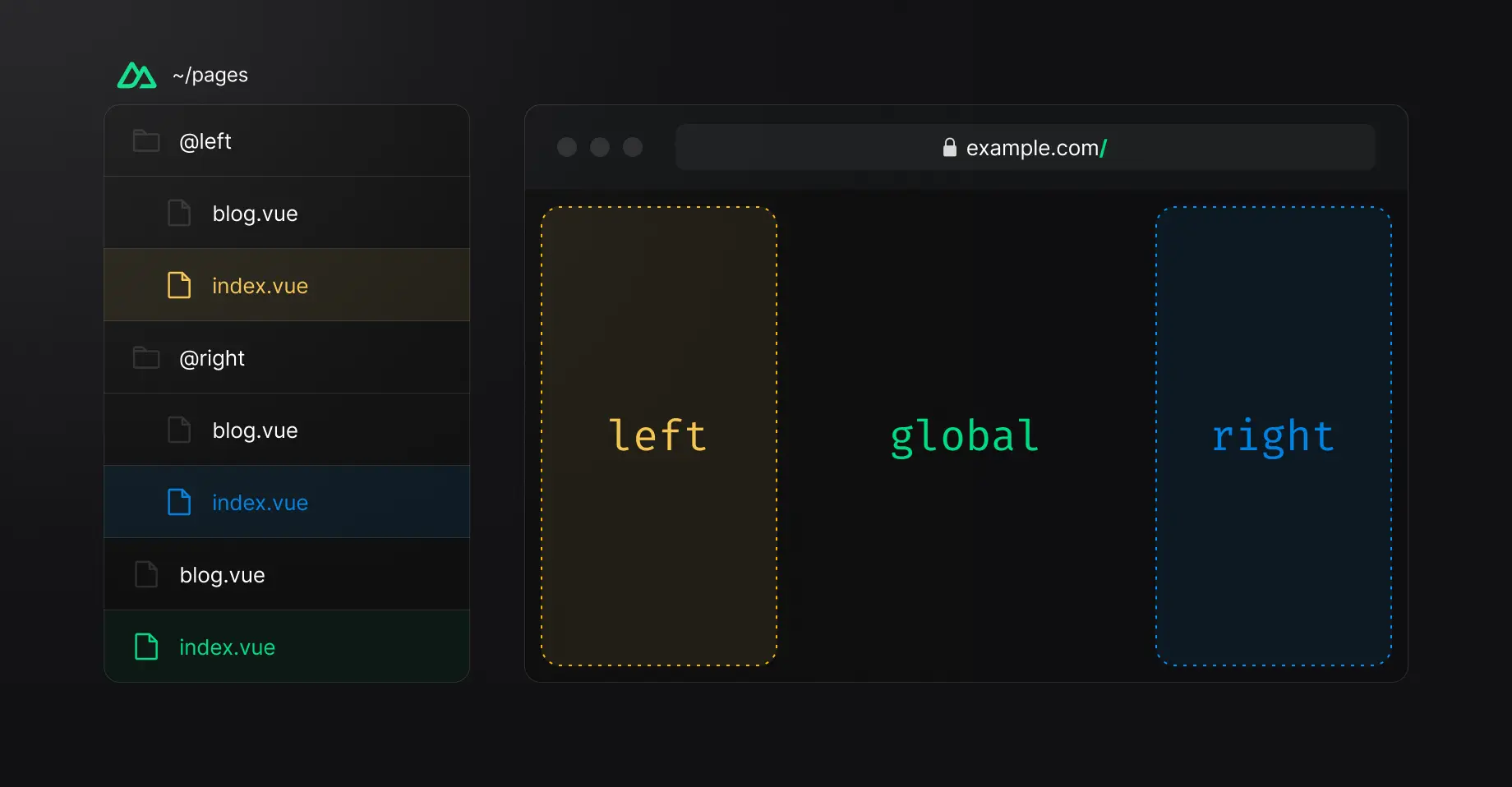
Nuxt Pages Plus is a Nuxt routing module that adds parallel routes and URL-aware modal routes to Nuxt Pages.
A single URL can render multiple page outlets, or open route content as a modal during in-app navigation and as a regular page on direct access.
Features
- Parallel page outlets for one global route.
sync,sync-once, andmanualrouting modes.- URL-aware modal navigation with regular-page direct access.
- File-based parallel routes inside
~/pages. - Nested parallel router names for multi-level layouts.
- Configurable fallback routes, redirects, and fallback slots.
- Components and composables for parallel and modal routing.
- SSR and static site generation compatibility.
Use Cases
- Build dashboards where the primary content, navigation panel, and contextual sidebar follow the same route.
- Create inbox or workspace layouts with independently rendered list and detail regions.
- Open product or gallery details in a modal from a listing page while keeping the detail URL directly accessible.
- Build nested modal flows where an image detail can open another modal route for comments or related content.
How To Use Nuxt Pages Plus
Install the Module
npx nuxi module add nuxt-pages-plusFor manual installation:
npm i -D nuxt-pages-plus// nuxt.config.ts
export default defineNuxtConfig({
modules: ['nuxt-pages-plus'],
})Basic Parallel Route Usage
Create a named parallel route inside ~/pages:
pages/
├── index.vue
├── about.vue
└── @sidebar/
    ├── index.vue
    └── about.vue
Render the sidebar router from the application layout:
<!-- layouts/default.vue -->
<template>
  <div class="app-layout">
    <aside>
      <PlusParallelPage name="sidebar" />
    </aside>
    <main>
      <slot />
    </main>
  </div>
</template>
At /, the main outlet renders pages/index.vue and the sidebar renders pages/@sidebar/index.vue.
At /about, the main outlet renders pages/about.vue and the sidebar renders pages/@sidebar/about.vue.
Parallel Route File Patterns
| File | Router Name | URL |
|---|---|---|
@sidebar/index.vue | sidebar | / |
[email protected] | sidebar | / |
about/[email protected] | sidebar | /about/team |
@sidebar/@details/product.vue | sidebar/details | /product |
Nuxt 4.5+ interprets the [email protected] filename form as a Vue Router named view when the default @ separator is active. Set namedViewsAsParallelRoutes: true when those files belong to Nuxt Pages Plus:
// nuxt.config.ts
export default defineNuxtConfig({
  modules: ['nuxt-pages-plus'],
  pagesPlus: {
    namedViewsAsParallelRoutes: true,
  },
})
Directory-style routes such as @sidebar/index.vue do not require this option.
Module Configuration
| Option | Default | Purpose |
|---|---|---|
separator | @ | Defines the marker used in parallel route names. |
namedViewsAsParallelRoutes | false | Restores [email protected] parallel-route parsing on Nuxt 4.5+. |
parallelPages | {} | Configures individual parallel routers. |
Change the separator when @ conflicts with application route names:
// nuxt.config.ts
export default defineNuxtConfig({
  pagesPlus: {
    separator: '+',
  },
})
Configure Individual Parallel Routers
Each entry under parallelPages accepts mode, index, and fallback.
// nuxt.config.ts
export default defineNuxtConfig({
  pagesPlus: {
    parallelPages: {
      sidebar: {
        mode: 'manual',
        fallback: false,
      },
    },
  },
})| Setting | Values | Default Behavior |
|---|---|---|
mode | sync, sync-once, manual | sync |
index | Route path | Uses /~index as the fallback index |
fallback | boolean or { redirect?: string } | true |
Parallel Route Fallbacks
Add not-found or index slots to PlusParallelPage:
<PlusParallelPage name="sidebar">
  <template #not-found>
    <p>No sidebar page matches this route.</p>
  </template>
  <template #index>
    <p>Select an item.</p>
  </template>
</PlusParallelPage>
On the initial page load, Nuxt Pages Plus checks fallback states in this order:
- Matching parallel route.
fallback.redirect.not-foundslot.- Configured index route or
/~index. indexslot.- Empty outlet.
Use hide-fallback when the outlet should disappear after fallback handling:
<PlusParallelPage name="sidebar" hide-fallback />Create URL-Aware Modal Routes
Modal Routes use a regular Nuxt page for direct access and a named parallel page for the modal presentation.
For a product route such as /products/42:
pages/
├── products/
│   ├── index.vue
│   └── [id].vue
└── @product-modal/
    └── products/
        └── [id].vue
1. Add PlusModalApp
Use PlusModalApp as the root page tree for new Modal Routes implementations:
<!-- app.vue -->
<template>
  <PlusModalApp />
</template>
Use its scoped slot when the application needs a custom root tree:
<!-- app.vue -->
<template>
  <PlusModalApp v-slot="{ route, layout }">
    <NuxtLayout :name="layout">
      <NuxtPage :route="route" />
    </NuxtLayout>
  </PlusModalApp>
</template>
2. Create the Modal Page
<!-- pages/@product-modal/products/[id].vue -->
<template>
  <Teleport to="body">
    <div class="product-modal">
      <h2>Product Details</h2>
      <button type="button" @click="$modalRouter.close()">
        Close
      </button>
    </div>
  </Teleport>
</template>
3. Open the Route as a Modal
<!-- pages/products/index.vue -->
<template>
  <section>
    <h1>Products</h1>
    <PlusModalLink to="/products/42">
      View Product 42
    </PlusModalLink>
    <PlusModalPage name="product-modal" />
  </section>
</template>
Nested Modal Navigation
Use the open prop when a link inside an existing modal should create another modal level:
<PlusModalLink open :to="`/comments/${productId}`">
  View Comments
</PlusModalLink>
Custom Modal Rendering
Use useModalRouter().isOpen when the application renders its own dialog component:
<script setup lang="ts">
const { isOpen } = useModalRouter()
</script>
<template>
  <PlusModalLink to="/products/42">
    View Product 42
  </PlusModalLink>
  <Teleport v-if="isOpen" to="body">
    <div class="product-modal">
      <ProductDetails />
      <button type="button" @click="$modalRouter.close()">
        Close
      </button>
    </div>
  </Teleport>
</template>
Components
| Component | Purpose |
|---|---|
PlusParallelPage | Renders a named parallel page outlet. |
PlusModalApp | Renders the modal-aware route, Nuxt layout, and page tree. |
PlusModalNuxtPage | Retains the page-only modal root behavior for custom layout trees. |
PlusModalPage | Renders a named modal outlet while a modal route is open. |
PlusModalLink | Opens a route as a modal or navigates within a modal stack. |
Composables
| API | Purpose |
|---|---|
useModalRouter() | Returns the global modal router. |
useParallelRouter() | Returns the parent parallel router. |
useParallelRoute() | Returns the parent parallel route. |
useParentRouterName() | Returns the parent parallel router name. |
useParallelRouters() | Returns all registered parallel routers. |
useParallelRoutes() | Returns the current routes from all parallel routers. |
useParentRouter() | Returns the parent parallel router or global Nuxt router. |
useParentRoute() | Returns the parent parallel route or global Nuxt route. |
resolveParallelRoutersByPath() | Finds parallel routers that contain a path. |
ModalRouter API
| API | Purpose |
|---|---|
route | Background route for the current modal. |
isOpen | Reactive modal-open state. |
layout | Layout associated with the background or current route. |
stacks | Reactive modal stack data. |
close(allOpened?) | Closes the current modal or the complete stack. |
push(to, open?) | Pushes another modal route. |
replace(to) | Replaces the current modal route. |
ParallelRouter API
useParallelRouter() returns a Vue Router instance with these additional routing controls:
| API | Purpose |
|---|---|
name | Parallel router name. |
fallback | Current fallback state. |
hasPath(path) | Checks whether the router contains a path. |
tryPush(path, fallbackRedirect?) | Attempts navigation with optional fallback redirection. |
sync() | Synchronizes the parallel router with the global route. |
setSync(value) | Turns route synchronization on or off. |
Modal Route History
Nuxt Pages Plus stores the modal background view through the browser History API. PlusModalApp renders that stored background route while the modal URL becomes the current route.
This history model is what lets a route opened through PlusModalLink appear as a modal while the same URL renders as a regular page after direct navigation or refresh.
Alternatives and Related Resources

