The Future of Web Dev
The Future of Web Dev
Gamification UI Kit by Trophy for React & Next.js
Build gamified React apps with editable streak, leaderboard, achievement, and points components from Trophy.
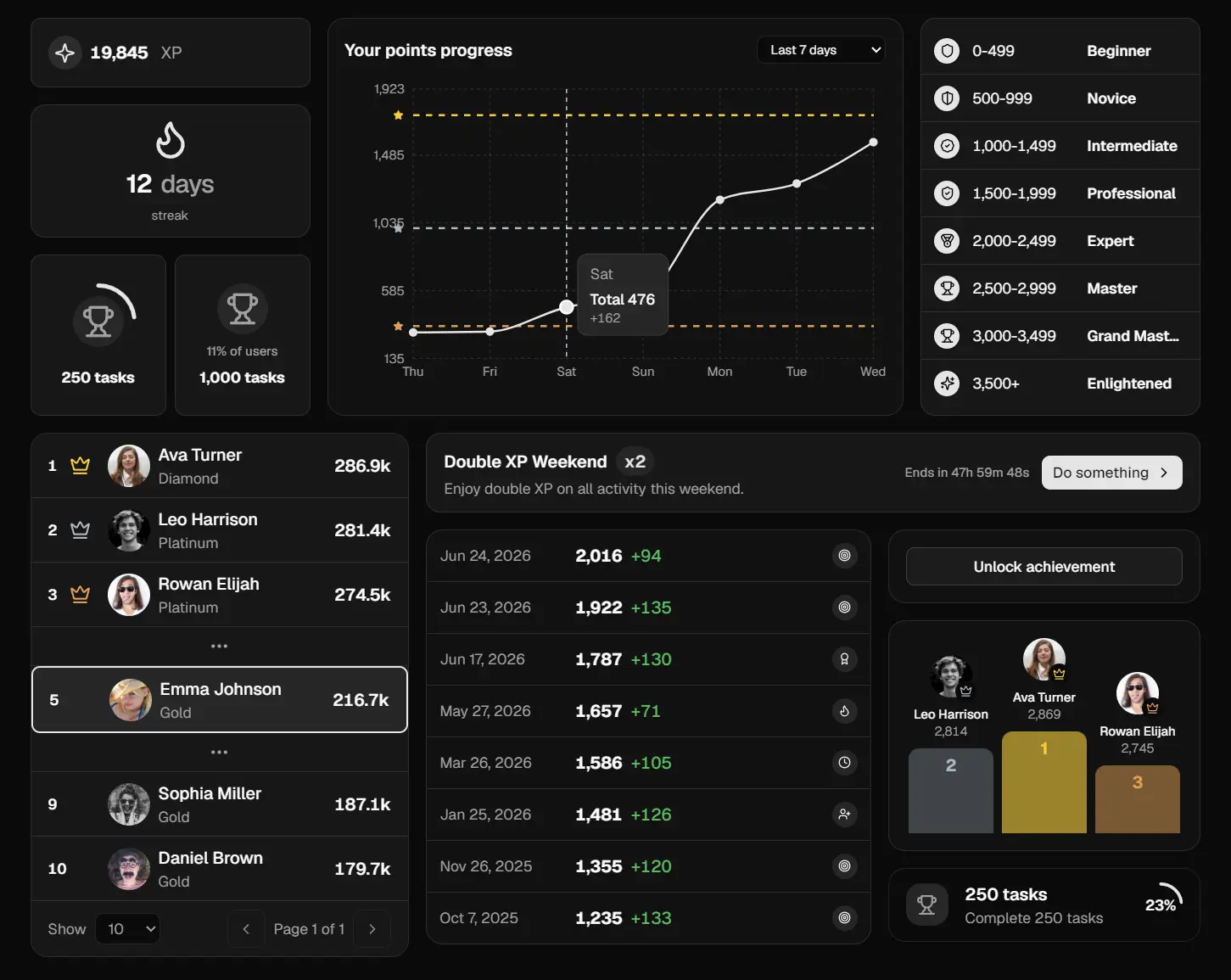
Gamification UI Kit by Trophy is a shadcn/ui component library that adds streaks, achievements, leaderboards, points, and XP-chart surfaces to React applications.
Use it to assemble a rewards hub, a learning streak panel, a weekly challenge view, or progress widgets inside an existing application.
Each registry entry copies TypeScript and Tailwind source into your project, so the component lives beside your app code and follows your own release process.
Features
- Installs through the shadcn CLI registry with local file ownership.
- Provides 17+ components for gamification patterns: streaks, achievements, leaderboards, points, and awards.
- Uses semantic Tailwind CSS tokens and CSS custom properties for theming.
- Includes gamification-specific tokens such as rank‑1, rank‑2, rank‑3, achievement, success, and warning.
- Works with React and Tailwind CSS.
- Ships a minimal theme starter that you can copy into your project as the foundation.
- Keeps every foreground token paired with a matching
-foregroundtoken for contrast control.
Use Cases
- Place a Streak Badge beside a learner’s daily task list so repeated study sessions remain visible between lessons.
- Weekly community challenges benefit from a leaderboard that keeps each member’s current position in view.
- Reward hubs for paid SaaS plans need point totals, milestone cards, and level progress in one consistent visual language.
- Show points history in a profile dashboard when users need context for recent activity spikes, campaign bonuses, or slower periods.
- Put a Points Boost panel above a task list during referral campaigns, seasonal events, or limited-time reward periods.
How To Use It
Prepare the Project
Start with a Node.js 18+ project that already runs React 18 and Tailwind CSS v4. Initialize shadcn/ui before adding registry entries so components.json and your project aliases are available.
npx shadcn@latest initNext.js App Router pages render on the server by default. Move Trophy UI into a Client Component when the screen depends on local state, countdown updates, click handlers, or browser APIs.
Install Individual Components
Install only the components required for the screen you are building.
npx shadcn@latest add https://ui.trophy.so/streak-badgeOther component URLs follow the same pattern:
npx shadcn@latest add https://ui.trophy.so/leaderboard-rankings
npx shadcn@latest add https://ui.trophy.so/points-chart
npx shadcn@latest add https://ui.trophy.so/points-boost
Install the full collection when your project needs several gamification surfaces from the start:
npx shadcn@latest add https://ui.trophy.so/allSelective installation keeps unused component files out of the repository.
Basic Usage
The default shadcn import path is @/components/ui/<component>. Update the import when your components.json file uses a different alias or component directory.
"use client"
import { StreakBadge } from "@/components/ui/streak-badge"
export function ActivityHeader() {
  const currentStreak = 12
  return (
    <header className="flex items-center justify-between border-b p-6">
      <div>
        <h1 className="text-lg font-semibold">Daily practice</h1>
        <p className="text-sm text-muted-foreground">
          Complete one lesson to continue your progress.
        </p>
      </div>
      <StreakBadge
        length={currentStreak}
        frequency="daily"
        size="default"
      />
    </header>
  )
}
Available Components
| Category | Components |
|---|---|
| Achievements | Achievement Badge, Achievement Card, Achievement Grid, Achievement List, Achievement Unlocked |
| Leaderboards | Leaderboard Card, Leaderboard Podium, Leaderboard Rankings |
| Points and Levels | Points Awards, Points Badge, Points Boost, Points Chart, Points Levels List, Points Levels Timeline |
| Streaks | Streak Badge, Streak Calendar, Streak Card |
Alternatives and Related Resources
- 200+ Extended UI Components & Blocks for shadcn/ui – Shadcn Space
- Create Feature-Rich Data Tables with shadcn-table-view
- 200+ Free Copy-Paste UI Components – shadcn.io
FAQs
Q: Does Gamification UI Kit by Trophy include a gamification backend?
A: No. The kit renders interfaces from props and data objects. Your application or backend must calculate scores, streaks, ranks, achievements, and campaign eligibility.
Q: Does it work with Next.js App Router?
A: Yes. Use the components inside Client Components when the UI depends on interaction, local state, countdown logic, or browser APIs. Server-side data fetching still works when you pass serializable results into the client boundary.
Q: Do I need to use Trophy’s platform?
A: No. The components accept standard React props and data structures. Connect them to Trophy, a custom API, database queries, or local development data.
Q: Why do the components look unstyled after installation?
A: Check your Tailwind CSS v4 setup, global semantic tokens, and alias configuration. Rank, feedback, and foreground tokens may need to be added to the project theme.