The Future of Web Dev
The Future of Web Dev
suiss/ui: Cross-Platform UI Component Library for Web and Mobile
A cross-platform UI component library with editable forms, navigation, dashboards and AI chat UI for Next.js, React Native, SwiftUI and Compose.
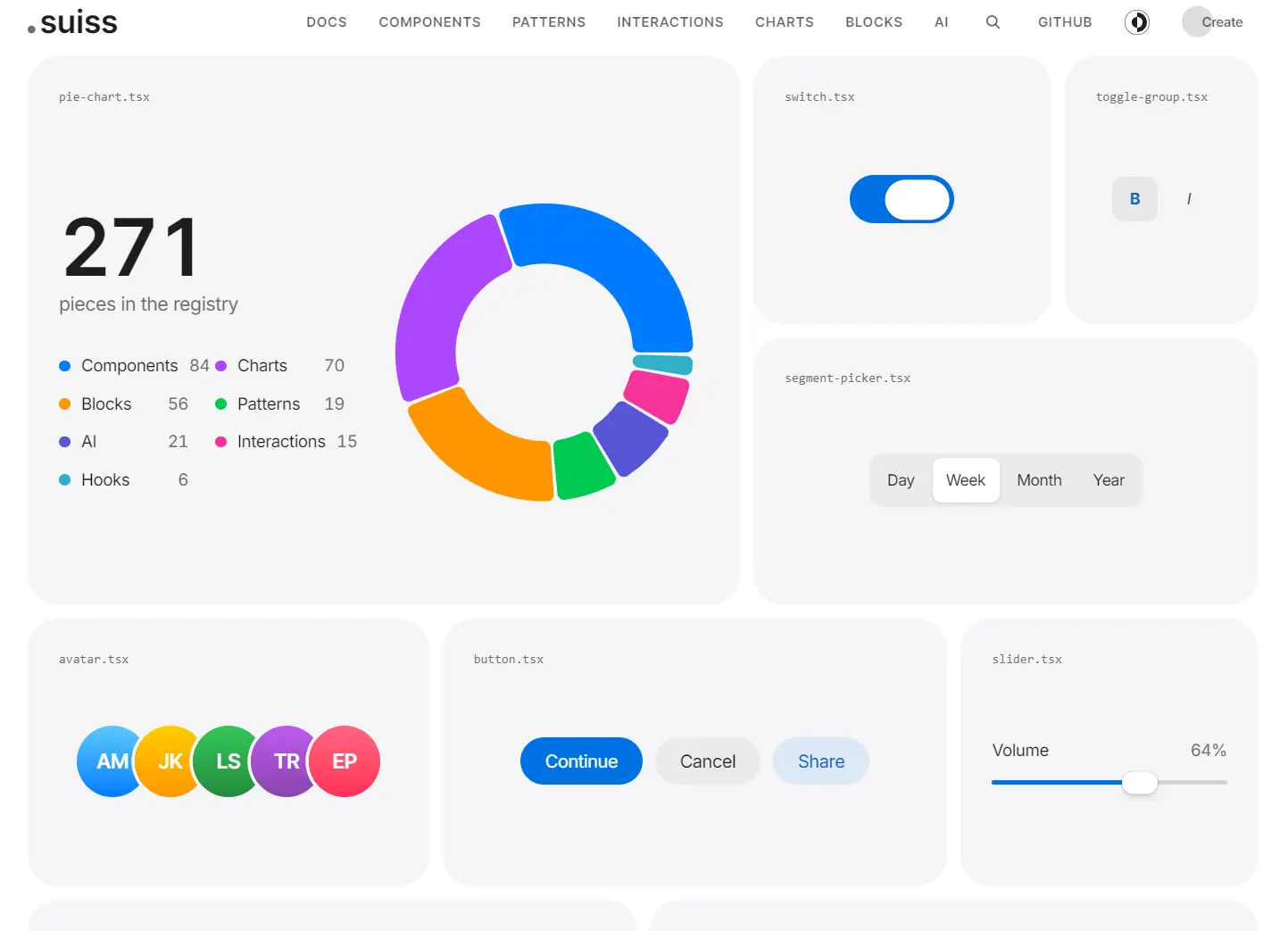
suiss/ui is a cross-platform UI component library that provides UI components, blocks, and interactions for React, React Native, SwiftUI, and Jetpack Compose.
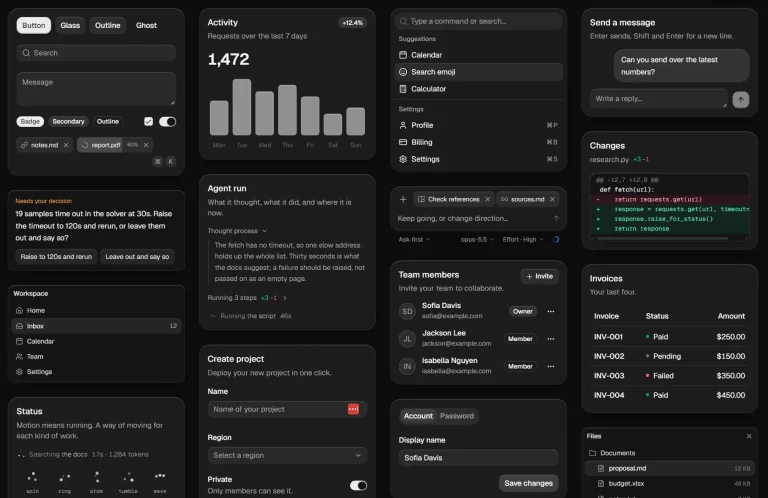
It has a minimal design, shared light and dark themes, and editable components for forms, navigation, dashboards, charts, and AI chat UI.
Features
- Consistent component names, variants and design tokens across web and native implementations.
- Configurable minimal styling, light and dark colors, and nine component styles.
- React components built on Base UI, Radix or React Aria primitives.
- React Native components using Uniwind, NativeWind v4 or React Native StyleSheet.
- Copy-paste installation through the suiss/ui CLI or a shadcn-compatible registry.
- Forms, navigation, interaction patterns, charts, app blocks and AI compositions.
Use Cases
- Build a Next.js admin dashboard with account settings, sidebar navigation, charts and confirmation dialogs.
- Give an Expo shopping app a checkout screen, tab navigation, swipe actions and native input controls.
- Implement iOS and Android screens in SwiftUI and Jetpack Compose with shared theme values.
- Create an AI support app with conversation threads, prompt input, citations, agent steps and tool results.
How To Use It
Install in Next.js or Vite
In an existing TypeScript project, run the CLI from your project root:
npx @esuiss/ui@latest init
npx @esuiss/ui@latest add dialog sidebar input
For a new Next.js App Router app, create the project and initialize suiss/ui with one command:
npx @esuiss/ui@latest init --template next --name customer-portalBasic Usage: Button Component
Use the copied Button in a profile form. Imports resolve through the @/* alias, relative to the configured source root.
components/save-profile-button.tsx (or src/components/ for an app with src/)
import { Button } from "@/components/ui/button"
export function SaveProfileButton() {
  return (
    <Button type="submit" variant="default" size="lg">
      Save profile
    </Button>
  )
}
Add Components to an Existing shadcn/ui Project
In a project with components.json, add a registry namespace that pins suiss/ui components to the Base UI and suiss styling:
components.json (merge the registries key with your existing settings)
{
  "registries": {
    "@esuiss": "https://suiss.app/ui/r/base-suiss/{name}.json"
  }
}
Use radix-suiss or aria-suiss in that URL for the other React primitive bases. To use the project’s existing primitive base and style, the registry also accepts https://suiss.app/ui/r/{style}/{name}.json and reads the style property in components.json.
npx shadcn@latest add @esuiss/dialog @esuiss/sidebar
npx shadcn@latest add @esuiss/theme-suiss
The theme item is optional. It replaces your theme colors and fonts.
Add Components to Expo and React Native
From an Expo project root, select Uniwind and install the controls.
Use --styling nativewind for NativeWind v4 or --styling stylesheet for plain React Native styles. The StyleSheet option needs no Tailwind CSS and writes components/ui/theme.ts with a useTheme() hook. init sets up the import alias, theme, Metro configuration and portal host.
npx @esuiss/ui@latest init --styling uniwind
npx @esuiss/ui@latest add button dialog text
Use --styling nativewind for NativeWind v4 or --styling stylesheet for plain React Native styles. The StyleSheet option needs no Tailwind CSS and writes components/ui/theme.ts with a useTheme() hook. init sets up the import alias, theme, Metro configuration and portal host.
components/continue-action.tsx
import { Button } from "@/components/ui/button"
import { Text } from "@/components/ui/text"
export function ContinueAction() {
  return (
    <Button variant="default" block>
      <Text>Continue</Text>
    </Button>
  )
}
For a manual registry installation, render PortalHost from @/components/primitives/portal as the last child of your root view.
With the shadcn registry CLI in Expo, run npx expo install --fix after component installation to align native modules with the Expo SDK.
In a bare React Native project, run cd ios && pod install after adding components.
Add Components to SwiftUI and Jetpack Compose
Run the CLI in your Xcode project/Swift package folder or Android Gradle project:
# SwiftUI
npx @esuiss/ui@latest init --platform swift
npx @esuiss/ui@latest add button --platform swift
# Jetpack Compose
npx @esuiss/ui@latest init --platform kotlin
npx @esuiss/ui@latest add button --platform kotlin
For SwiftUI, add the copied EsuissUI/ files to the Xcode app target. The initializer writes Theme.swift and Tokens.swift. Components using default Phosphor icons need the Phosphor Swift package. A copied SwiftUI Button is a native button style:
import SwiftUI
struct CheckoutAction: View {
  var body: some View {
    Button("Continue") {}
      .buttonStyle(.variant())
  }
}
For Compose, the initializer writes Theme.kt and Tokens.kt. Enable Compose in Gradle, add the dependencies printed by the CLI, and update the generated com.esuiss.ui package names for your app.
Wrap the screen in EsuissTheme before rendering the copied components. The CLI does not modify Gradle dependency declarations.
Install Patterns, Interactions, Charts and Blocks
npx @esuiss/ui@latest add patterns date-picker
npx @esuiss/ui@latest add interactions swipe-actions
npx @esuiss/ui@latest add charts area-chart-default
npx @esuiss/ui@latest add blocks dash-analytics
Available UI Components
- Accordion, Alert, Alert Dialog, Alert Sheet, Amount Input, Aspect Ratio, Attachment, Avatar, Badge, Bottom Bar, Breadcrumb, Bubble, Button, Button Group, Calendar, Card, Carousel, Chart, Checkbox, Chip, Code Block, Collapsible, Combobox, Command, Context Menu, Dialog, Direction, Drawer, Dropdown Menu.
- Empty, FAB, Field, Fullscreen Menu, Haptics, Header, Hover Card, Icon, Input, Input Accessory Bar, Input Group, Input OTP, Item, Kbd, Keyboard Scroll View, Keypad.
- Label, Marker, Menubar, Message, Message Scroller, Native Select, Navigation Menu, Page Indicator, Pagination, Pin Pad, Popover, Progress.
- QR Scanner, Questionnaire, Radio Group, Resizable, Screen, Scroll Area, Select, Separator, Sheet, Sidebar, Signature Pad, Skeleton, Slider, Spinner, Switch.
- Tab Bar, Table, Tabs, Text, Textarea, Toast, Toggle, Toggle Group, Tooltip, Trace, Wheel Picker, Widget.
Available Patterns and Interactions
Patterns
Action Bar, Action Menu, App Shell, Command Palette, Confirm, Context Actions, Date Picker, Flyout, Modal, Navbar, Paged List, Panel, Picker, Preview, Search Picker, Segment Picker, Split View, Table List, Trail.
Interactions
Card Stack, Image Viewer, Island, OTP Autofill, Preview Menu, Pull to Refresh, Reorder List, Search Reveal, Section Index, Selection List, Stepper, Swipe Actions, Tip, Top Banner, Undo Bar.
Available Charts
| Chart type | Variants |
|---|---|
| Area | Axes, Default, Gradient, Interactive, Linear, Range, Sparkline, Stacked, Stacked Expand, Step |
| Bar | Active, Default, Horizontal, Hourly, Interactive, Labeled, Multiple, Negative, Range, Stacked |
| Line | Default, Dots, Forecast, Goal, Goal Dots, Interactive, Labeled, Linear, Multiple, Step |
| Pie | Active, Default, Donut, Donut Text, Half, Interactive, Label, Legend, Nested, Separated |
| Radar | Default, Dots, Grid Circle, Grid Filled, Grid None, Interactive, Legend, Lines Only, Multiple, Radius Axis |
| Radial | Batteries, Default, Gauge, Interactive, Label, Progress, Rings, Stacked, Text, Tinted |
| Tooltip | Custom, Dashed, Dot, Formatter, Icons, Interactive, Label Formatter, Line, No Indicator, No Label |
Available App Blocks
| Block group | Variants |
|---|---|
| Bag | Checkout, Configure, Review |
| Bento | Closer Look, Features, Stats |
| Chat | Conversations, Support, Thread |
| Dash | Analytics, Health, Store |
| Empty | Bag, Offline, Search |
| Footer | Compact, Directory, Services |
| Grid | Accessories, Carousel, Lineup |
| Hero | Cinematic, Product, Tiles |
| Inbox | Categories, Mail, Support |
| Log | Activity, Live, Security |
| Login | Account, Passkey, Sheet |
| Nav | Categories, Global, Local |
| Onboarding | Onboarding |
| Permission | Primer |
| Price | Bundle, Care, Storage |
| Roles | Editor, Matrix, Requests |
| Settings | Account, Device, Notifications |
| Signup | Form, Steps, Trial |
| Users | Detail, Invite, Table |
| Verify | Code, Device, Email |
AI Chat and Agent Compositions
- Conversation: Chat, Chat Message, Prompt Input, Suggestion, Model Selector, Context, Checkpoint, Inline Citation.
- Agent steps: Chain of Thought, Reasoning, Tool, Confirmation, Task, Plan, Queue, Subagent, Sources.
- Output: Terminal, Stack Trace, Test Results, File Tree.
Alternatives and Related Resources